3 Best Cricut Machines for Wedding DIY: Top Picks Compared (2026)
Find the best Cricut machine for wedding DIY projects. We compare three models on cutting size, materials, and ease of use to help you pick the right one.
 By Colin Foster
Updated November 26, 2026
 By Colin Foster
Updated November 2026
Planning a wedding on a budget usually means doing some of the work yourself, and a cutting machine can handle a surprising share of it. The best Cricut machine for wedding DIY depends on how much you plan to cut, which materials you want to use, and how comfortable you are with software. This guide compares three models that cover the range from portable everyday cutting to heat-pressed fabric and apparel. Each pick was judged on cutting area, material range, included software and content, and how well it suits the kinds of projects couples typically make, such as invitations, place cards, signage, favor tags, and monogrammed linens.
Our top picks at a glance
- 1TOP CHOICEBest overallCricut Maker 4 Cutting Machine Bundle with EasyPress SE, Vinyl & Iron-OnView on Amazon
- 2
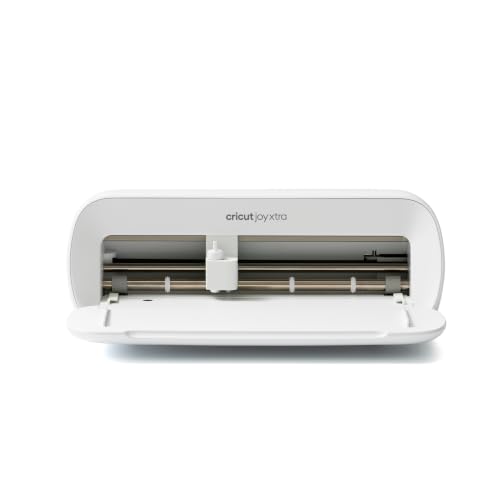 Best for portable card and label workCricut Joy Xtra – Smart Cutting MachineView on Amazon
- 3
 Best budget pickCricut Joy Machine & Digital Content Library BundleView on Amazon
Our Top Picks
Quick Comparison
| Product | Best for | Key feature |
|---|---|---|
| Cricut Maker 4 Cutting Machine Bundle with EasyPress SE | Full wedding decor and fabric projects | Broad material range with included heat press |
| Cricut Joy Xtra – Smart Cutting Machine | Invitations, place cards, and labels | Compact size and small-batch cutting |
| Cricut Joy Machine & Digital Content Library Bundle | Simple paper projects on a tight budget | Portable design with bundled image library |
Cricut Maker 4 Cutting Machine Bundle with EasyPress SE, Vinyl & Iron-On
Cricut Maker 4 Cutting Machine Bundle with EasyPress SE, Vinyl & Iron-On | Beginner Kit Smart Cutting Machine with Heat Press for DIY Shirts and Decals
Best for: Full wedding decor and fabric projects
This bundle suits couples who want one machine for paper, vinyl, and fabric. It works well for custom napkins, tote bags for welcome gifts, signage, and iron-on monograms for the wedding party. Because it includes an EasyPress SE, you can press designs onto garments and textiles without a separate iron setup.
Key specs
- Designed for cutting paper, vinyl, iron-on, and many fabric types
- Bundled with an EasyPress SE heat press
- Works with Cricut Design Space software
Pros
- Handles a wide range of materials for mixed wedding projects
- Included heat press reduces the number of separate tools you need
- Strong fit for garment and textile décor
Cons
- Larger footprint than the Joy-series machines
- Full capability is more than a simple invitation project requires
Bottom line: Choose this if you plan to make textiles, shirts, or a mix of décor across many categories and want the heat press included.
View on AmazonCricut Joy Xtra – Smart Cutting Machine
Cricut Joy Xtra – Smart Cutting Machine | Digital Content Bundle | Includes 30 images in Design Space App
Best for: Invitations, place cards, and labels
The Joy Xtra is aimed at paper-based wedding work: save-the-dates, table numbers, favor tags, and small-batch greeting cards. Its compact footprint lets you cut at a kitchen table, and the bundled image set gives you ready-to-use designs to start from.
Key specs
- Compact smart cutting machine for cards and labels
- Includes a digital content bundle with 30 images
- Works with the Cricut Design Space app
Pros
- Small footprint for limited workspace
- Well suited to stationery and card projects
- Bundled images help beginners get started quickly
Cons
- Narrower material range than the Maker series
- Not designed for heavier fabrics or large signage
Bottom line: A good match for couples focused on invitations, stationery, and printed décor who want a compact machine.
View on AmazonCricut Joy Machine & Digital Content Library Bundle
Cricut Joy Machine & Digital Content Library Bundle | Includes 30 images in Design Space App – Portable DIY Smart Machine for creating customized cards, crafts, & labels Blue
Best for: Simple paper projects on a tight budget
This bundle is the most economical way into Cricut cutting for wedding stationery. It handles cards, labels, and small paper décor, and it is light enough to move between rooms or pack for a crafting weekend away.
Key specs
- Portable smart cutting machine
- Includes a digital content library with 30 images
- Compatible with Design Space
Pros
- Lightweight and easy to store
- Good entry point for paper-based wedding projects
- Bundled content adds designs without extra purchases
Cons
- Limited cutting size for large décor pieces
- Fewer material options than the higher-end models
Bottom line: Pick this if your wedding DIY is mostly paper goods and you want the lowest-commitment way to start.
View on AmazonBuying Guide
Cutting Area and Project Size
Measure the largest item you plan to cut before you buy. Standard cards and invitations fit comfortably in smaller machines, while banners, large signs, and oversized table numbers need a wider mat. Keep in mind that Cricut mats come in several sizes, and larger mats usually require a larger machine.
Good picks for this: Cricut Maker 4 Cutting Machine Bundle with EasyPress SE, Cricut Joy Xtra – Smart Cutting Machine
Material Range
Think about what you want to cut. Cardstock, vinyl, and iron-on cover most paper and décor needs. Fabric and heavier materials require a machine rated for them and, often, the right blade and mat combination. Check the manufacturer’s material list for each model.
Good picks for this: Cricut Maker 4 Cutting Machine Bundle with EasyPress SE
Included Software and Content
All three picks use Cricut Design Space. Bundled image libraries can save time if you are new to design software, but check that the designs match your wedding style before you rely on them. Premium fonts and images may be available separately.
Good picks for this: Cricut Joy Xtra – Smart Cutting Machine, Cricut Joy Machine & Digital Content Library Bundle
Portability and Workspace
If you plan to craft at a kitchen table or in a shared room, a compact machine is easier to store between sessions. Heavier machines stay put, which can be an advantage for regular large-scale work.
Good picks for this: Cricut Joy Machine & Digital Content Library Bundle, Cricut Joy Xtra – Smart Cutting Machine
Heat Pressing for Garments
If you want to personalize wedding shirts, tote bags, or linens, you need a heat source. Some bundles include a heat press, while others require a separate iron or press. Follow the manufacturer’s temperature and time settings for each material.
Good picks for this: Cricut Maker 4 Cutting Machine Bundle with EasyPress SE
Durability and Blade Replacement
Blades and mats wear out with use. Check the cost and availability of replacement blades for the model you choose, and consider how often you will cut dense materials. Store mats flat and keep them clean to extend their life.
Good picks for this: Cricut Maker 4 Cutting Machine Bundle with EasyPress SE, Cricut Joy Machine & Digital Content Library Bundle
Care and Storage
Keep the machine dust-free and cover it when not in use. Clean the mat with a scraper and replace the adhesive when it no longer holds material. Store vinyl and cardstock flat, away from heat and sunlight.
Good picks for this: Cricut Joy Xtra – Smart Cutting Machine, Cricut Joy Machine & Digital Content Library Bundle
FAQ
Can a Cricut machine cut wedding invitations?
Yes. Cardstock and paper are standard materials for Cricut machines, and the Joy-series models are well suited to invitations, place cards, and table numbers.
Do I need a heat press for wedding shirts?
A heat press or a suitable iron makes iron-on designs last. The Maker 4 bundle includes the EasyPress SE, which simplifies pressing for shirts and totes.
Which Cricut is best for beginners planning a wedding?
The Joy-series machines are generally easier to start with because they cover paper projects and come with bundled designs. Move to a larger model if you need fabric or large décor.
How big should the cutting area be for wedding signage?
Measure your sign before buying. Larger signs and banners require a bigger mat, so confirm the maximum cut size in the manufacturer’s specifications.
Can I use these machines for vinyl wedding decor?
Yes. Vinyl works well for glassware, mirrors, and signage. Check the manufacturer’s list of compatible vinyl types for best results.
Do bundled image libraries cost extra later?
Bundled images are included with these packages, but additional premium content may be sold separately. Review the bundle contents before you buy.
Is a cutting machine worth it for a single wedding?
It depends on how many items you plan to make. For a short list of paper goods, a small machine may suffice. For many projects over several months, the investment spreads across the work. For more guidance, see Which Is the Best Cricut Machine? 4 Best Picks Compared (2026).
Conclusion
For a full range of wedding décor, including fabric and heat-pressed items, the Cricut Maker 4 bundle is the most capable choice. For invitations, place cards, and labels in a compact footprint, the Cricut Joy Xtra fits well. If your needs are limited to paper projects and budget matters most, the Cricut Joy Machine bundle covers the essentials. You can also compare other options in Top 4 Cricut Joy Cutting Machine Options for Crafters (2026) and 5 Best Vinyls for the Cricut Machine for Beginners (2026) for materials, and Accessories for Cricut Machine: 5 Best Picks for Beginners (2026) for add-ons.
Sources
- Product safety guidance for electrical appliances and heated tools used at home (cpsc.gov)
- Workplace and home workshop guidance on blade and cutting tool safety (osha.gov)
- Research-based guidance on fabric care and heat-setting textiles (extension.org)
Before you buy: helpful guides
About Colin Foster
Colin Foster is part of our editorial team and reviews and edits our arts & crafts supplies guides, checking product details against manufacturer specifications and owner feedback.
About the author
Colin Foster writes reviews and buying guides for Crafts Center.