Htvront Smart Cutting Machine 2 vs Cricut: 6 Best Picks Compared (2026)
Comparing the htvront smart cutting machine 2 vs Cricut? Here are 6 Cricut models, how they differ on fit, features and skill level, and who should buy each one
 By Colin Foster
Updated November 26, 2026
 By Colin Foster
Updated November 2026
Shoppers searching for the htvront smart cutting machine 2 vs cricut are usually trying to decide between a budget-minded alternative and the brand that most crafters already know. This list compares six Cricut smart cutting machines and bundles so you can see how each one handles the jobs you care about: vinyl decals, iron-on, cardstock, and card making. The selection criteria are specifications, brand reputation, and the patterns owners tend to report, including cutting range, connectivity, material support, and how much of the workflow depends on the Design Space app. Use this as a buyer’s guide, not a hands-on test.
Our top picks at a glance
- 1TOP CHOICEBest overallCricut Maker 4 Smart Cutting Machine (Seashell)View on Amazon
- 2
 TOP CHOICEBest for small craft spacesCricut Joy 2 Essential Bundle + Rainbow SamplerView on Amazon
- 3
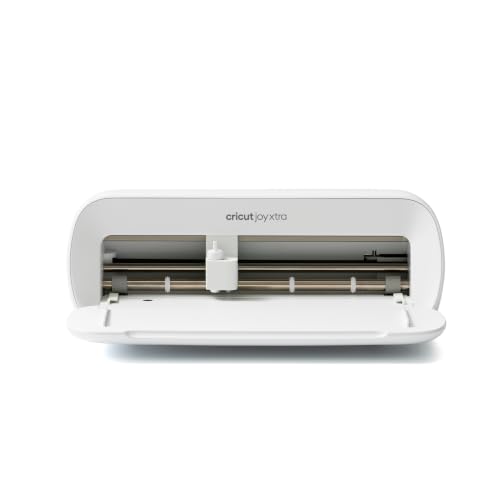 TOP CHOICEBest for beginners on a tight budgetCricut Joy Xtra Smart Cutting MachineView on Amazon
- 4
 Best for vinyl-heavy projectsCricut Maker 4 Cutting Machine Bundle with Rainbow Smart Vinyl RollsView on Amazon
- 5
 Best for home decor and T-shirtsCricut Explore Air 2 Wireless Smart Cutting MachineView on Amazon
- 6
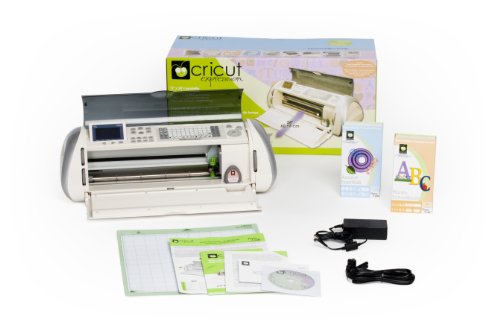 Best for legacy cutting setupsCricut Expression Electronic Cutting MachineView on Amazon
Our Top Picks
Quick Comparison
| Product | Best for | Key feature |
|---|---|---|
| Cricut Maker 4 Smart Cutting Machine (Seashell) | Serious hobbyists and mixed materials | Engagement bundle with tools, mat and Smart Vinyl |
| Cricut Joy 2 Essential Bundle + Rainbow Sampler | Small craft spaces | Compact footprint with Smart Vinyl and cardstock |
| Cricut Joy Xtra Smart Cutting Machine | Beginners on a tight budget | Digital content bundle with 30 images |
| Cricut Maker 4 Cutting Machine Bundle with Rainbow Smart Vinyl Rolls | Vinyl-heavy projects | Included rainbow Smart Vinyl rolls |
| Cricut Explore Air 2 Wireless Smart Cutting Machine | Home decor and custom T-shirts | Wireless Bluetooth connection |
| Cricut Expression Electronic Cutting Machine | Legacy cutting setups | Older cartridge-era platform |
Cricut Maker 4 Smart Cutting Machine (Seashell)
Cricut Maker 4 – Smart Cutting Machine (Seashell) | Engagement Bundle | Includes Smart Vinyl, Cardstock, Transfer Tape, Iron On HTV, Mat, Pens, Tool Kit, & 30 images in Design Space App
Best for: Serious hobbyists and mixed materials
This is the most complete option in the group for crafters who want one machine to handle vinyl, iron-on, cardstock and fabric-based projects. It suits people who plan to grow into more demanding work and want the included tool kit and accessories from the start.
Key specs
- Smart Cutting Machine with the Engagement Bundle
- Includes Smart Vinyl, cardstock, transfer tape, iron-on HTV, mat, pens, tool kit
- Includes 30 images in the Design Space app
Pros
- Broad material range in one machine
- Bundle includes the accessories you would otherwise buy separately
- Works well with the Design Space app ecosystem
Cons
- Larger footprint than the Joy models
- Full bundle costs more to set up than entry-level machines
Bottom line: Pick this if you want the most capable Cricut setup in this list and plan to use a wide range of materials.
View on AmazonCricut Joy 2 Essential Bundle + Rainbow Sampler
Cricut Joy 2 Essential Bundle + Rainbow Sampler | Smart Cutting Machine with Smart Vinyl, Smart Iron-On, Cardstock, Insert Cards & Printable Vinyl – Create Up to 65 Projects
Best for: Small craft spaces
The Joy line is built for crafters with limited room. This bundle adds a rainbow sampler of materials, which helps you experiment before committing to larger supply purchases.
Key specs
- Smart Cutting Machine with Smart Vinyl, Smart Iron-On, cardstock and insert cards
- Printable vinyl included
- Listing states up to 65 projects can be created
Pros
- Compact enough for a shelf or small desk
- Good starter materials in the bundle
- Straightforward setup for new users
Cons
- Smaller cutting area limits large decals
- Fewer tools than the Maker-class bundles
Bottom line: A strong fit for crafters who need a compact machine and want a sampler of materials to start with.
View on AmazonCricut Joy Xtra Smart Cutting Machine
Cricut Joy Xtra – Smart Cutting Machine | Digital Content Bundle | Includes 30 images in Design Space App
Best for: Beginners on a tight budget
This is the most approachable entry point. It is aimed at people who want to learn the basics of cutting vinyl and cardstock without a large upfront commitment to tools and materials.
Key specs
- Smart Cutting Machine with Digital Content Bundle
- Includes 30 images in the Design Space app
Pros
- Simple setup and operation
- Digital content gets beginners started quickly
- Small footprint
Cons
- Fewer included physical materials than the bundles
- Limited for thick or heavy materials
Bottom line: A sensible first machine for beginners who want to learn without spending heavily on accessories.
View on AmazonCricut Maker 4 Cutting Machine Bundle with Rainbow Smart Vinyl Rolls
Cricut Maker 4 Cutting Machine Bundle with Rainbow Smart Vinyl Rolls
Best for: Vinyl-heavy projects
This bundle is aimed at crafters whose main output is vinyl decals, labels and signs. The included rainbow rolls mean you can start cutting color projects right away.
Key specs
- Cricut Maker 4 Smart Cutting Machine
- Rainbow Smart Vinyl rolls included
Pros
- Ready-to-cut vinyl colors in the box
- Maker 4 handles a broad range of materials
- Good for tumblers, decals and signs
Cons
- Vinyl-focused bundle is less useful if you rarely cut vinyl
- Ongoing material costs add up with heavy use
Bottom line: Choose this if vinyl is your main medium and you want colors on hand from day one.
View on AmazonCricut Explore Air 2 Wireless Smart Cutting Machine
Cricut Explore Air 2 – Wireless Smart Cutting Machine for Vinyl Decals, Custom T Shirts, HTV Projects, Card Making and Home Décor [Persimmon]
Best for: Home decor and custom T-shirts
The Explore Air 2 is a long-established model that many crafters still use for decals, HTV projects and card making. Its wireless connectivity is a practical plus for shared workspaces.
Key specs
- Wireless Smart Cutting Machine
- Suited to vinyl decals, custom T-shirts, HTV and card making
Pros
- Wireless connection reduces cable clutter
- Well-documented workflow with plenty of community guidance
- Handles home decor and apparel projects well
Cons
- Older platform compared with the Maker 4 and Joy 2
- Newer models offer more built-in features
Bottom line: A dependable choice for home decor and apparel crafters who value a wireless setup.
View on AmazonCricut Expression Electronic Cutting Machine
Cricut Expression Electronic Cutting Machine
Best for: Legacy cutting setups
This is an older cartridge-era machine. It may suit crafters who already own compatible cartridges or who are maintaining an existing setup rather than starting fresh.
Key specs
- Electronic cutting machine from the earlier Cricut lineup
Pros
- Useful if you already own compatible cartridges
- Simple, focused cutting workflow
- Lower learning curve for specific legacy projects
Cons
- Not built around the current Design Space app
- Fewer modern material and connectivity options
Bottom line: Best for crafters maintaining an older setup; newcomers should look at the Smart Cutting Machine models instead.
View on AmazonBuying Guide
Machine size and cutting area
Measure your workspace before buying. Compact Joy-class machines fit on small desks, while Maker-class machines need more room for the mat and for feeding materials. The cutting area determines the largest single decal or print you can make in one pass, so match it to the projects you plan to make most often.
Good picks for this: Cricut Joy 2 Essential Bundle + Rainbow Sampler, Cricut Maker 4 Smart Cutting Machine (Seashell)
Material compatibility
Check which materials the machine handles. Vinyl, iron-on, cardstock and printable vinyl are the most common. If you want to cut fabric or thicker stock, confirm the model and blade options support it before you buy.
Good picks for this: Cricut Maker 4 Smart Cutting Machine (Seashell), Cricut Maker 4 Cutting Machine Bundle with Rainbow Smart Vinyl Rolls
Connectivity
Smart Cutting Machines typically connect through Bluetooth or USB. Wireless setups reduce clutter, but confirm your computer or tablet supports the connection type. Owners often report connection issues when Bluetooth is unreliable, so keep a USB cable as a backup.
Good picks for this: Cricut Explore Air 2 Wireless Smart Cutting Machine, Cricut Joy Xtra Smart Cutting Machine
Included accessories and bundles
Bundles can save setup time, but check what is actually included. A tool kit, mat, pens and sample materials add value only if you will use them. Compare the bundle contents against what you would otherwise buy separately.
Good picks for this: Cricut Maker 4 Smart Cutting Machine (Seashell), Cricut Joy 2 Essential Bundle + Rainbow Sampler
Skill level and learning curve
Beginners benefit from simpler machines with included starter content. Experienced crafters may want the capability of a Maker-class machine. Be honest about how much time you can spend learning the software.
Good picks for this: Cricut Joy Xtra Smart Cutting Machine, Cricut Joy 2 Essential Bundle + Rainbow Sampler
Durability and long-term support
Newer models receive current app support and firmware updates, while older platforms may lose features over time. Check whether the model still works with the current Design Space app before buying a legacy machine.
Good picks for this: Cricut Maker 4 Smart Cutting Machine (Seashell), Cricut Explore Air 2 Wireless Smart Cutting Machine
Care and maintenance
Keep the cutting mat clean and replace it when the adhesive weakens. Store blades in their holders and keep the machine dust-free. Regular cleaning helps cuts stay consistent over time.
Good picks for this: Cricut Maker 4 Cutting Machine Bundle with Rainbow Smart Vinyl Rolls, Cricut Explore Air 2 Wireless Smart Cutting Machine
FAQ
Is the htvront smart cutting machine 2 a good alternative to Cricut?
Cricut has a broader ecosystem of apps, materials and accessories. Before buying a non-Cricut machine, compare compatibility with your design software, supported materials and the availability of replacement blades and mats.
Which Cricut machine is best for beginners?
The Cricut Joy Xtra Smart Cutting Machine is a sensible starting point because it is compact, simple to set up and includes starter digital content.
Can these machines cut fabric?
Some Maker-class models support fabric with the right mat and blade. Check the model’s listed material compatibility before cutting fabric projects.
Do I need a Bluetooth connection?
Not always. USB connection works with most setups. Bluetooth is convenient for wireless workflows, but owners often keep a USB cable as a fallback.
What is the difference between the Joy and Maker lines?
Joy machines are smaller and aimed at quick projects and beginners. Maker machines have larger cutting areas, more material support and more included tools.
Are bundles worth it?
Bundles can be worthwhile if you will use the included materials and tools. If you already own supplies, a standalone machine may be enough.
Conclusion
For most crafters comparing the htvront smart cutting machine 2 vs cricut, the Cricut lineup offers the most mature app support and accessory range. The Cricut Maker 4 Smart Cutting Machine (Seashell) suits serious hobbyists, the Cricut Joy 2 Essential Bundle + Rainbow Sampler fits small spaces, and the Cricut Joy Xtra Smart Cutting Machine is a practical beginner choice. Vinyl-focused crafters should consider the Maker 4 vinyl bundle, while those with an existing wireless setup may stay with the Explore Air 2. The Expression is best left to owners maintaining legacy cartridge projects.
Sources
- Product safety guidance for electrical appliances and tools used at home (cpsc.gov)
- Workplace and home workshop safety practices for cutting tools (osha.gov)
Before you buy: helpful guides
- Cricut Explore Air 2 Smart Cutting Machine: A Step-by-Step Guide for Beginners
- Cricut Explore 3 Craft Cutting Machine: A Step-by-Step Guide for Beginners
- Cricut Explore Air 2 Craft Cutting Machine: A Step-by-Step Guide for Beginners
- Vinyl Cutting Machine Cricut: A Step-by-Step Guide for Beginners
- Cricut Vinyl Cutter Machine: A Step-by-Step Guide for Beginners
Related reading
About Colin Foster
Colin Foster is part of our editorial team and reviews and edits our arts & crafts supplies guides, checking product details against manufacturer specifications and owner feedback.
About the author
Colin Foster writes reviews and buying guides for Crafts Center.