Htvront Cutting Machine vs Cricut: Which Should You Buy? 3 Picks Compared (2026)
Comparing htvront cutting machine vs Cricut? See how three Cricut options stack up on setup, materials and beginner fit, so you can choose with confidence.
 By Colin Foster
Updated November 26, 2026
 By Colin Foster
Updated November 2026
Choosing between an htvront cutting machine and a Cricut comes down to what you plan to cut, how much hands-on setup you want, and whether you need a closed ecosystem or open material options. This list compares three Cricut machines that are widely available on Amazon US, so you can see how the brand’s lineup fits different hobbies. The selection criteria are cut capacity, ease of setup for beginners, material compatibility (vinyl, iron-on, cardstock), and how well each model suits a first-time crafter. Where a direct htvront comparison matters, we note the differences in approach rather than claiming performance results we have not verified.
Our top picks at a glance
- 1TOP CHOICEBest overallCricut Maker 4 Cutting Machine Bundle with EasyPress SE, Vinyl & Iron-OnView on Amazon
- 2
 Best for small crafting spacesCricut Joy 2 Essential Bundle + Rainbow SamplerView on Amazon
- 3
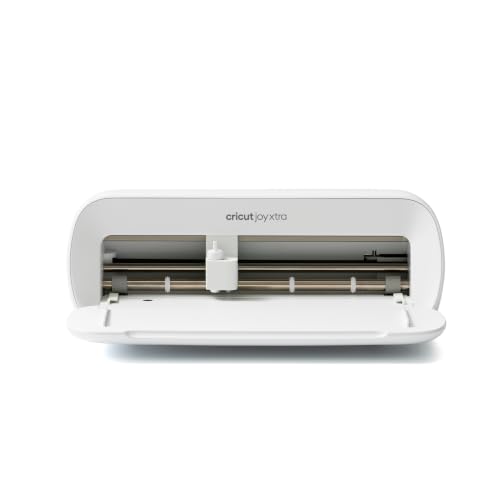 Best budget pickCricut Joy Xtra – Smart Cutting MachineView on Amazon
Our Top Picks
| Product | Best for | Key feature |
|---|---|---|
| Cricut Maker 4 Cutting Machine Bundle with EasyPress SE | Shirts, decals and heat-pressed projects | Bundled heat press for iron-on work |
| Cricut Joy 2 Essential Bundle + Rainbow Sampler | Small spaces and quick cards or labels | Compact footprint with a sampler of materials |
| Cricut Joy Xtra – Smart Cutting Machine | Beginners who want a simple starting point | Included digital content in the Design Space app |
Cricut Maker 4 Cutting Machine Bundle with EasyPress SE, Vinyl & Iron-On
Cricut Maker 4 Cutting Machine Bundle with EasyPress SE, Vinyl & Iron-On | Beginner Kit Smart Cutting Machine with Heat Press for DIY Shirts and Decals
Best for: Shirts, decals and heat-pressed projects
This bundle suits crafters who want to move from cutting vinyl to making finished apparel and home decor in one setup. It pairs a larger cutting machine with a heat press, so the cut-to-press workflow stays in one kit rather than being assembled from separate purchases.
Key specs
- Smart cutting machine designed for a wide range of materials, including vinyl and iron-on
- Bundled EasyPress SE heat press for transferring iron-on designs
- Works with the Cricut Design Space app on a computer, tablet or phone
Pros
- Includes the heat press, so iron-on projects need less extra equipment
- Handles a broad range of materials for future projects
- Design Space offers guided steps that help first-time users
Cons
- Takes up more desk or table space than the compact Joy models
- The heat press adds a learning curve for getting pressure and temperature right
Bottom line: Pick this if shirts and heat-transfer projects are your main goal and you want the press included rather than bought separately.
View on AmazonCricut Joy 2 Essential Bundle + Rainbow Sampler
Cricut Joy 2 Essential Bundle + Rainbow Sampler | Smart Cutting Machine with Smart Vinyl, Smart Iron-On, Cardstock, Insert Cards & Printable Vinyl – Create Up to 65 Projects
Best for: Small spaces and quick cards or labels
This bundle fits crafters working in a spare corner, a dorm, or a shared room. The Joy line is built for smaller projects, and the included sampler of materials gives you options to test without buying each one separately.
Key specs
- Smart cutting machine in the Cricut Joy size class, designed for compact storage
- Includes a sampler of materials such as Smart Vinyl, Smart Iron-On and cardstock
- Listing states it can create up to 65 projects
Pros
- Compact footprint suits small workspaces
- Material sampler lets you try several types right away
- Quick setup for simple cards, labels and decals
Cons
- Smaller cutting area limits the size of large designs
- Not the right choice for heavy or thick materials
Bottom line: Choose this if you have limited space and mostly make small paper or vinyl projects.
View on AmazonCricut Joy Xtra – Smart Cutting Machine
Cricut Joy Xtra – Smart Cutting Machine | Digital Content Bundle | Includes 30 images in Design Space App
Best for: Beginners who want a simple starting point
This model is aimed at people who are new to digital cutting and want a low-commitment entry point. The listing highlights included digital content, which reduces the time spent searching for designs before your first cut.
Key specs
- Smart cutting machine in the Joy Xtra line
- Includes a digital content bundle with 30 images in the Design Space app
- Uses the Cricut Design Space app for design and cutting
Pros
- Included images mean you can start cutting right away
- Simple, approachable interface through Design Space
- Good fit for cards, stickers and small décor pieces
Cons
- The included image set is a fixed starting library, so you will want more content over time
- Cutting capacity is limited compared with larger Maker-class machines
Bottom line: A sensible pick for a first machine if you want included content and a simple workflow.
View on AmazonBuying Guide
Cut size and cutting area
Check the maximum cutting width and length in the manufacturer’s specifications before buying. Larger machines handle wall decals and full-width shirt designs, while compact models work best for cards, labels and small stickers.
Good picks for this: Cricut Maker 4 Cutting Machine Bundle, Cricut Joy 2 Essential Bundle
Material compatibility
List the materials you plan to use: permanent vinyl, iron-on, cardstock, or fabric with a stabilizer. Confirm the machine’s listed material support, and check whether any blade or mat you need is included.
Good picks for this: Cricut Maker 4 Cutting Machine Bundle, Cricut Joy 2 Essential Bundle
Heat transfer capability
If you make shirts, you need a way to press the transfer. Bundles that include a heat press save you a separate purchase, but check the press’s size against the designs you want to make.
Good picks for this: Cricut Maker 4 Cutting Machine Bundle
Space and portability
Measure the surface where the machine will live, including clearance for the mat to feed in and out. A compact machine is easier to store between sessions, which matters if you work at a kitchen table.
Good picks for this: Cricut Joy 2 Essential Bundle, Cricut Joy Xtra – Smart Cutting Machine
Software and included content
Most Cricut machines run through the Design Space app. Check whether the bundle includes starter images or fonts, since building a design library from scratch takes time at the start.
Good picks for this: Cricut Joy Xtra – Smart Cutting Machine, Cricut Joy 2 Essential Bundle
Connectivity and setup
Confirm how the machine connects to your computer or tablet. Bluetooth and USB setups differ, and connection issues are a common early frustration, so read the setup instructions before you commit.
Good picks for this: Cricut Joy Xtra – Smart Cutting Machine, Cricut Maker 4 Cutting Machine Bundle
Long-term use and upgrades
Consider whether you will want to add tools, blades or accessories later. Machines within the same ecosystem often share materials and blades, which can lower the cost of expanding your setup over time.
Good picks for this: Cricut Maker 4 Cutting Machine Bundle, Cricut Joy 2 Essential Bundle
FAQ
Is an htvront cutting machine a good alternative to a Cricut?
It depends on your priorities. Cricut’s advantage is its established app, material library and wide accessory ecosystem. Other brands may suit specific needs, so compare cut area, materials and software before deciding.
Which Cricut is best for a total beginner?
The Cricut Joy Xtra is a practical starting point because it includes digital content and a simple interface. Beginners who plan to make shirts may prefer the Maker 4 bundle instead.
Do I need a heat press to make iron-on shirts?
You need a way to apply heat and even pressure. A heat press gives consistent results, while a household iron can work for some projects but is less predictable. The Maker 4 bundle includes a press.
Can these machines cut fabric?
Cricut machines can cut certain fabrics when used with a stabilizer and the correct blade setting. Check the material guidance in Design Space before cutting an unfamiliar fabric.
Do Cricut machines need a constant internet connection?
Design Space typically requires an internet connection for setup, updates and accessing content. Check the current app requirements for offline use before relying on a machine in a location with poor connectivity.
Which model is best for small spaces?
The Cricut Joy 2 Essential Bundle is the most compact option in this list and suits limited workspaces well, though its cutting area is smaller.
Conclusion
Among these three Cricut options, the Maker 4 bundle suits crafters focused on shirts and heat-transfer work, the Joy 2 bundle suits small spaces and quick paper or vinyl projects, and the Joy Xtra suits beginners who want included content. If you are weighing an htvront cutting machine against Cricut, compare cut size, material support and software on each product page first. Consult the manufacturer’s specifications before purchase, since model details can change.
Sources
- Product safety guidance for electrical and heat-producing household equipment, useful when using heat presses and cutting tools (cpsc.gov)
- Workplace safety information on blade handling and ergonomic workspace setup (osha.gov)
Before you buy: helpful guides
- Cricut Explore 3 Craft Cutting Machine: A Step-by-Step Guide for Beginners
- Cricut Explore Air 2 Craft Cutting Machine: A Step-by-Step Guide for Beginners
- Vinyl Cutting Machine Cricut: A Step-by-Step Guide for Beginners
- Cricut Explore Air 2 Smart Cutting Machine: A Step-by-Step Guide for Beginners
- Cricut Vinyl Cutter Machine: A Step-by-Step Guide for Beginners
Related reading
- Silhouette Cutting Machine vs Cricut: 5 Best Picks Compared (2026)
- Top 4 Cricut Joy Cutting Machine Options for Crafters (2026)
- Cricut Personal Electronic Cutting Machine Review: What You Should Know
About Colin Foster
Colin Foster is part of our editorial team and reviews and edits our arts & crafts supplies guides, checking product details against manufacturer specifications and owner feedback.
About the author
Colin Foster writes reviews and buying guides for Crafts Center.