5 Best Second Hand Cricut Machine Picks for Buyers (2026)
Looking for a second hand Cricut machine? Compare five models by fit, specs and owner feedback, plus a buying guide to help you choose wisely.
 By Colin Foster
Updated November 23, 2026
 By Colin Foster
Updated November 2026
Buying a second hand Cricut machine can save you a lot of money, but the used market is mixed. Some listings are well-kept machines from crafters who simply outgrew them, while others have worn blades, missing mats or outdated software compatibility. This guide compares five Cricut models that are commonly found on the secondhand market and explains what to check before you pay. The selection method is research-based: we looked at manufacturer specifications, brand reputation for reliability, and the patterns owners tend to report about cutting accuracy, connectivity and long-term durability. No machine here was tested in a lab or by our staff.
Our top picks at a glance
- 1TOP CHOICEBest overallCricut Maker 5 Cutting Machine and EasyPress Heat Press BundleView on Amazon
- 2
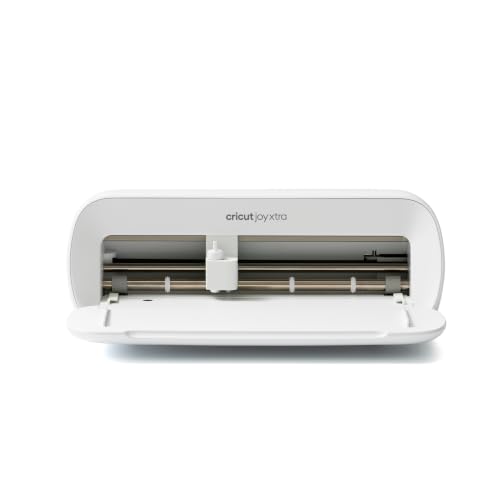 TOP CHOICEBest for small kitchensCricut Joy Xtra – Smart Cutting MachineView on Amazon
- 3
 TOP CHOICEBest budget pickCricut Joy Machine & Digital Content Library BundleView on Amazon
- 4
 Best for beginners with starter materialsCricut Joy 2 Essential Bundle + Rainbow SamplerView on Amazon
- 5
 Best for heat-transfer shirt projectsCricut AutoPress 2 15×15 Heat Press MachineView on Amazon
Our Top Picks
Quick Comparison
| Product | Best for | Key feature |
|---|---|---|
| Cricut Maker 5 Cutting Machine and EasyPress Heat Press Bundle | Multi-material crafters | Cutting and heat pressing in one bundle |
| Cricut Joy Xtra – Smart Cutting Machine | Small kitchens and portable crafting | Compact footprint with Smart Materials support |
| Cricut Joy Machine & Digital Content Library Bundle | Budget-minded buyers | Bundled digital image library |
| Cricut Joy 2 Essential Bundle + Rainbow Sampler | First-time buyers | Starter material sampler included |
| Cricut AutoPress 2 15×15 Heat Press Machine | Heat-transfer apparel projects | Adjustable pressure and heat settings |
Cricut Maker 5 Cutting Machine and EasyPress Heat Press Bundle
Cricut Maker 5 Cutting Machine and EasyPress Heat Press Bundle | Crafting Bundle, Rainbow Vinyl Included, Iron-On Sheets, DIY Crafts, Multiple Materials
Best for: Multi-material crafters who want cutting and heat pressing in one purchase.
This bundle suits someone who plans to cut vinyl, iron-on and cardstock and then press finished designs onto fabric. It is the most expensive path in this list on paper, but a used bundle can make sense if you already know you will use both tools.
Key specs
- Cutting machine paired with an EasyPress heat press
- Works with a wide range of materials, including iron-on and vinyl
- Bundle includes rainbow vinyl and iron-on sheets in the listing
Pros
- Covers cutting and heat transfer in a single setup
- Strong material range for varied projects
- Bundled supplies help you start immediately
Cons
- Heavier and needs more workspace than compact models
- Bundled consumables may be partly used on a secondhand unit
Bottom line: Best for hobbyists who want a complete cutting-and-pressing workflow and are comfortable inspecting a used bundle closely.
View on AmazonCricut Joy Xtra – Smart Cutting Machine
Cricut Joy Xtra – Smart Cutting Machine | Digital Content Bundle | Includes 30 images in Design Space App
Best for: Small kitchens and crafters who need a portable machine.
The Joy line is designed for compact spaces and short projects such as cards, labels and small decor. The Xtra version adds a bundled digital image library, which can be useful if you do not want to buy design assets separately.
Key specs
- Smart Cutting Machine with Design Space app connectivity
- Includes a digital content bundle of 30 images in the app
Pros
- Small footprint fits on a shelf or narrow desk
- Good for cards and small projects
- Bundled images add immediate value
Cons
- Smaller cutting area limits large-format work
- Not suited to heavy materials or thick chipboard
Bottom line: A strong pick for apartment crafters and anyone whose projects stay under letter-size.
View on AmazonCricut Joy Machine & Digital Content Library Bundle
Cricut Joy Machine & Digital Content Library Bundle | Includes 30 images in Design Space App – Portable DIY Smart Machine for creating customized cards, crafts, & labels Blue
Best for: Budget-minded buyers who want the Joy platform with extra digital content.
This bundle pairs a portable Joy machine with the digital content library. It suits buyers who want the simplest entry into Cricut cutting without paying for advanced features they will not use.
Key specs
- Portable smart cutting machine
- Includes a digital content library of 30 images in Design Space
Pros
- Simple setup and a lightweight build
- Good starter option for cards and labels
- Digital library adds design variety
Cons
- Limited cutting width for larger projects
- Older units may need firmware or app updates to run smoothly
Bottom line: A sensible choice for someone who wants low commitment and is willing to verify the condition of a used unit.
View on AmazonCricut Joy 2 Essential Bundle + Rainbow Sampler
Cricut Joy 2 Essential Bundle + Rainbow Sampler | Smart Cutting Machine with Smart Vinyl, Smart Iron-On, Cardstock, Insert Cards & Printable Vinyl – Create Up to 65 Projects
Best for: First-time buyers who want a material sampler to begin with.
The Essential Bundle with a Rainbow Sampler is aimed at people who are still learning which materials they like. The sampler gives you a range of colors and types to experiment with, which is useful when you are deciding what to invest in next.
Key specs
- Smart cutting machine with Smart Vinyl and Smart Iron-On support
- Includes cardstock, insert cards and printable vinyl in the bundle
Pros
- Good variety of starter materials
- Compact and approachable for new crafters
- Works well for cards, stickers and simple decor
Cons
- Sampler materials may be partly used on a secondhand unit
- Limited for heavy or large-format cutting
Bottom line: The most beginner-friendly pick here, especially if the seller includes unopened or mostly full materials.
View on AmazonCricut AutoPress 2 15×15 Heat Press Machine
Cricut AutoPress™ 2 15×15 Heat Press Machine for T Shirts & More | Adjustable Pressure & Heat for Professional Results – For Heat Transfer Vinyl (HTV), Sublimation, & DTF – Heat Guide
Best for: Heat-transfer apparel projects such as shirts and tote bags.
This is a heat press rather than a cutting machine, so it fits buyers who already own a cutter and want a dedicated pressing tool. Its 15×15 platen covers most common shirt and tote designs.
Key specs
- 15×15 inch heat press platen
- Adjustable pressure and heat for heat transfer vinyl (HTV), sublimation and DTF
Pros
- Large platen covers most apparel designs
- Adjustable settings suit different materials
- Heat guide helps with setup
Cons
- Takes up significant bench space
- Not a cutter, so you need a separate machine for designs
Bottom line: Ideal if you already have a cutter and want a dedicated press for shirts and bags.
View on AmazonBuying Guide
Check the machine’s age and model generation
Older Cricut models may not support current Design Space features or newer materials. Confirm the exact model name on the base or in the listing, then check which software versions it supports. Manufacturers update compatibility over time, so a machine that works today may lose access to some features later.
Good picks for this: Cricut Joy Xtra – Smart Cutting Machine, Cricut Joy 2 Essential Bundle + Rainbow Sampler
Inspect the cutting blade and housing
Blades are a consumable, and a worn or damaged blade reduces cut quality. Ask the seller for photos of the blade housing and test-cut a simple shape if possible. Look for cracks in the housing and confirm the carriage moves smoothly along its track.
Good picks for this: Cricut Maker 5 Cutting Machine and EasyPress Heat Press Bundle, Cricut Joy Machine & Digital Content Library Bundle
Confirm the cutting mat and accessories
Cutting mats wear out, and missing tools such as scrapers, weeders or spatulas can add to the total effort of getting started. Count the accessories against the original included list and ask whether mats still have strong grip. Replacement mats are sold separately and are a routine expense.
Good picks for this: Cricut Joy 2 Essential Bundle + Rainbow Sampler, Cricut Maker 5 Cutting Machine and EasyPress Heat Press Bundle
Match the cutting size to your projects
Smaller Joy-line machines suit cards, labels and small stickers. Larger machines handle full-sheet work and heavier materials. Measure the largest project you plan to make and compare it to the cutting width of the model. Buying too small a machine is a common reason secondhand buyers resell quickly.
Good picks for this: Cricut Joy Xtra – Smart Cutting Machine, Cricut Joy Machine & Digital Content Library Bundle
Plan for your use case: cutting or heat pressing
A cutter and a heat press do different jobs. If your goal is printed shirts or tote bags, a heat press may be the right purchase, while a cutter is better for decals, cards and paper crafts. Decide which tool solves your main problem before buying a bundle.
Good picks for this: Cricut AutoPress 2 15×15 Heat Press Machine, Cricut Maker 5 Cutting Machine and EasyPress Heat Press Bundle
Evaluate durability and wear
Check the feed rollers, power cord and any moving parts for wear. Ask whether the machine has been stored in a dry place, since dust and humidity can affect performance over time. Cosmetic scratches are usually harmless, but grinding noises or inconsistent cuts point to a mechanical issue.
Good picks for this: Cricut Joy 2 Essential Bundle + Rainbow Sampler, Cricut Joy Xtra – Smart Cutting Machine
Test connectivity before you pay
Connectivity problems are common complaints with any cutting machine, whether the connection is Bluetooth or USB. Ask the seller to confirm the machine pairs with a current device, and confirm you can create an account and sign into Design Space. If you can, have the seller demonstrate a short cut before purchase.
Good picks for this: Cricut Joy Machine & Digital Content Library Bundle, Cricut Maker 5 Cutting Machine and EasyPress Heat Press Bundle
FAQ
Is a second hand Cricut machine a good buy?
It can be, especially if the machine is well maintained and the model still receives software support. The main risks are worn blades, missing accessories and older firmware. Inspect the unit closely and buy from a seller who accepts returns when possible.
What should I check first on a used Cricut?
Start with the model name and generation, then ask for photos of the blade housing, cutting mat and power cord. A short demo cut and a check that the machine connects to Design Space will tell you a lot about its condition.
Are used Cricut blades safe to reuse?
Blades are consumables and wear down with use, so a used blade may cut poorly. Replacing the blade is usually a simple step, and replacement blades are sold separately. Handle blades carefully and store them safely, since they are sharp.
Do older Cricut machines still work with current software?
Compatibility depends on the model and the Design Space version. Check the manufacturer’s current system requirements for the specific model before you buy. If support has ended for a model, some features may be limited.
Should I buy a bundle or just the machine?
Bundles add value when the included materials or digital content match what you will use. If the materials are partly used on a secondhand unit, factor that into your decision. A bare machine can be a better choice if you already have supplies.
Is a heat press or a cutter the better buy for shirts?
You need a cutter to create the design and a heat press to apply it to fabric. Some buyers start with a cutter and add a press later. If you already own a cutter, a dedicated heat press such as the AutoPress 2 can be a sensible addition.
Conclusion
A second hand Cricut machine can be a practical way to start crafting, but the right choice depends on your space, budget tolerance and project type. The Cricut Maker 5 bundle suits multi-material crafters, the Joy Xtra fits small spaces, and the Joy Machine bundle is a sensible low-commitment option. The Joy 2 Essential Bundle is best for beginners who want a sampler, while the AutoPress 2 is the right pick if you already own a cutter and need a heat press. Inspect any used unit carefully for blade wear, accessories and connectivity before you buy. For more background, see Which Is the Best Cricut Machine? 4 Best Picks Compared (2026) and Cricut Machine Not Connecting (2026): Bluetooth vs USB Connection Compared.
Sources
- Consumer product safety guidance on recalls, safe use and checking used items for hazards (cpsc.gov)
- Workplace and tool safety guidance on handling sharp blades and electrical equipment (osha.gov)
- Information on electrical equipment efficiency and safe operation of household appliances (energy.gov)
Related reading
- What Can You Make with Cricut Machine: 12 Project Ideas for Beginners
- Vinyl Cutting Machine Cricut: A Step-by-Step Guide for Beginners
- Top 4 Cricut Joy Cutting Machine Options for Crafters (2026)
- How Much Is Cricut Machine? Typical Prices and What Affects Them
- Cricut Vinyl Cutter Machine: A Step-by-Step Guide for Beginners
- Cricut Personal Electronic Cutting Machine Review: What You Should Know
About Colin Foster
Colin Foster is part of our editorial team and reviews and edits our arts & crafts supplies guides, checking product details against manufacturer specifications and owner feedback.
About the author
Colin Foster writes reviews and buying guides for Crafts Center.