7 Best Cricut Sticker Making Machine Options for 2026
Compare 7 Cricut sticker making machine options by fit, features and owner feedback. Find the right pick for beginners, hobbyists and custom sticker projects.
 By Colin Foster
Updated November 23, 2026
 By Colin Foster
Updated November 2026
Choosing a cricut sticker making machine comes down to how you plan to use it. Some people want a quick printer-and-cutter combo for custom labels and gift stickers. Others need a dependable vinyl cutter that handles weeding, layering and repeat runs. This list compares seven machines and supplies that handle sticker work, based on manufacturer specifications, brand reputation, and patterns that owners commonly report. We looked at print quality, cutting method, software support, size and ease of setup, and how well each option fits beginner to hobbyist use.
Our top picks at a glance
- 1TOP CHOICEBest overallCricut StickerPix Print + Cut Essential Bundle, Sea GreenView on Amazon
- 2
 TOP CHOICEBest for full-size cutting projectsCricut Maker 4 Cutting Machine Bundle Ultimate Sticker Making KitView on Amazon
- 3
 TOP CHOICEBest for color printed stickersLiene PixCut S1 Color Sticker Printer & Cutting MachineView on Amazon
- 4
 Best for beginners on a starter kitCricut Joy 2 Essential Bundle, BlueView on Amazon
- 5
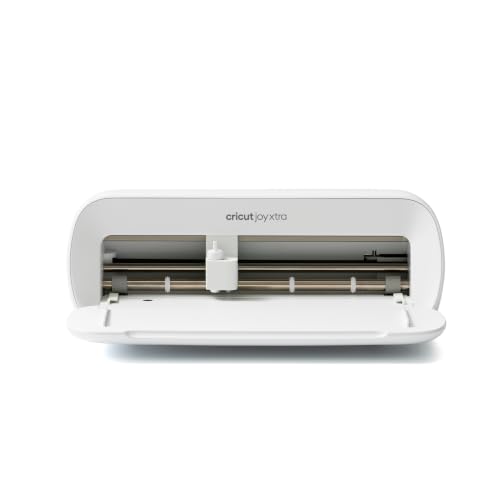 Best for compact spacesCricut Joy Xtra Smart Cutting MachineView on Amazon
- 6
 Best supply pickCricut Printable Sticker Paper (8 ct)View on Amazon
- 7
 Best budget pickLikcut S41 Vinyl Cutter Machine with Print Then CutView on Amazon
Our Top Picks
Quick Comparison
| Product | Best for | Key feature |
|---|---|---|
| Cricut StickerPix Print + Cut Essential Bundle | Custom printed stickers and labels | All-in-one printer, label maker and sticker maker |
| Cricut Maker 4 Cutting Machine Bundle Ultimate Sticker Making Kit | Serious sticker and vinyl crafters | Full-size cutting with a sticker-focused kit |
| Liene PixCut S1 Color Sticker Printer and Cutting Machine | Full-color die-cut stickers | Thermal dye-sublimation printing with auto-cutting |
| Cricut Joy 2 Essential Bundle | First-time sticker makers | Compact cutter with supplies for many projects |
| Cricut Joy Xtra Smart Cutting Machine | Small spaces and quick projects | Compact size with a digital content bundle |
| Cricut Printable Sticker Paper (8 ct) | Printing and cutting your own designs | Sticker paper sized for Cricut print-then-cut |
| Likcut S41 Vinyl Cutter Machine with Print Then Cut | Budget-minded sticker and vinyl projects | Print-then-cut with AI image generation |
Cricut StickerPix Print + Cut Essential Bundle, Sea Green
Cricut StickerPix Print + Cut™ Essential Bundle, Sea Green | All-in-One Photo Printer, Label Maker, & Sticker Maker Machine – Includes Sticker & Photo Paper – 300 DPI – Amazon Exclusive
Best for: Custom printed stickers, labels and photo prints in one device
This bundle suits people who want to print a design and cut it out without juggling separate machines. It is a strong fit for gift tags, party favors, planner stickers and product labels. Beginners often appreciate that the printing and cutting steps are handled inside one workflow.
Key specs
- All-in-one photo printer, label maker and sticker maker
- Includes sticker and photo paper
- 300 DPI print resolution, as listed by the manufacturer
Pros
- Prints and cuts in one device, reducing setup steps
- Bundled paper gets you started right away
- Well suited to photo-style and full-color designs
Cons
- Ongoing costs for ink or supplies add up over time
- Less suited to heavy vinyl or thick material work
Bottom line: A good pick for someone who wants printed, cut stickers with minimal setup.
View on AmazonCricut Maker 4 Cutting Machine Bundle Ultimate Sticker Making Kit
Cricut Maker 4 Cutting Machine Bundle Ultimate Sticker Making Kit
Best for: Full-size cutting for sticker sheets, vinyl and mixed materials
The Maker line is built for crafters who cut a wide range of materials and want room to grow. This bundle is aimed at sticker projects, so it suits people planning regular sticker runs or who also want to cut fabric and cardstock.
Key specs
- Full-size cutting machine in the Maker 4 line
- Sold as an ultimate sticker making bundle
Pros
- Handles a wide range of materials beyond stickers
- Bundle format simplifies getting started
- Works well with Cricut Design Space software
Cons
- Larger footprint than compact machines
- Higher commitment than a casual sticker hobby needs
Bottom line: Best for crafters who want one machine for stickers and many other projects.
View on AmazonLiene PixCut S1 Color Sticker Printer & Cutting Machine
Liene PixCut S1 Color Sticker Printer & Cutting Machine – All-in-One Sticker Maker for DIY Crafts, Custom Labels & Gifts. Thermal Dye-Sublimation Photo Printer, 300 DPI, Precise AI Auto-Cutting
Best for: Full-color die-cut stickers with automatic cutting
This all-in-one sticker printer targets people who want vivid, full-color stickers with clean cut lines. It fits small sellers, teachers making labels and crafters who want printed designs rather than cut vinyl.
Key specs
- Thermal dye-sublimation photo printer
- 300 DPI resolution, as listed in the product name
- AI auto-cutting feature
Pros
- Full-color output suited to detailed designs
- Automatic cutting reduces manual trimming
- Designed around sticker and label workflows
Cons
- Specialized for printed stickers rather than vinyl cutting
- Print media and consumables are an ongoing cost
Bottom line: A focused choice for colorful printed stickers rather than general cutting.
View on AmazonCricut Joy 2 Essential Bundle, Blue
Cricut Joy™ 2 Essential Bundle + Digital Content, Blue | Includes Supplies for 35 Projects + Bonus Digital Content – Perfect for Making Cards, Stickers, Labels, & More
Best for: First-time sticker makers who want a compact starter setup
The Joy line is designed for small, fast projects. This bundle includes supplies for dozens of projects, which helps beginners test whether sticker making suits them before buying larger equipment.
Key specs
- Compact smart cutting machine
- Bundle includes supplies for 35 projects, as listed
- Includes bonus digital content, as listed
Pros
- Small footprint fits easily on a desk
- Bundled supplies reduce the first-day shopping list
- Simple setup through Design Space
Cons
- Smaller cutting area limits large sticker sheets
- Fewer material options than full-size machines
Bottom line: A sensible starting point for beginners and light sticker projects.
View on AmazonCricut Joy Xtra Smart Cutting Machine
Cricut Joy Xtra – Smart Cutting Machine | Digital Content Bundle | Includes 30 images in Design Space App
Best for: Small spaces and quick sticker projects
The Joy Xtra is a compact cutter with a digital content bundle, making it a good match for people working in a small room or on a crowded craft table. It handles simple vinyl and sticker designs without needing much setup.
Key specs
- Compact smart cutting machine
- Digital content bundle with 30 images in Design Space, as listed
Pros
- Takes up very little space
- Ready-made images speed up first projects
- Works within the familiar Design Space app
Cons
- Limited cutting area for large designs
- Not intended for heavy-duty material cutting
Bottom line: A tidy option for small-scale sticker making in tight spaces.
View on AmazonCricut Printable Sticker Paper (8 ct)
Cricut® Printable Sticker Paper (8 ct)
Best for: Printing your own designs and cutting them on a Cricut
This is a supply rather than a machine, but it is essential if you plan to print at home and cut with a Cricut. Owners generally use it with a standard inkjet printer and then run the print-then-cut workflow.
Key specs
- Pack of 8 sheets
- Designed for print-then-cut sticker projects
Pros
- Small pack lets you test designs without waste
- Works with a standard inkjet printer
- Pairs directly with Cricut cutting machines
Cons
- Only 8 sheets, so frequent makers will need repeat packs
- Requires a separate printer
Bottom line: Pick this up if you already own a printer and a Cricut and want to start printing stickers.
View on AmazonLikcut S41 Vinyl Cutter Machine with Print Then Cut
Likcut S41 Vinyl Cutter Machine with Print Then Cut – AI Image Generation Sticker Cutter and Maker Machine for Room Decor, HTV, Cardstock and Custom Stickers, Crafts for Adults
Best for: Budget-minded sticker and vinyl projects
This machine suits crafters who want print-then-cut capability and AI image generation without choosing a premium brand. It is well suited to room decor, custom stickers and light HTV work.
Key specs
- Print-then-cut workflow
- AI image generation feature, as listed
Pros
- Strong feature set for the category
- Print-then-cut supports custom printed stickers
- Useful for room decor and gift projects
Cons
- Brand support and community resources are smaller than Cricut’s
- Owners may need more trial and error with settings
Bottom line: A good pick for shoppers who want more features for less commitment to a major brand.
View on AmazonBuying Guide
Printing versus cutting capability
Decide whether you need the machine to print designs, cut existing vinyl, or do both. Print-and-cut machines let you design and print full-color stickers, while cutting-only machines work with pre-made sticker paper or vinyl you print elsewhere.
Good picks for this: Cricut StickerPix Print + Cut Essential Bundle, Liene PixCut S1 Color Sticker Printer
Cutting area and maximum sheet size
Check the maximum cutting width and length. Compact machines are fine for small stickers, but a larger mat is useful if you want to fit multiple designs on one sheet to save material.
Good picks for this: Cricut Maker 4 Cutting Machine Bundle, Cricut Joy Xtra Smart Cutting Machine
Material compatibility
Stickers use vinyl, printable sticker paper and sometimes cardstock. Confirm that the machine handles the materials you plan to use. A machine built for a wider range of materials gives you more room to expand later.
Good picks for this: Cricut Maker 4 Cutting Machine Bundle, Likcut S41 Vinyl Cutter Machine
Software and app support
Design software shapes your daily experience. Cricut machines work with Design Space, while other brands use their own apps. Check whether the app supports the file types you already use and whether it works on your phone, tablet or computer.
Good picks for this: Cricut Joy 2 Essential Bundle, Cricut Joy Xtra Smart Cutting Machine
Durability and build quality
Look at how the machine is built and how often it will be used. Owners who cut daily report that sturdier frames and reliable blades matter more over time than extra features they rarely use.
Good picks for this: Cricut Maker 4 Cutting Machine Bundle, Liene PixCut S1 Color Sticker Printer
Ongoing supply costs
Print-based systems depend on ink, print media and sticker paper. Estimate how many sheets you will use each month and factor in replacement blades and mats for vinyl cutters.
Good picks for this: Cricut Printable Sticker Paper (8 ct), Cricut StickerPix Print + Cut Essential Bundle
Setup and learning curve
Beginners benefit from bundles that include starter materials and guided projects. Compact machines with bundled supplies usually get you cutting faster than building a kit from scratch.
Good picks for this: Cricut Joy 2 Essential Bundle, Likcut S41 Vinyl Cutter Machine
FAQ
Can a Cricut make stickers?
Yes. A Cricut can cut sticker designs from vinyl or printable sticker paper. For full-color stickers, you typically print the design first and then use the print-then-cut feature so the machine cuts along the printed edges.
Do I need a separate printer for sticker making?
For printed stickers, yes, unless you use an all-in-one printer and cutter. For cut-only vinyl stickers, you do not need a printer, but you will need the correct vinyl or sticker material.
What is the difference between vinyl and printable sticker paper?
Vinyl is a solid colored material you cut and weed. Printable sticker paper is designed to go through an inkjet printer, then be cut around the printed image. Choose based on whether you want solid color or printed artwork.
Is a compact machine enough for sticker projects?
For small stickers, labels and planner decorations, compact machines work well. If you plan to cut large sheets or many materials, a full-size machine gives you more room and flexibility.
How do I keep stickers from peeling or lifting?
Use the correct material for your surface, clean the surface before applying, and press firmly. Manufacturers usually recommend specific application and curing steps for their materials, so follow the packaging instructions.
Should I choose a major brand or a lesser-known one?
Major brands usually offer more tutorials, software support and accessories. Lesser-known brands can offer strong features for less commitment, but check owner feedback and support options before buying.
Conclusion
For most beginners, the Cricut StickerPix Print + Cut Essential Bundle is a practical all-in-one choice that keeps printing and cutting in one place. Crafters who want a larger machine for stickers plus other materials should look at the Cricut Maker 4 bundle. Those focused on full-color die-cut stickers may prefer the Liene PixCut S1. Compact options like the Cricut Joy 2 and Joy Xtra suit small spaces, while the Likcut S41 offers a budget-minded route. Pair any cutter with suitable sticker paper or vinyl, and match the machine to the materials and volume you actually plan to use.
If you are still comparing options, read more on Can a Cricut Machine Make Stickers? Cricut vs Inkjet Printer Stickers (2026) and Which Is the Best Cricut Machine? 4 Best Picks Compared (2026). For a step-by-step start, see Vinyl Cutting Machine Cricut: A Step-by-Step Guide for Beginners and Cricut Joy Smart Cutting Machine Review: Is It Worth It?. Project ideas are covered in What Can You Make with Cricut Machine: 12 Project Ideas for Beginners.
Sources
- Product safety guidance for household craft tools and electrical appliances (cpsc.gov)
- Workplace and small-shop safety practices for cutting equipment and adhesives (osha.gov)
- Voluntary standards that inform electrical equipment and labeling practices
Related reading
- 6 Best Cricut Machines for Stickers Picks for Crafters (2026)
- Top 4 Cricut Joy Cutting Machine Options for Crafters (2026)
About Colin Foster
Colin Foster is part of our editorial team and reviews and edits our arts & crafts supplies guides, checking product details against manufacturer specifications and owner feedback.
About the author
Colin Foster writes reviews and buying guides for Crafts Center.