6 Best Cricut Machines for Stickers Picks for Crafters (2026)
Find the best cricut machine for stickers for your craft room. We compare six models by sticker-making features, ease of use and owner feedback to help you choo
 By Colin Foster
Updated November 22, 2026
 By Colin Foster
Updated November 2026
Choosing a cricut machine for stickers depends on how you plan to make them: printing and cutting full-color designs, cutting vinyl from your own artwork, or simply cutting pre-made sticker paper. This list weighs each model by its sticker workflow, the materials it supports, the software it uses, and the feedback owners commonly share about setup and cut quality. Compact footprint and the included bundle also factored in.
Our top picks at a glance
- 1TOP CHOICEBest overallCricut StickerPix Print + Cut Essential BundleView on Amazon
- 2
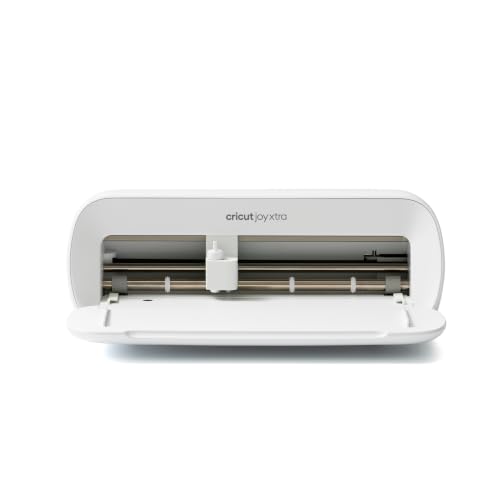 TOP CHOICEBest for beginners on a tight setupCricut Joy XtraView on Amazon
- 3
 TOP CHOICEBest for mixed materialsCricut Joy 2 Essential Bundle + Rainbow SamplerView on Amazon
- 4
 Best for heavier projectsCricut Maker 4 Cutting Machine Bundle Ultimate Sticker Making KitView on Amazon
- 5
 Best for full-color printed stickersLiene PixCut S1 Color Sticker Printer & Cutting MachineView on Amazon
- 6
 Best supply add-onCricut Printable Sticker Paper (8 ct)View on Amazon
Our Top Picks
Quick Comparison
| Product | Best for | Key feature |
|---|---|---|
| Cricut StickerPix Print + Cut Essential Bundle | Printed custom stickers | All-in-one print and cut |
| Cricut Joy Xtra | Small, quick sticker projects | Compact smart cutting |
| Cricut Joy 2 Essential Bundle + Rainbow Sampler | Mixed sticker materials | Smart Vinyl and iron-on |
| Cricut Maker 4 Cutting Machine Bundle Ultimate Sticker Making Kit | Heavier, detailed sticker work | Wide material compatibility |
| Liene PixCut S1 Color Sticker Printer & Cutting Machine | Full-color sticker printing | Thermal dye-sublimation printing |
| Cricut Printable Sticker Paper (8 ct) | Printing stickers on home printers | Printable sticker sheets |
Cricut StickerPix Print + Cut Essential Bundle
Cricut StickerPix Print + Cut™ Essential Bundle, Sea Green | All-in-One Photo Printer, Label Maker, & Sticker Maker Machine – Includes Sticker & Photo Paper – 300 DPI – Amazon Exclusive
Best for: Printed custom stickers from start to finish.
This bundle suits crafters who want one machine to print designs, label items and cut the finished sticker in a single workflow.
Pros
- Prints and cuts without a separate printer.
- Includes sticker and photo paper to start right away.
Cons
- Output is limited to the sticker and photo media it supports.
Cricut Joy Xtra
Cricut Joy Xtra – Smart Cutting Machine | Digital Content Bundle | Includes 30 images in Design Space App
Best for: Small, quick sticker projects on a limited workspace.
Owners often describe this as a good fit for a compact craft corner where sticker batches are small and frequent.
Pros
- Small footprint that fits on a desk.
- Includes a bundle of 30 images in the Design Space app.
Cons
- Smaller cutting area limits large sticker sheets.
Cricut Joy 2 Essential Bundle + Rainbow Sampler
Cricut Joy 2 Essential Bundle + Rainbow Sampler | Smart Cutting Machine with Smart Vinyl, Smart Iron-On, Cardstock, Insert Cards & Printable Vinyl – Create Up to 65 Projects
Best for: Trying several sticker materials without buying each one separately.
This bundle suits beginners who want to experiment with vinyl, iron-on and printable media in one kit.
Pros
- Sampler gives you several materials to test designs.
- Smart materials load without a mat for many projects.
Cons
- Smart materials cost more per sheet than standard vinyl.
Cricut Maker 4 Cutting Machine Bundle Ultimate Sticker Making Kit
Cricut Maker 4 Cutting Machine Bundle Ultimate Sticker Making Kit
Best for: Detailed sticker work across a wide range of materials.
This kit fits hobbyists who plan to cut thicker materials and intricate designs beyond basic vinyl.
Pros
- Handles a broad range of materials for sticker and craft projects.
- Bundle includes sticker-making supplies to get started.
Cons
- Larger footprint than the Joy models.
Liene PixCut S1 Color Sticker Printer & Cutting Machine
Liene PixCut S1 Color Sticker Printer & Cutting Machine – All-in-One Sticker Maker for DIY Crafts, Custom Labels & Gifts. Thermal Dye-Sublimation Photo Printer, 300 DPI, Precise AI Auto-Cutting
Best for: Full-color printed stickers with automatic cutting.
This option suits makers who want photo-quality sticker designs and labels rather than cut-only vinyl.
Pros
- Thermal dye-sublimation printing at 300 DPI.
- Auto-cutting for printed designs.
Cons
- Consumables are specific to the printer, so supply options are narrower.
Cricut Printable Sticker Paper (8 ct)
Cricut® Printable Sticker Paper (8 ct)
Best for: Printing your own stickers on a standard inkjet printer.
This pack suits crafters who already own a printer and want a Cricut-compatible printable surface for cut stickers.
Pros
- Works with standard home inkjet printers.
- Pairs directly with Cricut cutting workflows.
Cons
- Only eight sheets per pack, so it runs out quickly on larger projects.
Buying Guide
Print-and-Cut Capability
Decide first whether you need to print full-color designs before cutting them, or whether you only need to cut solid-color vinyl or pre-printed sticker paper. Print-and-cut models are the better fit for custom photo stickers and multi-color artwork, while cutting-only machines suit crafters who already have their own printed or colored materials.
Materials and Sticker Types
Check which materials each machine handles, such as printable sticker paper, permanent vinyl, cardstock, or iron-on. A machine that works with a wide range of materials gives you more flexibility for labels, decals, and gift projects without buying extra equipment.
Also confirm that the materials you plan to use are compatible with the machine’s cutting system. Some brands require their own branded materials for the best results.
Software and Ease of Use
Most of these machines rely on companion design software, so look at how intuitive the app is and whether it includes ready-made images and templates. Beginners often benefit from built-in design libraries and step-by-step guidance, while experienced crafters may want more advanced editing tools.
Space, Portability, and Bundle Contents
If your crafting space is limited, a compact machine can be easier to store and move. Pay attention to what comes in the bundle, since included starter materials, mats, and blades can save you from making extra purchases right away.
Your Budget and Volume
Consider how often you expect to make stickers and whether you will sell them. Higher-volume or business-focused projects may justify a more capable machine, while occasional personal projects can be handled well by a simpler, lower-commitment option.
FAQ
Can I make stickers with any Cricut machine?
Most Cricut cutting machines can cut sticker-friendly materials such as vinyl and printable sticker paper. However, printing full-color designs requires a model or accessory that supports print-then-cut, so check the specific capabilities before you buy.
What is the difference between printable sticker paper and vinyl?
Printable sticker paper is fed through a printer first to add color or images, then cut to shape. Vinyl is typically a solid-color material that is cut directly, and it is often more durable for outdoor or long-lasting use.
Do I need to buy Cricut-branded materials?
Cricut-branded materials are designed to work well with the machines and cutting settings, which can make results more predictable. Many crafters also use third-party materials, but they may need to adjust settings or test cuts first.
Is a print-and-cut machine worth it for sticker making?
If you want custom, full-color stickers with photos or detailed artwork, a print-and-cut setup is usually worth the investment. If you mainly cut solid-color designs, a standard cutting machine may be enough and more affordable.
How do I keep stickers from peeling or tearing during cutting?
Use the correct material setting in the software and a fresh cutting mat with enough tack for your material. Running a test cut on a small piece before a full project can help you dial in the right blade depth and pressure.
Conclusion
For full-color, print-and-cut sticker projects, the photo-printing and print-and-cut options are the strongest picks, with the all-in-one sticker printer suited to custom printed designs. For cutting vinyl and other solid materials, the compact Joy-series models and the Maker 4 bundle offer a good balance of ease, versatility, and value depending on your budget and project size.
Beginners on a budget who mainly want simple, pre-printed sticker paper projects will do well with a starter bundle and the printable sticker paper, while serious crafters or small sellers may prefer the more capable machines that handle a wider range of materials.
Related reading
- Can a Cricut Machine Make Stickers? Cricut vs Inkjet Printer Stickers (2026)
- Which Is the Best Cricut Machine? 4 Best Picks Compared (2026)
- What Can You Make with Cricut Machine: 12 Project Ideas for Beginners
About Colin Foster
Colin Foster is part of our editorial team and reviews and edits our arts & crafts supplies guides, checking product details against manufacturer specifications and owner feedback.
About the author
Colin Foster writes reviews and buying guides for Crafts Center.