6 Best What Is the Best Cricut Machines to Purchase (2026): Our Picks
Wondering what is the best cricut machine to purchase? Compare six popular models by specs, materials, and best-fit use to choose the right one.
 By Colin Foster
Updated November 23, 2026
 By Colin Foster
Updated November 2026
If you are wondering what is the best Cricut machine to purchase, the honest answer depends on what you plan to make. A machine that suits vinyl decals on a kitchen shelf may be a poor fit for chipboard shadow boxes or fabric appliqué. This list compares six current Cricut models across the criteria that matter most: cutting capability, supported materials, size and storage, the software bundle included, and how easy each one is to learn. Use it as a shortlist, then match the machine to the projects you already have in mind.
Our top picks at a glance
- 1TOP CHOICEBest overallCricut Explore 5 + Deluxe BundleView on Amazon
- 2
 TOP CHOICEBest for heat-transfer projectsCricut Maker 5 Cutting Machine and EasyPress Heat Press BundleView on Amazon
- 3
 TOP CHOICEBest for small spacesCricut Joy Machine & Digital Content Library BundleView on Amazon
- 4
 Best budget pickCricut Joy 2 Essential Bundle + Rainbow SamplerView on Amazon
- 5
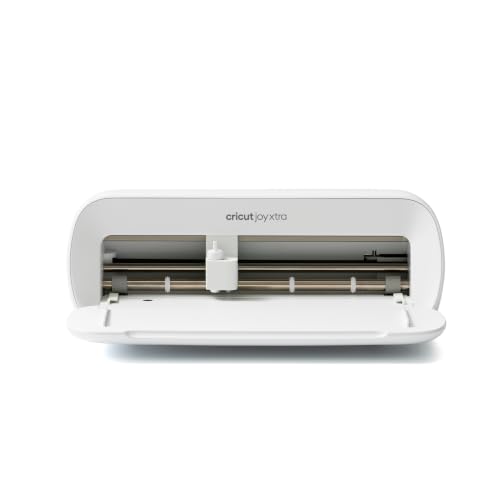 Best for compact cuttingCricut Joy Xtra – Smart Cutting MachineView on Amazon
- 6
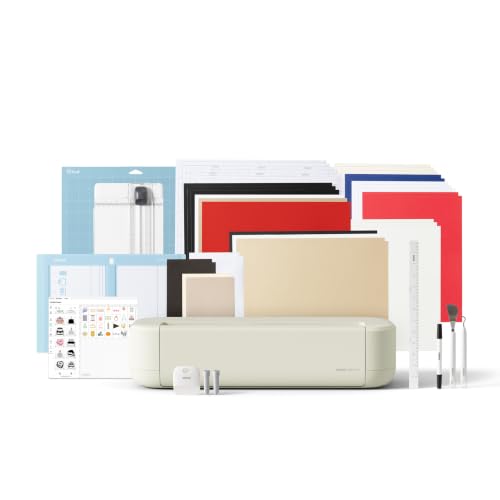 Best for a complete starter kitCricut Explore 5 Essential Bundle + Digital ContentView on Amazon
Our Top Picks
Quick Comparison
| Product | Best for | Key feature |
|---|---|---|
| Cricut Explore 5 + Deluxe Bundle | Versatile crafters who work with many materials | Broad material range with a large starter supply set |
| Cricut Maker 5 + EasyPress Bundle | Heat-transfer apparel and fabric projects | Pairs cutting with a dedicated heat press |
| Cricut Joy Machine & Digital Content Bundle | Small spaces and quick cards or labels | Compact, portable body with included design images |
| Cricut Joy 2 Essential Bundle + Rainbow Sampler | Budget-conscious beginners | Smart materials ready to cut without a mat |
| Cricut Joy Xtra Smart Cutting Machine | Wider cuts than a basic Joy in a small footprint | Extended cutting width for larger single pieces |
| Cricut Explore 5 Essential Bundle | Beginners who want a full kit on day one | Supplies for a large set of starter projects |
Cricut Explore 5 + Deluxe Bundle
Cricut Explore® 5 + Deluxe Bundle + Digital Content, Taupe | Includes Supplies for 100 Projects + Additional $30 Bonus Digital Content – Works w/100+ Materials
Best for: Versatile crafters who work with many materials
This is a good fit for hobbyists who plan to cut vinyl, cardstock, iron-on, and thicker specialty materials and want one machine for all of them. It suits people ready to move beyond basic cards into more varied projects.
Key specs
- Works with a broad range of materials, as stated in the listing
- Deluxe bundle with included digital content
- Designed for the Cricut Design Space app
Pros
- Handles a wide variety of materials in one machine
- Bundle reduces the number of separate purchases needed at the start
- Good growth path as skills develop
Cons
- Larger footprint than the Joy models
- Full capability is more than a casual card-maker needs
Bottom line: A strong choice if you want one machine that can grow with your projects and you have room on your craft table.
View on AmazonCricut Maker 5 Cutting Machine and EasyPress Heat Press Bundle
Cricut Maker 5 Cutting Machine and EasyPress Heat Press Bundle | Crafting Bundle, Rainbow Vinyl Included, Iron-On Sheets, DIY Crafts, Multiple Materials
Best for: Heat-transfer apparel and fabric projects
Crafters who make shirts, tote bags, or pillow covers will get the most from this bundle, since cutting and pressing are handled in one setup. It is aimed at people who want to move from design to finished textile without buying a separate press.
Key specs
- Cutting machine bundled with a heat press
- Includes iron-on sheets and vinyl, per the listing
- Works with multiple material types
Pros
- Cutting and heat pressing in one bundle
- Good for garment and fabric decoration
- Includes starter materials for immediate use
Cons
- Takes up more space than compact models
- Heat press adds to the setup and storage needs
Bottom line: Best for people whose main goal is custom apparel and home textiles.
View on AmazonCricut Joy Machine & Digital Content Library Bundle
Cricut Joy Machine & Digital Content Library Bundle | Includes 30 images in Design Space App – Portable DIY Smart Machine for creating customized cards, crafts, & labels Blue
Best for: Small spaces
This model suits people with limited room, those who want to make cards and labels, and anyone who likes to craft in short sessions. Its portability makes it easy to store between projects.
Key specs
- Compact, portable body
- Includes 30 images in the Design Space app, per the listing
- Designed for smaller projects such as cards and labels
Pros
- Easy to store and move
- Quick setup for simple projects
- Bundled digital content adds immediate design options
Cons
- Smaller cutting area limits large designs
- Not suited to thick or specialty materials
Bottom line: A practical pick for crafters working in a shared or small room who mainly make cards and labels.
View on AmazonCricut Joy 2 Essential Bundle + Rainbow Sampler
Cricut Joy 2 Essential Bundle + Rainbow Sampler | Smart Cutting Machine with Smart Vinyl, Smart Iron-On, Cardstock, Insert Cards & Printable Vinyl – Create Up to 65 Projects
Best for: Budget-conscious beginners
If you are new to cutting machines and want to test whether the hobby suits you before spending more, this bundle keeps the entry point low. The included sampler gives you a range of colors to experiment with right away.
Key specs
- Smart Vinyl, Smart Iron-On, and cardstock included, per the listing
- Printable vinyl and insert cards included
- Listed as enough for up to 65 projects
Pros
- Smart materials can be cut without a mat
- Good variety of starter supplies
- Simple learning curve
Cons
- Narrower material range than the Explore line
- Smart materials cost more per sheet than standard supplies over time
Bottom line: Best for beginners who want a low-commitment way to start and a sampler to explore colors.
View on AmazonCricut Joy Xtra – Smart Cutting Machine
Cricut Joy Xtra – Smart Cutting Machine | Digital Content Bundle | Includes 30 images in Design Space App
Best for: Wider cuts in a small footprint
This is for people who like the Joy form factor but find the standard width too limiting for banners, larger stickers, or wider labels. It keeps the compact idea while offering more room per cut.
Key specs
- Compact smart cutting machine
- Includes 30 images in the Design Space app, per the listing
- Wider cutting capacity than the basic Joy
Pros
- Larger cuts than the standard Joy
- Still compact enough for small spaces
- Bundled digital content
Cons
- Still limited compared with full-size cutting machines
- Materials range narrower than the Explore models
Bottom line: A good middle ground for crafters who have outgrown the smallest Joy but do not need a full-size machine.
View on AmazonCricut Explore 5 Essential Bundle + Digital Content
Cricut Explore® 5 Essential Bundle + Digital Content, Taupe | Includes Supplies for 65 Projects + Bonus Digital Content – Works with 100+ Materials – Sleek, Simplified Design
Best for: Beginners who want a full kit on day one
This bundle suits someone who wants everything needed for a first round of projects in one box. It gives you the Explore platform and supplies for a large set of starter projects, which reduces early guesswork.
Key specs
- Supplies listed for 65 projects
- Works with 100+ materials, per the listing
- Includes bonus digital content
Pros
- Complete starter kit reduces early purchases
- Broad material compatibility
- Sleek, simplified design
Cons
- Larger footprint than the Joy line
- Essential bundle has fewer extras than the Deluxe version
Bottom line: Ideal for first-time buyers who want a machine and starter supplies together without choosing components separately.
View on AmazonBuying Guide
Before you choose, think through the projects you expect to make most often. The factors below will help you narrow the list.
Cutting Capability and Material Range
Check which materials the machine supports. Vinyl, cardstock, and iron-on cover most beginner projects, while chipboard, balsa, or heavier fabrics need more cutting force and a suitable blade. Read the material list in each product description before you buy.
Good picks for this: Cricut Explore 5 + Deluxe Bundle, Cricut Explore 5 Essential Bundle
Cutting Area and Size
Cutting width decides how large a single piece can be. Compact Joy models suit stickers, cards, and labels, while larger designs such as wall decals or banners need a wider mat area. Measure the spot where the machine will live, including clearance for the mat to load and unload.
Good picks for this: Cricut Joy Xtra – Smart Cutting Machine, Cricut Joy Machine & Digital Content Library Bundle
Included Software and Digital Content
Every Cricut model works with the Design Space app. Bundles often add image libraries or digital content, which can save time when you are learning. Check whether the bundle includes the content you want, rather than relying only on the machine itself.
Good picks for this: Cricut Joy Machine & Digital Content Library Bundle, Cricut Explore 5 + Deluxe Bundle
Heat Transfer and Apparel Use
If you plan to make shirts or tote bags, check whether a heat press or iron-on supplies are included. Heat-transfer work needs a reliable pressing method, and the press may matter more than the cutter for finished quality.
Good picks for this: Cricut Maker 5 Cutting Machine and EasyPress Heat Press Bundle
Space and Portability
A machine that lives on a shelf and moves between rooms has different needs than one that stays on a dedicated desk. Compact models are easier to store, but may limit cut size. Consider how often you will set up and put away your machine.
Good picks for this: Cricut Joy 2 Essential Bundle + Rainbow Sampler, Cricut Joy Xtra – Smart Cutting Machine
Starter Materials and Ongoing Supply Costs
Some bundles include a sampler of materials, which helps you learn without buying everything separately. Smart materials are convenient but can be more costly to keep stocked than standard vinyl and cardstock. Plan your ongoing supply needs before committing.
Good picks for this: Cricut Joy 2 Essential Bundle + Rainbow Sampler, Cricut Explore 5 Essential Bundle
Durability and Care
Keep the cutting blade, mat, and housing clean, and store the machine away from dust and direct sunlight. Replace blades and mats when cuts start tearing or dragging, and follow the manufacturer’s care instructions for the specific model.
Good picks for this: Cricut Explore 5 Essential Bundle, Cricut Maker 5 Cutting Machine and EasyPress Heat Press Bundle
FAQ
What is the best Cricut machine for a complete beginner?
For most beginners, a starter bundle is the simplest path. The Cricut Explore 5 Essential Bundle includes supplies for a large set of first projects, which helps you learn without buying components separately. If space or budget is tighter, a Joy model is a reasonable alternative.
Can a Cricut machine cut fabric?
Some Cricut models can cut fabric when used with a stabilizer and the correct blade and mat settings. Results depend on the fabric type and thickness. Check the material list for each model and follow the guidance in Design Space.
Do I need a heat press to make shirts?
A heat press gives the most consistent results for heat-transfer materials. An iron can work for some projects, but pressure and temperature are harder to control. If apparel is your main goal, a bundle that includes a press is worth considering.
Is a Joy model enough for serious crafting?
A Joy model handles cards, labels, and small stickers well. It is less suited to large designs, thick materials, or heavy use. Crafters who plan to expand into wall decor or chipboard projects will likely want a larger Explore or Maker machine.
Which bundle includes the most starter supplies?
Bundle contents change over time, so compare the listing details for each product before buying. The Explore 5 Essential Bundle is described as supplying a large number of starter projects, and the Joy 2 bundle includes a sampler of smart materials.
How do I keep my Cricut machine working well?
Clean the mat and blade regularly, store the machine covered, and replace worn blades. Follow the manufacturer’s maintenance guidance for your model. If the machine will not power on or cut evenly after troubleshooting, contact Cricut support or a qualified repair service.
Conclusion
There is no single answer to what is the best Cricut machine to purchase, because the right choice depends on your materials, space, and budget. The Cricut Explore 5 + Deluxe Bundle is a solid all-round option for crafters who want room to grow. The Cricut Maker 5 bundle suits apparel and heat-transfer work, while the Joy models fit small spaces and simple cards. First-time buyers who want everything in one box should look at the Explore 5 Essential Bundle, and those who want to start small may prefer the Joy 2 bundle. Match the machine to the projects you plan to make in the next few months, and you will get the most from your purchase.
Sources
- Consumer safety guidance on using electrical household and hobby equipment safely (cpsc.gov)
- Workplace and home workshop safety practices for cutting tools and heat equipment (osha.gov)
Related reading
- Which Is the Best Cricut Machine? 4 Best Picks Compared (2026)
- What Can You Make with Cricut Machine: 12 Project Ideas for Beginners
- Top 4 Cricut Joy Cutting Machine Options for Crafters (2026)
- How Much Is Cricut Machine? Typical Prices and What Affects Them
- Cricut Personal Electronic Cutting Machine Review: What You Should Know
- Cricut Machine for Shirts: 6 Best Picks for Beginners (2026)
- Cost of Cricut Machine: 5 Best Cricut Models Compared for Beginners (2026)
About Colin Foster
Colin Foster is part of our editorial team and reviews and edits our arts & crafts supplies guides, checking product details against manufacturer specifications and owner feedback.
About the author
Colin Foster writes reviews and buying guides for Crafts Center.