Cricut Explore Air 2 Die Cutting Machine: 6 Best Picks Compared (2026)
Comparing six Cricut die cutting machines against the Explore Air 2 die cutting machine benchmark: specs, bundles, and who each model suits best.
 By Colin Foster
Updated November 26, 2026
 By Colin Foster
Updated November 2026
Shoppers searching for a cricut explore air 2 die cutting machine usually want one of two things: a reliable machine for cutting vinyl, cardstock and iron-on, or an upgrade path that won’t leave them stuck with supplies they can’t use. This guide compares six current Cricut machines so you can see how the Explore lineup, the Joy line and the Maker 4 differ in cutting capacity, bundle contents and the kinds of projects each one handles well. The selection criteria were cutting versatility, the materials each model supports, included starter supplies, footprint, and the consistency of owner feedback on setup and day-to-day use. This is a research-based comparison built from manufacturer specifications and common owner feedback patterns, not hands-on testing.
Our top picks at a glance
- 1TOP CHOICEBest overallCricut Explore 5 + Deluxe Bundle, TaupeView on Amazon
- 2
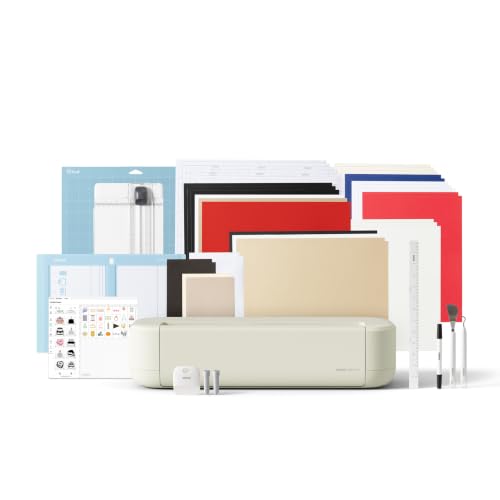 TOP CHOICEBest for small starter kitsCricut Explore 5 Essential Bundle, TaupeView on Amazon
- 3
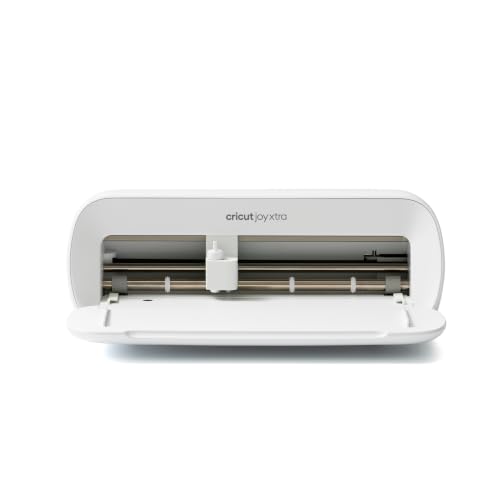 TOP CHOICEBest for compact spacesCricut Joy Xtra – Smart Cutting MachineView on Amazon
- 4
 Best budget pickCricut Joy 2 Essential Bundle + Rainbow SamplerView on Amazon
- 5
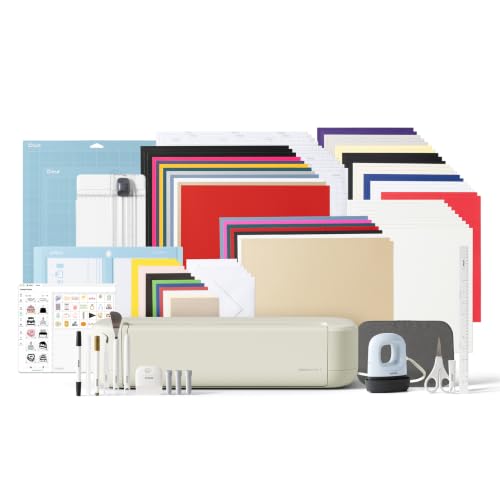 Best for large project volumeCricut Explore 5 Ultimate Bundle, TaupeView on Amazon
- 6
 Best for heavy materials and fabricCricut Maker 4 – Smart Cutting Machine (Seashell)View on Amazon
Our Top Picks
Quick Comparison
| Product | Best for | Key feature |
|---|---|---|
| Cricut Explore 5 + Deluxe Bundle | Crafters who want the most versatile everyday machine | Bundle with supplies for about 100 projects |
| Cricut Explore 5 Essential Bundle | First-time buyers who want a lean starter kit | Supplies for about 65 projects with a sleek design |
| Cricut Joy Xtra | Small spaces and quick, small-format cuts | Compact smart cutting machine with 30 Design Space images |
| Cricut Joy 2 Essential Bundle + Rainbow Sampler | Budget-minded beginners | Smart Vinyl, Smart Iron-On and cardstock in one bundle |
| Cricut Explore 5 Ultimate Bundle | High-volume crafters and gift-makers | Supplies for about 135 projects |
| Cricut Maker 4 | Heavier materials and fabric projects | Smart Cutting Machine with 30 Design Space images |
Cricut Explore 5 + Deluxe Bundle, Taupe
Cricut Explore® 5 + Deluxe Bundle + Digital Content, Taupe | Includes Supplies for 100 Projects + Additional $30 Bonus Digital Content – Works w/100+ Materials For a deeper look, Mat Board Cutting Machine: How to Choose and Use One for Clean Cuts covers this in detail.
Best for: the most versatile everyday machine for mixed projects
This bundle suits crafters who plan to cut vinyl, cardstock, iron-on and a range of specialty materials, and who want enough starter supplies to begin right away. It is a good fit for people who expect to grow into a wide project list.
Key specs
- Works with 100+ materials, as stated in the listing
- Includes supplies for 100 projects
- Includes additional bonus digital content
- Taupe finish
Pros
- Broad material compatibility covers most hobby projects
- Large supply bundle reduces the need for early restocking
- Bonus digital content adds design options from the start
Cons
- Higher commitment than a basic starter kit
- Bundle contents matter most; buyers who already own supplies may not need all of it
Bottom line: A strong pick for crafters who want one machine that handles nearly everything and a generous starter supply.
View on AmazonCricut Explore 5 Essential Bundle, Taupe
Cricut Explore® 5 Essential Bundle + Digital Content, Taupe | Includes Supplies for 65 Projects + Bonus Digital Content – Works with 100+ Materials – Sleek, Simplified Design
Best for: first-time buyers who want a lean starter kit
This is the same family of machine as the Deluxe bundle with a smaller supply package. It suits beginners who want to learn the platform without paying for a large inventory of materials they may not use.
Key specs
- Works with 100+ materials, as stated in the listing
- Includes supplies for 65 projects
- Includes bonus digital content
- Sleek, simplified design
Pros
- Good entry point to the Explore platform
- Broad material support for future projects
- Supply count is still substantial for early practice
Cons
- Fewer included supplies than the larger bundles
- Buyers planning heavy use may restock sooner
Bottom line: Ideal for beginners who want the Explore experience at a more measured starting point.
View on AmazonCricut Joy Xtra – Smart Cutting Machine
Cricut Joy Xtra – Smart Cutting Machine | Digital Content Bundle | Includes 30 images in Design Space App
Best for: small spaces and quick, small-format cuts
The Joy Xtra is aimed at people with limited desk or craft-room space who mostly make cards, labels, stickers and small decor pieces. It is a practical choice for apartment crafters and gift-makers working on a small scale.
Key specs
- Smart cutting machine format
- Includes a digital content bundle with 30 images in Design Space
Pros
- Compact footprint fits small work surfaces
- Simple setup for quick projects
- Good for cards, labels and small vinyl decals
Cons
- Smaller cutting area limits large-format projects
- Not the best choice for heavy materials or fabric
Bottom line: A good match for crafters who prioritize space and small, frequent projects over large cuts.
View on AmazonCricut Joy 2 Essential Bundle + Rainbow Sampler
Cricut Joy 2 Essential Bundle + Rainbow Sampler | Smart Cutting Machine with Smart Vinyl, Smart Iron-On, Cardstock, Insert Cards & Printable Vinyl – Create Up to 65 Projects
Best for: budget-minded beginners who want a sampler of materials
This bundle packages the Joy 2 with a range of Smart materials, so buyers can try vinyl, iron-on and cardstock without buying each separately. It suits people testing whether they enjoy cutting machines before committing to a larger setup.
Key specs
- Smart Vinyl, Smart Iron-On, cardstock, insert cards and printable vinyl included
- Listed capacity of up to 65 projects
Pros
- Material sampler helps identify favorite project types
- Smart materials load without a separate mat for many cuts
- Lower commitment than the Explore bundles
Cons
- Smaller cutting capacity than the Explore line
- Specialty and thick materials may require a different model
Bottom line: The most approachable entry point for beginners watching their spending.
View on AmazonCricut Explore 5 Ultimate Bundle, Taupe
Cricut Explore® 5 Ultimate Bundle + Digital Content, Taupe | Includes Supplies for 135 Projects + Bonus Digital Content – Works with 100+ Materials – Sleek, Simplified Design
Best for: high-volume crafters and gift-makers
The Ultimate bundle is built for people who cut frequently and want a deep stock of materials on hand. It suits small craft businesses, teachers and families planning many projects across a year.
Key specs
- Works with 100+ materials, as stated in the listing
- Includes supplies for 135 projects
- Includes bonus digital content
- Sleek, simplified design
Pros
- Largest supply count in this lineup reduces restocking
- Same versatile Explore platform as the smaller bundles
- Good value for steady, ongoing use
Cons
- Overkill for occasional crafters
- Larger upfront commitment to supplies
Bottom line: Best for crafters who know they will cut often and want supplies ready for a long project list.
View on AmazonCricut Maker 4 – Smart Cutting Machine (Seashell)
Cricut Maker 4 – Smart Cutting Machine (Seashell) | Digital Content Bundle | Includes 30 images in Design Space App
Best for: heavier materials and fabric projects
The Maker line is positioned for crafters who cut thicker or more demanding materials, including fabric and chipboard-style stock. It suits sewists, quilters and people who want a machine that handles more than paper and vinyl.
Key specs
- Smart cutting machine format
- Includes a digital content bundle with 30 images in Design Space
Pros
- Stronger material range suited to fabric and heavier stock
- Works within the same Design Space workflow
- Useful for crafters who expect to expand beyond paper
Cons
- Higher investment than entry-level Joy models
- Many paper-only crafters will not use its extra capability
Bottom line: The right choice for crafters who already know they will cut fabric or heavier materials regularly.
View on AmazonBuying Guide
Cutting capacity and machine type
Start by deciding how large your typical cut will be. Joy-series machines suit small cards, labels and stickers, while Explore-series machines handle a wider range of sizes and materials. Check the listed cutting dimensions for each model before you commit.
Good picks for this: Cricut Joy Xtra, Cricut Explore 5 + Deluxe Bundle
Material compatibility
Confirm the materials each machine supports. Many Explore models list compatibility with 100+ materials, which covers vinyl, cardstock, iron-on and specialty stock. If you plan to cut fabric or thicker chipboard, look for a model explicitly designed for those materials.
Good picks for this: Cricut Maker 4, Cricut Explore 5 Essential Bundle
Included supplies and bundle contents
Bundles change the real cost of getting started. Compare how many projects each supply package covers, and whether it includes Smart Vinyl, Smart Iron-On or a sampler. A larger bundle makes sense only if you will use the materials.
Good picks for this: Cricut Joy 2 Essential Bundle + Rainbow Sampler, Cricut Explore 5 Ultimate Bundle
Space and footprint
Measure your work surface before buying. A compact machine fits a desk or small table, while larger Explore machines need more room, especially when a mat is loaded. Plan for clearance at the front and back for mats to feed through.
Good picks for this: Cricut Joy Xtra, Cricut Joy 2 Essential Bundle + Rainbow Sampler
Software and digital content
Every model in this lineup works with Cricut Design Space. Check which digital content bundles are included, since image libraries affect how quickly you can start designing. Confirm the software runs on your computer or tablet before buying.
Good picks for this: Cricut Explore 5 Essential Bundle, Cricut Maker 4
Durability and care
Keep the cutting blade, mats and drive area clean. Replace worn blades and mats as the manufacturer recommends, and store the machine covered when not in use. Owners often report that regular cleaning of mats extends their usefulness.
Good picks for this: Cricut Explore 5 Ultimate Bundle, Cricut Maker 4
Use case and future plans
Think about what you will make in the next year. Occasional cards suggest a Joy model. Varied projects, fabric and small-business work point toward an Explore or Maker. Choosing for future plans can save a second purchase later.
Good picks for this: Cricut Explore 5 + Deluxe Bundle, Cricut Maker 4
FAQ
What is the main difference between the Explore and Joy lines?
Explore machines generally offer a larger cutting area and wider material compatibility. Joy machines are smaller and aimed at quick, small-format projects like cards, labels and decals.
Can these machines cut fabric?
The Maker line is positioned for heavier materials, including fabric. Explore and Joy models focus more on paper, vinyl and iron-on. Check each listing for the specific materials it supports.
Do I need a separate subscription to use Cricut Design Space?
Design Space can be used with a free account for basic features. Some images, fonts and digital content require a paid plan or individual purchases. Check current Cricut terms before buying.
Which bundle is best for a beginner?
The Cricut Joy 2 Essential Bundle + Rainbow Sampler gives beginners a material sampler at a lower commitment. The Explore 5 Essential Bundle is a good choice if you want more versatility from the start.
How often should I replace the cutting blade?
Blade life depends on the materials you cut and how often you use the machine. Replace the blade when cuts become incomplete or ragged, following the manufacturer’s guidance.
Is a larger supply bundle always worth it?
Not always. A bundle is worth it when you plan to use most of its contents. If you are still learning, a smaller bundle lets you add materials once you know which ones you enjoy.
Conclusion
For most crafters searching for a cricut explore air 2 die cutting machine alternative, the Explore 5 family offers the most versatility, with the Deluxe bundle as the best overall pick and the Essential bundle as a leaner start. The Joy Xtra suits small spaces and quick cards, while the Joy 2 bundle is the most budget-minded entry point. The Explore 5 Ultimate bundle fits high-volume makers, and the Maker 4 is the choice for fabric and heavier materials. Match the machine to your space, materials and expected project volume, and buy the bundle that fits how you actually plan to craft.
Sources
- Product safety guidance for electrical and household appliances, useful when setting up any powered craft machine (cpsc.gov)
- Workplace guidance on blade and cutting tool safety, applicable to home craft workspaces (osha.gov)
Before you buy: helpful guides
Related reading
- Cricut Machine Explore Air 2 Bundle: 6 Best Picks Compared (2026)
- Cricut Explore 3 Craft Cutting Machine: A Step-by-Step Guide for Beginners
About Colin Foster
Colin Foster is part of our editorial team and reviews and edits our arts & crafts supplies guides, checking product details against manufacturer specifications and owner feedback.
About the author
Colin Foster writes reviews and buying guides for Crafts Center.