6 Best Cricut Stencil Maker Machine Options for Crafters (2026)
Compare 6 Cricut stencil maker machine options for crafters, with best-fit picks, key specs, pros, cons and a buying guide to help you choose.
 By Colin Foster
Updated November 25, 2026
 By Colin Foster
Updated November 2026
Shopping for a cricut stencil maker machine usually comes down to a few practical questions: how much you plan to cut, which materials you want to use, how much room you have on your craft table, and whether you need a basic cutter or a machine that also prints. This list compares six options from the Cricut lineup and a related vinyl cutter, grouped by the kind of crafter each one suits best. The selection method is research-based: we looked at manufacturer specifications, brand track record, and patterns in owner feedback about cutting accuracy, setup, and material range.
Our top picks at a glance
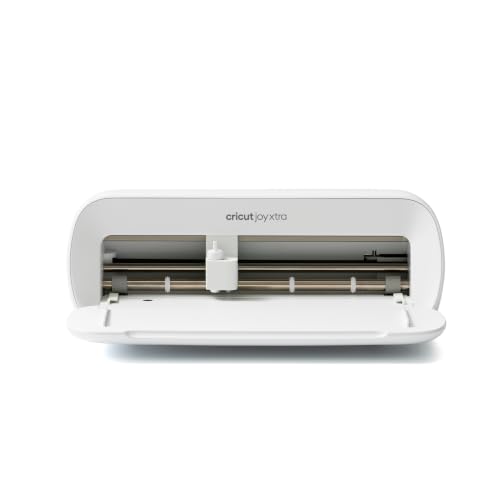
- 1TOP CHOICEBest overallCricut Joy Xtra – Smart Cutting Machine | Digital Content Bundle | IncView on Amazon
- 2
 TOP CHOICEBest for print-and-cut stickersCricut StickerPix Print + Cut™ Essential Bundle, Sea Green | All-in-OnView on Amazon
- 3
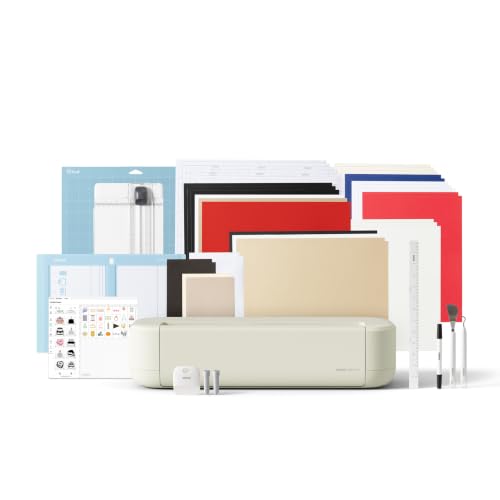 TOP CHOICEBest for a full materials kitCricut Explore® 5 Essential Bundle + Digital Content, Taupe | IncludesView on Amazon
- 4
 Best budget pickLikcut S41 Vinyl Cutter Machine with Print Then CutView on Amazon
- 5
 Best for larger projectsCricut Explore® 5 + Deluxe Bundle + Digital Content, Taupe | IncludesView on Amazon
- 6
 Best accessory for stencil workCricut® Stencil Film, Flexible (12 in x 12 ft)View on Amazon
Our Top Picks
Quick Comparison
| Product | Best for | Key feature |
|---|---|---|
| Cricut Joy Xtra – Smart Cutting Machine | Small spaces and everyday projects | Compact footprint with a digital content bundle |
| Cricut StickerPix Print + Cut Essential Bundle | Printed stickers and labels | All-in-one photo printer and sticker maker |
| Cricut Explore 5 Essential Bundle | Crafters who want materials included | Works with 100+ materials |
| Likcut S41 Vinyl Cutter Machine | Budget-minded vinyl and sticker work | Print-then-cut with AI image generation |
| Cricut Explore 5 Deluxe Bundle | High-volume and larger projects | Expanded supply set for around 100 projects |
| Cricut Stencil Film, Flexible | Stencil making with any compatible cutter | 12 in x 12 ft flexible roll |
Cricut Joy Xtra – Smart Cutting Machine | Digital Content Bundle | Includes 30 images in Design Space App
Cricut Joy Xtra – Smart Cutting Machine | Digital Content Bundle | Includes 30 images in Design Space App
Best for: Small spaces and everyday projects
This suits crafters with limited table space who want a Cricut that cuts stencils, vinyl, and light cardstock without taking over a workroom. It is also a sensible first machine for someone who expects to make a mix of small cards and decals.
Key specs
- Smart Cutting Machine format
- Includes a digital content bundle with 30 images in Design Space
Pros
- Compact enough for a shared or small desk
- Bundled digital images give you material to start cutting right away
- Works with the Design Space app for straightforward setup
Cons
- Smaller cutting area limits very large stencils
- Fewer included supplies than the bundled Explore options
Bottom line: A good pick for beginners and space-conscious crafters who mainly need a reliable cutter for stencils and small decor.
View on AmazonCricut StickerPix Print + Cut™ Essential Bundle, Sea Green | All-in-One Photo Printer, Label Maker, & Sticker Maker Machine
Cricut StickerPix Print + Cut™ Essential Bundle, Sea Green | All-in-One Photo Printer, Label Maker, & Sticker Maker Machine – Includes Sticker & Photo Paper – 300 DPI – Amazon Exclusive
Best for: Printed stickers and labels
This fits crafters who want to print a design and cut it out in one workflow, especially for stickers, labels, and photo-based projects. It is less about classic stencil cutting and more about turning printed artwork into finished pieces.
Key specs
- All-in-one photo printer, label maker, and sticker maker
- Includes sticker and photo paper
Pros
- Combines printing and cutting in one machine
- Includes starter sticker and photo paper
- Useful for labels and personalized stickers
Cons
- Not a general-purpose cutter for thick materials
- Stencil work is secondary to its print-focused design
Bottom line: Best for crafters whose main goal is printed stickers and labels rather than cutting stencils from vinyl or film.
View on AmazonCricut Explore® 5 Essential Bundle + Digital Content, Taupe | Includes Supplies for 65 Projects
Cricut Explore® 5 Essential Bundle + Digital Content, Taupe | Includes Supplies for 65 Projects + Bonus Digital Content – Works with 100+ Materials – Sleek, Simplified Design
Best for: Crafters who want materials included
This suits someone who wants a capable cutter plus a starter set of supplies to begin projects immediately. It is a solid middle option for hobbyists who expect to cut a wide range of materials, including stencil film.
Key specs
- Works with 100+ materials
- Includes supplies for 65 projects and bonus digital content
Pros
- Broad material compatibility
- Supply bundle reduces the first-week shopping list
- Clean, simplified design
Cons
- Bundled supply count is a starting point, not a long-term stockpile
- Full-size machine needs more table space than compact models
Bottom line: A strong choice for crafters who want one machine that handles many materials and comes with enough supplies to begin right away.
View on AmazonLikcut S41 Vinyl Cutter Machine with Print Then Cut
Likcut S41 Vinyl Cutter Machine with Print Then Cut – AI Image Generation Sticker Cutter and Maker Machine for Room Decor, HTV, Cardstock and Custom Stickers, Crafts for Adults
Best for: Budget-minded vinyl and sticker work
This is aimed at hobbyists who want a vinyl cutter with print-then-cut capability and are comfortable with a brand outside the Cricut ecosystem. It suits room decor, HTV, cardstock, and custom sticker projects.
Key specs
- Vinyl cutter with print-then-cut function
- Suited to HTV, cardstock, and custom stickers
Pros
- Print-then-cut workflow for sticker production
- Covers a range of materials for décor and apparel projects
- Positioned as a budget-friendly alternative
Cons
- Works outside the Cricut app and accessory ecosystem
- Owners often recommend checking software compatibility before buying
Bottom line: Worth considering if you want print-then-cut stickers and décor on a tighter budget and don’t need Cricut’s own accessory system.
View on AmazonCricut Explore® 5 + Deluxe Bundle + Digital Content, Taupe | Includes Supplies for 100 Projects
Cricut Explore® 5 + Deluxe Bundle + Digital Content, Taupe | Includes Supplies for 100 Projects + Additional $30 Bonus Digital Content – Works w/100+ Materials
Best for: High-volume and larger projects
This suits crafters who expect to cut frequently and want a larger supply set on hand. It is a good match for those planning many stencil and vinyl projects across the year.
Key specs
- Works with 100+ materials
- Includes supplies for 100 projects and additional digital content
Pros
- Larger supply bundle covers more projects
- Same broad material compatibility as the Explore 5 line
- Good value for regular makers who will use the supplies
Cons
- Bigger upfront commitment than the Essential bundle
- Full-size footprint needs dedicated desk space
Bottom line: The right pick for active crafters who want the most included supplies and plan to cut often.
View on AmazonCricut® Stencil Film, Flexible (12 in x 12 ft)
Cricut® Stencil Film, Flexible (12 in x 12 ft)
Best for: Stencil making with any compatible cutter
This is a consumable rather than a machine, but it is the material most people buy when they want to make reusable stencils. It suits anyone who already owns a cutter and wants a long roll for repeat stencil projects.
Key specs
- Flexible stencil film
- Roll size 12 in x 12 ft
Pros
- Long roll covers many stencils
- Flexible film conforms to flat and gently curved surfaces
- Pairs with a range of cutting machines
Cons
- Needs a cutter; it is not a standalone machine
- Cut depth and blade settings must be dialed in for clean results
Bottom line: Essential for anyone who wants to make stencils with a cricut stencil maker machine and needs a reliable supply of film.
View on AmazonBuying Guide
Cutting Area and Size
Check the maximum cut width and length against the stencils you plan to make. Compact machines handle small decor and cards well, while larger formats give you room for full-page stencils. Measure your table before ordering, and leave clearance behind the machine for the mat to feed through.
Good picks for this: Cricut Joy Xtra, Cricut Explore 5 Essential Bundle
Material Compatibility
Look for explicit compatibility with stencil film, vinyl, cardstock, and any heavier materials you intend to use. Machines that list 100+ compatible materials give more flexibility, but you should still confirm your specific material appears on the manufacturer’s list.
Good picks for this: Cricut Explore 5 Essential Bundle, Cricut Explore 5 Deluxe Bundle
Print-and-Cut Capability
If you want to print artwork and cut it out, confirm the machine supports that workflow. Print-then-cut requires alignment markers and a compatible printer or built-in printing function, so verify this before buying if it is a priority.
Good picks for this: Cricut StickerPix Print + Cut Essential Bundle, Likcut S41 Vinyl Cutter Machine
Included Supplies and Starter Materials
Bundles with starter materials reduce the cost of getting started and let you test settings on real stock. Compare how many projects the included supplies cover, and check whether the digital content is useful to you.
Good picks for this: Cricut Explore 5 Essential Bundle, Cricut Explore 5 Deluxe Bundle
Software and Connectivity
Most Cricut machines are designed around the Design Space app, while other cutters may use different software. Consider how comfortable you are with the app, whether you prefer Bluetooth or USB connections, and whether you already have files that need to be imported.
Good picks for this: Cricut Joy Xtra, Likcut S41 Vinyl Cutter Machine
Durability and Build Quality
A cutter is a long-term tool, so look at the manufacturer’s warranty terms and how the brand supports replacement parts and blades. Owners often report that blade and mat replacement are the main ongoing costs, so check availability before committing.
Good picks for this: Cricut Explore 5 Deluxe Bundle, Cricut Stencil Film, Flexible
Care and Maintenance
Keep the cutting strip and blade clean, and replace the mat when the adhesive weakens. Store stencil film flat and away from direct heat so it stays flexible. Follow the manufacturer’s cleaning instructions for your model, and consult a professional repair service if the machine develops a persistent fault.
Good picks for this: Cricut Stencil Film, Flexible, Cricut Joy Xtra
FAQ
What is a cricut stencil maker machine used for?
A cricut stencil maker machine cuts shapes and designs from stencil film or similar material. The cut stencil can then be used for painting, sponging, or applying texture to surfaces like wood, paper, and fabric.
Do I need a special stencil film to cut stencils?
Specialized stencil film is designed to hold up to repeated use and to release cleanly. Many crafters use it because it is flexible and durable, but you should check your machine’s material list before cutting.
Is a smart cutting machine better than a vinyl cutter for stencils?
It depends on your priorities. Cricut-branded machines benefit from a large accessory and software ecosystem, while standalone vinyl cutters may offer different features or software options. Compare the material lists and software needs for each.
Can I use a print-and-cut machine to make stencils?
Print-and-cut machines are primarily built for stickers and printed designs. They can be used for some stencil work, but dedicated stencil film cutting is usually better handled by a standard cutting machine.
How long does stencil film last?
Lifespan depends on how often the stencil is used, how it is cleaned, and how it is stored. Owners often report getting many uses from a well-cut stencil when it is kept flat and cleaned gently after each session.
How do I choose between a compact and a full-size machine?
Compact machines suit small projects and tight spaces, while full-size machines give more cutting area and more included supplies. Consider the size of your typical stencil and how much table space you can dedicate.
Should I buy a bundle or the machine alone?
Bundles can save time by including starter materials and digital content, which helps if you are new to cutting. If you already have supplies, a machine-only purchase may suit you better.
Conclusion
For most beginners, the Cricut Joy Xtra is a practical starting point for stencils and small decor projects. Crafters who want a wider material range and included supplies will get more from the Cricut Explore 5 Essential Bundle, while the Deluxe Bundle suits those who cut often. If printed stickers are the main goal, the StickerPix Print + Cut bundle is the more relevant option, and the Likcut S41 is worth a look for budget-minded print-then-cut work. Pair any of these machines with Cricut Stencil Film, Flexible, and check material compatibility before you buy.
For more background, you might find Cricut Joy Smart Cutting Machine Review: Is It Worth It? and Cricut Maker 4 Smart Cutting Machine Review: Is It Worth It? useful, along with Cricut Explore Air 2 Craft Cutting Machine: A Step-by-Step Guide for Beginners when you are ready to start cutting.
Sources
- Product safety guidance for electrical and crafting equipment, including use and storage recommendations (cpsc.gov)
- Workplace and home workshop safety practices for handling blades and cutting tools (osha.gov)
- Standards information relevant to electrical equipment and measurement (nist.gov)
Before you buy: helpful guides
Related reading
About Colin Foster
Colin Foster is part of our editorial team and reviews and edits our arts & crafts supplies guides, checking product details against manufacturer specifications and owner feedback.
About the author
Colin Foster writes reviews and buying guides for Crafts Center.