4 Best Cricut Machine Maker 4 Options for Crafters (2026)
Comparing four cricut machine maker 4 bundles by use case, key features and bundle contents, so you can pick the right Cricut Maker 4 setup for your crafts.
 By Colin Foster
Updated November 25, 2026
 By Colin Foster
Updated November 2026
Choosing a cricut machine maker 4 bundle is less about the machine itself and more about what comes in the box. Every option below uses the same core cutting platform, so the real differences come down to included heat-press tools, digital content, materials and whether you want a Maker 4 or an Explore-series machine. The selection criteria here are specifications, brand reputation and the patterns owners commonly report: setup ease, how well the bundle suits beginners, and how useful the included supplies are for real projects.
Our top picks at a glance
- 1TOP CHOICEBest overallCricut Maker 4 – Smart Cutting Machine (Seashell)View on Amazon
- 2
 Best for beginners who want heat-pressed apparelCricut Maker 4 Cutting Machine Bundle with EasyPress SEView on Amazon
- 3
 Best for high-volume project varietyCricut Explore 5 + Deluxe Bundle + Digital Content, TaupeView on Amazon
- 4
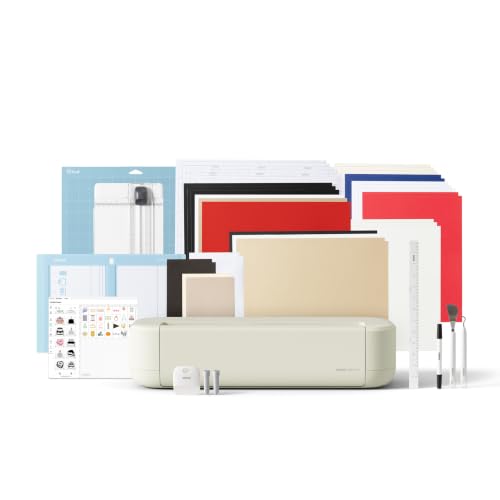 Best budget pick within the Explore 5 lineCricut Explore 5 Essential Bundle + Digital Content, TaupeView on Amazon
Our Top Picks
Quick Comparison
| Product | Best for | Key feature |
|---|---|---|
| Cricut Maker 4 – Smart Cutting Machine (Seashell) | Crafters who want a full Maker 4 with digital content | Includes 30 images in the Design Space app |
| Cricut Maker 4 Cutting Machine Bundle with EasyPress SE | Beginners making custom shirts and decals | Bundled EasyPress SE heat press with vinyl and iron-on |
| Cricut Explore 5 + Deluxe Bundle + Digital Content | Hobbyists who want supplies for many projects | Supplies for 100 projects plus bonus digital content |
| Cricut Explore 5 Essential Bundle + Digital Content | Buyers who want a leaner starter kit | Supplies for 65 projects with a simplified design |
Cricut Maker 4 – Smart Cutting Machine (Seashell)
Cricut Maker 4 – Smart Cutting Machine (Seashell) | Digital Content Bundle | Includes 30 images in Design Space App
Best for: Crafters who want the Maker 4 platform with a digital content bundle
This is the most straightforward way to get the Maker 4 itself. It suits crafters who already know which materials they plan to cut and want to add their own supplies rather than buy a kit.
Key specs
- Cricut Maker 4 smart cutting machine
- Seashell color finish
- Digital content bundle with 30 images in the Design Space app
Pros
- Works with the Design Space app for cutting, writing and drawing workflows
- Digital content gives beginners ready-made designs to start with
- Maker 4 platform is designed for a wide range of materials
Cons
- No heat press or starter materials included, so extra purchases are likely
- Digital content is a bundle add-on rather than a full library
Bottom line: A good pick for a buyer who wants the Maker 4 itself and plans to supply their own vinyl, cardstock and blades.
View on AmazonCricut Maker 4 Cutting Machine Bundle with EasyPress SE
Cricut Maker 4 Cutting Machine Bundle with EasyPress SE, Vinyl & Iron-On | Beginner Kit Smart Cutting Machine with Heat Press for DIY Shirts and Decals
Best for: Beginners who want heat-pressed apparel and decals
This bundle pairs the Maker 4 with a heat press and iron-on materials, which removes a lot of the guesswork for first-time shirt and tote makers.
Key specs
- Cricut Maker 4 cutting machine
- EasyPress SE heat press included
- Vinyl and iron-on materials included
Pros
- Everything needed for a first shirt project is in one box
- Heat press matches the cutting workflow in the Design Space app
- Good fit for DIY decals and apparel gifts
Cons
- Heat press takes up counter space and requires a stable, heat-safe surface
- Less digital content than the Seashell bundle, so more designs must be sourced separately
Bottom line: The best choice for someone who wants to start making shirts right away and does not want to buy a separate press.
View on AmazonCricut Explore 5 + Deluxe Bundle + Digital Content, Taupe
Cricut Explore® 5 + Deluxe Bundle + Digital Content, Taupe | Includes Supplies for 100 Projects + Additional $30 Bonus Digital Content – Works w/100+ Materials
Best for: Hobbyists who want supplies for a wide range of projects
The Deluxe bundle is aimed at crafters who expect to try many different projects and want materials on hand without reordering often.
Key specs
- Cricut Explore 5 cutting machine
- Deluxe bundle with supplies for 100 projects
- Bonus digital content included
Pros
- Large supply set reduces early shopping trips
- Works with 100+ materials as stated in the listing
- Taupe finish is a neutral option for a workspace
Cons
- The larger bundle means more storage space is needed
- Explore-series machines do not offer the same feature set as the Maker 4 line
Bottom line: A strong pick for a hobbyist who wants a broad starter stash and plans to cut many different materials. 6 Best Cricut Print and Cut Machine Options for Crafters (2026) goes further into this.
View on AmazonCricut Explore 5 Essential Bundle + Digital Content, Taupe
Cricut Explore® 5 Essential Bundle + Digital Content, Taupe | Includes Supplies for 65 Projects + Bonus Digital Content – Works with 100+ Materials – Sleek, Simplified Design
Best for: Buyers who want a leaner starter kit with fewer extras
This bundle keeps the Explore 5 platform and includes a smaller set of supplies, which suits people who want to learn the machine before building a full stash.
Key specs
- Cricut Explore 5 cutting machine
- Essential bundle with supplies for 65 projects
- Bonus digital content included
Pros
- Simpler, more focused kit for first-time users
- Same 100+ material compatibility as the Deluxe bundle
- Smaller footprint in terms of supplies to store
Cons
- Fewer supplies mean more reordering sooner
- Not the best fit for buyers who need the Maker 4 feature set
Bottom line: Best for a beginner who wants to try the Explore 5 before committing to a larger supply collection.
View on AmazonBuying Guide
Machine line: Maker 4 vs Explore 5
The Maker series is built for a broader range of materials and a more precise cutting workflow, while the Explore line targets everyday craft cutting. Check which line you actually need before comparing bundles. Read more in Cricut Maker 4 Smart Cutting Machine Review: Is It Worth It?.
Good picks for this: Cricut Maker 4 – Smart Cutting Machine (Seashell), Cricut Explore 5 + Deluxe Bundle
Included supplies and starter materials
Bundles differ mainly in how many projects their supplies cover. Count the materials you will use in the first month, then compare them against the project totals in each listing.
Good picks for this: Cricut Explore 5 + Deluxe Bundle, Cricut Explore 5 Essential Bundle
Heat press and apparel capability
If you plan to make shirts, totes or other fabric items, an included heat press saves a separate purchase. Make sure you have a heat-safe work surface and enough room for the press.
Good picks for this: Cricut Maker 4 Cutting Machine Bundle with EasyPress SE
Digital content and design library
Digital images and fonts shorten the time from idea to finished cut. Check whether bonus content is included and what it covers before choosing a bundle. The guide to Crafts with Cricut Machine: 7 Project Ideas and Steps for Beginners shows how designs translate into finished projects.
Good picks for this: Cricut Maker 4 – Smart Cutting Machine (Seashell), Cricut Explore 5 Essential Bundle
Material compatibility
Both lines are described as working with a large number of materials, including vinyl, cardstock and iron-on. Confirm the materials you plan to cut appear on the manufacturer’s compatibility list before buying.
Good picks for this: Cricut Explore 5 + Deluxe Bundle, Cricut Explore 5 Essential Bundle
Workspace size and storage
Larger bundles and heat presses need more space. Measure your table and plan storage for rolls of vinyl and leftover sheets before you commit to a bigger kit.
Good picks for this: Cricut Explore 5 Essential Bundle, Cricut Maker 4 – Smart Cutting Machine (Seashell)
Ongoing supply costs and reordering
A smaller kit means more frequent reorders. Consider how often you expect to cut and whether a larger starter stash will save you trips to the store.
Good picks for this: Cricut Explore 5 + Deluxe Bundle, Cricut Maker 4 Cutting Machine Bundle with EasyPress SE
FAQ
What is the difference between the Maker 4 and the Explore 5?
The Maker line is designed for a wider range of materials and more precise cutting, while the Explore line focuses on everyday craft cutting. Both use the Design Space app. Compare the feature lists on the product pages before choosing. You may also like 4 Best Cricut Maker 4 Machine Only Options for Crafters (2026).
Do I need a heat press to use a cricut machine maker 4?
No. The machine cuts vinyl, cardstock and other materials without a heat press. A press is only needed for iron-on and some apparel projects.
Which bundle is best for a first-time crafter?
The Maker 4 with EasyPress SE is well suited to beginners who want to make shirts right away. A buyer who wants to learn the platform first may prefer the Explore 5 Essential Bundle.
Do the bundles include digital content?
Each listing includes some digital content or bonus designs. Check the listing details for the exact amount and what is covered, because bundle contents can change.
Can I use third-party materials with these machines?
Many crafters do use non-brand vinyl and cardstock. Cut settings may need adjusting, so run a small test cut before a full project.
How do I keep my cutting blades sharp?
Replace blades when cuts start to tear or skip. Store the machine covered and away from dust, and follow the manufacturer’s care instructions.
Conclusion
For a buyer who wants the Maker platform and plans to build their own supply stash, the Seashell Maker 4 bundle is the most flexible option. Beginners focused on heat-pressed apparel will get the most out of the EasyPress SE bundle. Hobbyists who want a large variety of materials on hand should look at the Explore 5 Deluxe bundle, while the Essential bundle suits someone who wants to try the platform with fewer extras. Check your project list and workspace before deciding.
Sources
- Product safety guidance for small electrical appliances and heat tools (cpsc.gov)
- Electrical safety tips for home workspaces and small appliances (energy.gov)
Related reading
- 3 Best Cricut Maker 3 Craft Cutting Machine Options for 2026
- Which Is the Best Cricut Machine? 4 Best Picks Compared (2026)
- What Can You Make with Cricut Machine: 12 Project Ideas for Beginners
- Vinyl Cutting Machine Cricut: A Step-by-Step Guide for Beginners
- Top 4 Cricut Joy Cutting Machine Options for Crafters (2026)
- How Much Is Cricut Machine? Typical Prices and What Affects Them
About Colin Foster
Colin Foster is part of our editorial team and reviews and edits our arts & crafts supplies guides, checking product details against manufacturer specifications and owner feedback.
About the author
Colin Foster writes reviews and buying guides for Crafts Center.