6 Best Cricut Print and Cut Machine Options for Crafters (2026)
Compare the best Cricut print and cut machine options for crafters. See key specs, pros, cons and who each model suits before you buy.
 By Colin Foster
Updated November 23, 2026
 By Colin Foster
Updated November 2026
Shopping for a cricut print and cut machine can be confusing, because the category now covers everything from smart cutters that only cut to all-in-one printers that print stickers, labels and photos before cutting them out. This list focuses on the models most likely to fit a beginner or hobbyist who wants to print designs and cut them cleanly. Each pick was judged against four criteria: how well the machine handles print-then-cut workflows, the range of materials it supports, how approachable the software is for newcomers, and what owners commonly report about reliability and ease of setup. Specifications come from manufacturer listings, and the observations reflect patterns in owner feedback rather than our own testing.
Our top picks at a glance
- 1TOP CHOICEBest overallCricut Explore 5 + Deluxe Bundle, TaupeView on Amazon
- 2
 TOP CHOICEBest for small kitchensCricut Joy 2 Essential Bundle + Rainbow SamplerView on Amazon
- 3
 TOP CHOICEBest for sticker printingCricut StickerPix Print + Cut Essential Bundle, Sea GreenView on Amazon
- 4
 Best budget pickLiene PixCut S1 Color Sticker Printer & Cutting MachineView on Amazon
- 5
 Best for apparel projectsCricut Maker 4 Cutting Machine Bundle with EasyPress SEView on Amazon
- 6
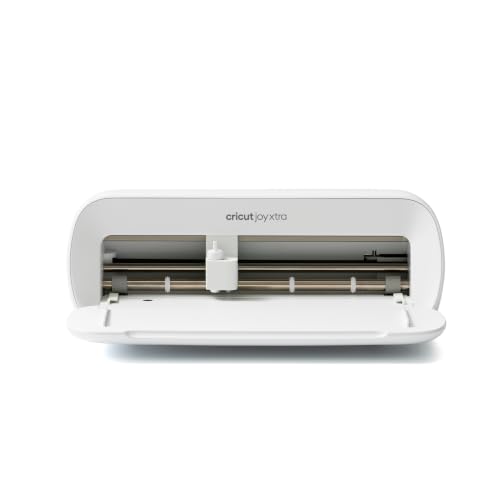 Best for digital design contentCricut Joy Xtra Smart Cutting MachineView on Amazon
Our Top Picks
| Product | Best for | Key feature |
|---|---|---|
| Cricut Explore 5 + Deluxe Bundle | Versatile everyday crafting | Works with a wide range of materials |
| Cricut Joy 2 Essential Bundle + Rainbow Sampler | Small spaces and quick projects | Compact footprint with smart materials |
| Cricut StickerPix Print + Cut Essential Bundle | Stickers, labels and photo prints | Built-in printing before cutting |
| Liene PixCut S1 Color Sticker Printer and Cutting Machine | Budget-minded sticker makers | Thermal dye-sublimation printing with auto-cutting |
| Cricut Maker 4 Cutting Machine Bundle with EasyPress SE | Custom shirts and heat-transfer projects | Includes a heat press for iron-on work |
| Cricut Joy Xtra Smart Cutting Machine | Users who want a large image library | Digital content bundle in Design Space |
Cricut Explore 5 + Deluxe Bundle, Taupe
Cricut Explore® 5 + Deluxe Bundle + Digital Content, Taupe | Includes Supplies for 100 Projects + Additional $30 Bonus Digital Content – Works w/100+ Materials
Best for: Versatile everyday crafting
This is a good fit for crafters who expect to move between vinyl, cardstock, iron-on and other materials and want one machine that can handle most of them. It suits people who plan to grow into more complex projects over time.
Key specs Mat Board Cutting Machine: How to Choose and Use One for Clean Cuts goes further into this.
- Listed with supplies for 100 projects and works with 100+ materials
- Includes a deluxe bundle with digital content
Pros
- Broad material compatibility for a single machine
- Strong fit for projects that mix paper, vinyl and fabric
- Bundle format reduces the number of starter purchases
Cons
- Larger footprint than compact smart cutters
- Full value depends on using the included materials and content
Bottom line: A strong choice for hobbyists who want one flexible machine and plan to cut many different materials.
View on AmazonCricut Joy 2 Essential Bundle + Rainbow Sampler
Cricut Joy 2 Essential Bundle + Rainbow Sampler | Smart Cutting Machine with Smart Vinyl, Smart Iron-On, Cardstock, Insert Cards & Printable Vinyl – Create Up to 65 Projects
Best for: Small spaces and quick projects
This suits crafters with limited table space or those making small decals, cards and labels. It is a practical pick for a first machine that will mostly handle compact jobs.
Key specs
- Listed as a smart cutting machine with smart vinyl and smart iron-on materials
- Listing indicates it can create up to 65 projects with the included supplies
Pros
- Compact design fits easily on a desk or shelf
- Smart materials simplify setup for beginners
- Good for small, repeatable projects
Cons
- Smaller cutting area limits large designs
- Not intended for heavy-duty materials
Bottom line: Best for beginners with limited space who want an approachable machine for small crafts.
View on AmazonCricut StickerPix Print + Cut Essential Bundle, Sea Green
All-in-One Photo Printer, Label Maker, & Sticker Maker Machine – Includes Sticker & Photo Paper – 300 DPI – Amazon Exclusive Cricut StickerPix Print + Cut™ Essential Bundle, Sea Green
Best for: Stickers, labels and photo prints
This is aimed at users whose main goal is printing full-color designs and then cutting them out, such as stickers, labels and photo-based crafts. It is one of the most direct matches for the print-and-cut workflow.
Key specs
- Listed as an all-in-one photo printer, label maker and sticker maker
- Includes sticker and photo paper in the bundle
- Listing states 300 DPI print resolution
Pros
- Handles printing and cutting in one device
- Bundled paper supports immediate use
- Well suited to custom labels and sticker sheets
Cons
- Narrower material range than a dedicated craft cutter
- Ongoing costs depend on how much paper and ink you use
Bottom line: The right pick for anyone whose priority is printed stickers and labels rather than cutting a broad range of materials.
View on AmazonLiene PixCut S1 Color Sticker Printer & Cutting Machine
Liene PixCut S1 Color Sticker Printer & Cutting Machine – All-in-One Sticker Maker for DIY Crafts, Custom Labels & Gifts. Thermal Dye-Sublimation Photo Printer, 300 DPI, Precise AI Auto-Cutting
Best for: Budget-minded sticker makers
This model is aimed at hobbyists who want color sticker printing with automated cutting and are willing to consider a non-Cricut brand. It is a sensible option for people testing whether print-and-cut suits them before committing to a larger system.
Key specs
- Listed as a thermal dye-sublimation photo printer
- Listing states 300 DPI and AI-assisted auto-cutting
Pros
- Focused design for sticker and custom label production
- Auto-cutting reduces manual trimming
- Good for gifts and small custom orders
Cons
- Smaller ecosystem of accessories and tutorials than Cricut
- Less suited to vinyl, fabric and heat-transfer crafts
Bottom line: A reasonable choice for sticker-focused crafters who want to keep their setup lean.
View on AmazonCricut Maker 4 Cutting Machine Bundle with EasyPress SE
Cricut Maker 4 Cutting Machine Bundle with EasyPress SE, Vinyl & Iron-On | Beginner Kit Smart Cutting Machine with Heat Press for DIY Shirts and Decals
Best for: Custom shirts and heat-transfer projects
This bundle suits crafters who want to make apparel and other heat-transfer items as well as cut paper and vinyl. Including a heat press in the kit saves a separate purchase for iron-on projects.
Key specs
- Listed as a cutting machine bundle with EasyPress SE heat press
- Includes vinyl and iron-on materials for beginner projects
Pros
- Complete starter kit for shirts and decals
- Heat press matches the included iron-on materials
- Suits a wide mix of craft and apparel work
Cons
- Larger setup and storage needs than compact machines
- Heat press adds a learning curve for temperature and timing
Bottom line: Ideal for crafters who plan to make custom clothing and want everything needed in one bundle.
View on AmazonCricut Joy Xtra Smart Cutting Machine
Cricut Joy Xtra – Smart Cutting Machine | Digital Content Bundle | Includes 30 images in Design Space App
Best for: Users who want a large image library
This is a good match for beginners who want ready-made designs to start cutting right away. It works well for people who prefer working from a built-in image collection over creating every design from scratch.
Key specs
- Listed as a smart cutting machine with a digital content bundle
- Listing states 30 images included in Design Space
Pros
- Ready-made images reduce early design work
- Compact smart cutter that is easy to store
- Good starting point for gift and card projects
Cons
- Limited cutting area for large projects
- Printing workflows depend on compatible materials and setup
Bottom line: Suited to beginners who value a ready image library and a compact footprint.
View on AmazonBuying Guide
Print capability and print-then-cut support
A true print and cut machine prints a design in color and then cuts around its edges. Check whether the machine prints directly or relies on a separate printer, and whether its registration system is reliable. Look for stated print resolution, which manufacturers often list in DPI.
Good picks for this: Cricut StickerPix Print + Cut Essential Bundle, Liene PixCut S1 Color Sticker Printer & Cutting Machine
Cutting area and maximum material size
Measure your workspace before buying. Compact machines are easier to store, but they limit how large a single cut can be. If you plan to make wall decals or large signs, a bigger cutting bed matters more than a small footprint.
Good picks for this: Cricut Explore 5 + Deluxe Bundle, Cricut Joy 2 Essential Bundle + Rainbow Sampler
Material compatibility
Confirm which materials the machine supports, such as vinyl, cardstock, iron-on, sticker paper and fabric. A machine that handles many materials gives you more room to grow, while a specialized one may be enough if you only plan to make stickers.
Good picks for this: Cricut Explore 5 + Deluxe Bundle, Cricut Maker 4 Cutting Machine Bundle with EasyPress SE
Software and learning curve
Most Cricut machines use the Design Space app, and the learning curve depends on how comfortable you are with design software. Beginners usually benefit from included templates and digital content, which reduce the number of design decisions needed for a first project.
Good picks for this: Cricut Joy Xtra Smart Cutting Machine, Cricut Joy 2 Essential Bundle + Rainbow Sampler
Use case and project mix
Decide what you plan to make most often. Sticker and label work points toward print-capable models, apparel points toward a heat press, and general paper crafts point toward a versatile cutter. Matching the machine to your main project type avoids paying for features you will not use.
Good picks for this: Cricut Maker 4 Cutting Machine Bundle with EasyPress SE, Cricut StickerPix Print + Cut Essential Bundle
Durability and build quality
Look at the cutting head, the blade system and the way the machine holds materials. Owners often mention how well the machine keeps alignment over time, so read recent owner feedback about longevity rather than focusing only on first impressions.
Good picks for this: Cricut Explore 5 + Deluxe Bundle, Cricut Maker 4 Cutting Machine Bundle with EasyPress SE
Care, blades and consumables
Plan for replacement blades, cutting mats and print media. Cutting mats wear out, and blades dull with use, so factor these into your ongoing setup. Clean the cutting mat and wipe the blade housing regularly to keep cuts clean.
Good picks for this: Cricut Joy 2 Essential Bundle + Rainbow Sampler, Cricut Joy Xtra Smart Cutting Machine
FAQ
What is a print and cut machine?
A print and cut machine prints a full-color design and then cuts along its outline. This lets you make stickers, labels and printed decals with precise edges. Some models print internally, while others pair with a separate printer.
Do I need a print-capable machine to make stickers?
Not always. A standard cutter can cut sticker paper if you print the design on a separate inkjet printer first. A dedicated print-and-cut machine simplifies the process by handling both steps, but it is not strictly required.
Which material types work best with a print and cut machine?
Sticker paper, printable vinyl and cardstock are the most common choices. Check the manufacturer’s list of compatible materials, since settings and blade depth differ between products.
How accurate are print and cut results?
Accuracy depends on the registration system, paper alignment and print quality. Owners often report that loading media carefully and running a test cut improves results. Consult the manufacturer’s guidance for calibration steps.
Is a Cricut print and cut machine suitable for beginners?
Many beginners start with smart cutters and bundles that include templates and starter materials. Choose a machine that matches your project goals, and expect a short learning period while you get used to the software and materials.
How do I keep my cutting results clean over time?
Replace dull blades, keep cutting mats free of debris and store print media flat and dry. Follow the manufacturer’s care instructions, and replace worn consumables as needed to maintain consistent cuts.
Conclusion
For most crafters, the best cricut print and cut machine depends on what you plan to make. The Cricut Explore 5 + Deluxe Bundle suits those who want broad material support, while the Cricut StickerPix Print + Cut Essential Bundle is more focused on printed stickers and labels. Beginners with limited space may prefer the Cricut Joy 2 Essential Bundle + Rainbow Sampler, and apparel makers will find the Cricut Maker 4 Cutting Machine Bundle with EasyPress SE the most complete starting point. Budget-minded sticker makers can consider the Liene PixCut S1, and those who want ready-made designs may favor the Cricut Joy Xtra Smart Cutting Machine. Match the machine to your main project type, and you will get more value from your purchase.
If you are still deciding between machine types, these related guides can help: Which Is the Best Cricut Machine? 4 Best Picks Compared (2026), Can a Cricut Machine Make Stickers? Cricut vs Inkjet Printer Stickers (2026), What Can You Make with Cricut Machine: 12 Project Ideas for Beginners, and Cricut Machine Not Connecting (2026): Bluetooth vs USB Connection Compared.
Sources
- Product safety guidance for electrical and heat-producing craft equipment, useful when using heat presses and powered cutters (cpsc.gov)
- Workplace and home workshop safety practices for blades, cutting tools and ventilation (osha.gov)
- International standards related to print resolution and materials testing
Related reading
- Cricut Explore Air 2 Die Cut Machine: A Step-by-Step Guide for Beginners
- Vinyl Cutting Machine Cricut: A Step-by-Step Guide for Beginners
About Colin Foster
Colin Foster is part of our editorial team and reviews and edits our arts & crafts supplies guides, checking product details against manufacturer specifications and owner feedback.
About the author
Colin Foster writes reviews and buying guides for Crafts Center.