7 Best Cricut Venture Smart Cutting Machine Options for Crafters (2026)
Compare the Cricut Venture smart cutting machine with 6 other Cricut models. See specs, pros, cons and who each one suits before you buy.
 By Colin Foster
Updated November 23, 2026
 By Colin Foster
Updated November 2026
Shoppers searching for the cricut venture smart cutting machine usually want to know one thing: which model fits the crafts they plan to make, and whether the extra size and features are worth it. This guide compares seven Cricut machines and accessories sold on Amazon US. Our selection criteria were cutting width and material range, ease of setup for beginners, included digital content, portability and storage, and the kinds of owner feedback that show up most often. We did not run these machines ourselves. Everything below is based on manufacturer specifications, brand reputation and patterns in owner reports.
Our top picks at a glance
- 1TOP CHOICEBest overallCricut Maker 5 Essential Bundle + Digital Content, Slate BlueView on Amazon
- 2
 TOP CHOICEBest for small kitchensCricut Joy 2 Essential Bundle + Rainbow SamplerView on Amazon
- 3
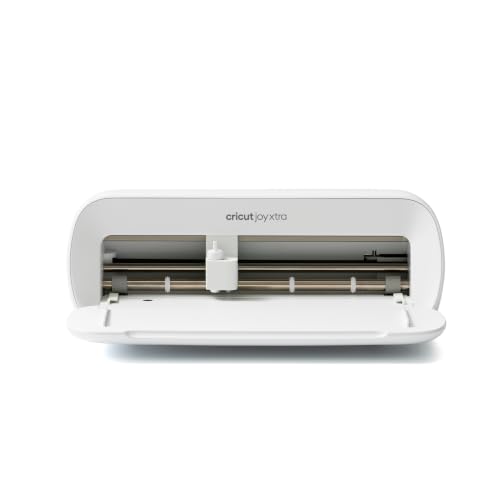 TOP CHOICEBest budget pickCricut Joy Xtra – Smart Cutting MachineView on Amazon
- 4
 Best for sticker makingCricut Maker 4 Cutting Machine Bundle Ultimate Sticker Making KitView on Amazon
- 5
 Best for fabric and heavy materialsCricut Maker 4 – Smart Cutting Machine (Seashell)View on Amazon
- 6
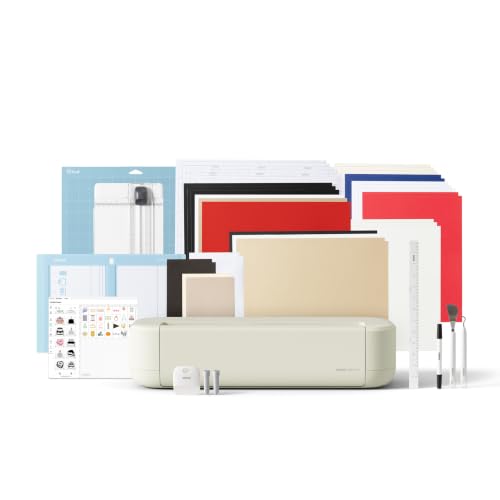 Best for everyday cuttingCricut Explore 5 Essential Bundle + Digital Content, TaupeView on Amazon
- 7
 Best accessory upgradeCricut Venture Automatic Cutoff BladeView on Amazon
Our Top Picks
| Product | Best for | Key feature |
|---|---|---|
| Cricut Maker 5 Essential Bundle + Digital Content, Slate Blue | Serious hobbyists who cut many materials | Works with 300+ materials and includes supplies for 65 projects |
| Cricut Joy 2 Essential Bundle + Rainbow Sampler | Small kitchens and beginners | Compact footprint with Smart Vinyl and Smart Iron-On |
| Cricut Joy Xtra – Smart Cutting Machine | Budget-minded crafters | Includes a digital content bundle of 30 images in Design Space |
| Cricut Maker 4 Cutting Machine Bundle Ultimate Sticker Making Kit | Sticker makers and label projects | Bundled sticker-making supplies for ready-to-use output |
| Cricut Maker 4 – Smart Cutting Machine (Seashell) | Fabric, leather and chipboard projects | Adjustable cutting pressure for a wide range of materials |
| Cricut Explore 5 Essential Bundle + Digital Content, Taupe | Everyday paper and vinyl crafts | Works with 100+ materials on a simplified design |
| Cricut Venture Automatic Cutoff Blade | Owners of a Venture who want wider cuts | Automatic cutoff for long vinyl and banner runs |
Cricut Maker 5 Essential Bundle + Digital Content, Slate Blue
Cricut Maker® 5 Essential Bundle + Digital Content, Slate Blue | Includes Supplies for 65 Projects + Bonus Digital Content – Works with 300+ Materials – Sleek, Simplified Design
Best for: Serious hobbyists who cut many materials
This bundle suits crafters who move between paper, vinyl, fabric and thicker stock and want one machine to handle most of it. It is a good fit for people planning a steady flow of projects rather than occasional crafts.
Key specs
- Works with 300+ materials according to the listing
- Includes supplies for 65 projects and bonus digital content
- Sleek, simplified design in Slate Blue
Pros
- Broad material compatibility reduces the need for a second machine
- Bundled supplies help new owners start cutting quickly
- Digital content adds design variety from day one
Cons
- Costs more to buy and footprint is larger than the Joy line
- Advanced features can be more than a casual crafter needs
Bottom line: The best pick for someone who wants one machine for a wide range of materials and is willing to trade some desk space for versatility.
View on AmazonCricut Joy 2 Essential Bundle + Rainbow Sampler
Cricut Joy 2 Essential Bundle + Rainbow Sampler | Smart Cutting Machine with Smart Vinyl, Smart Iron-On, Cardstock, Insert Cards & Printable Vinyl – Create Up to 65 Projects
Best for: Small kitchens and beginners
The Joy line is built for compact spaces and quick projects like labels, cards and small decor. It is a practical choice for first-time owners who want to see results without a large setup.
Key specs
- Smart Vinyl, Smart Iron-On, cardstock and insert cards in the bundle
- Listed capacity of up to 65 projects
- Rainbow Sampler adds a range of colors to start with
Pros
- Compact size fits on a small table or shelf
- Smart materials skip some of the setup steps beginners find confusing
- Good starter sampler for trying different materials
Cons
- Narrower cutting width limits large banners and big stickers
- Not the right choice for heavy materials like thick leather
Bottom line: Pick this if space is tight and your projects stay small. It gives beginners a low-friction start.
View on AmazonCricut Joy Xtra – Smart Cutting Machine
Cricut Joy Xtra – Smart Cutting Machine | Digital Content Bundle | Includes 30 images in Design Space App
Best for: Budget-minded crafters
This model covers the basics of smart cutting with a bundled set of digital images. It suits people who want to try cutting without committing to a larger machine.
Key specs
- Includes a digital content bundle of 30 images in the Design Space app
- Designed for small-format cutting projects
Pros
- Straightforward entry point into the Cricut ecosystem
- Included images give you designs to cut right away
- Works well with the Design Space app on common devices
Cons
- Smaller work area than the Maker and Explore lines
- Limited material range compared with higher-end models
Bottom line: A sensible choice for someone testing whether cutting machines suit their hobby before buying a bigger model.
View on AmazonCricut Maker 4 Cutting Machine Bundle Ultimate Sticker Making Kit
Cricut Maker 4 Cutting Machine Bundle Ultimate Sticker Making Kit
Best for: Sticker makers and label projects
Sticker-focused crafters often want a bundle that includes the materials and tools for finished results. This kit is aimed at people who plan to make stickers regularly for gifts, small business packaging or journaling.
Key specs
- Sold as a sticker making kit with the Maker 4 machine
- Bundled materials intended for ready-to-use sticker output
Pros
- Focused bundle saves time sourcing sticker sheets
- Maker-class machine handles a range of sticker materials
- Good for repeat sticker runs with consistent results
Cons
- Bundle is narrower in purpose than a general-use kit
- Sticker supplies are an ongoing cost if you cut heavily
Bottom line: Choose this if stickers are your main project and you want a kit built around that goal.
View on AmazonCricut Maker 4 – Smart Cutting Machine (Seashell)
Cricut Maker 4 – Smart Cutting Machine (Seashell) | Digital Content Bundle | Includes 30 images in Design Space App
Best for: Fabric, leather and chipboard projects
Crafters working with fabric, faux leather and chipboard need a machine with more cutting force than the Joy line offers. This Maker 4 model is a common choice for those projects.
Key specs
- Smart Cutting Machine with a digital content bundle of 30 images
- Designed for a wide range of crafting materials
Pros
- Handles heavier materials than entry-level Joy machines
- Strong fit for fabric and apparel-adjacent projects
- Included digital images support new designs immediately
Cons
- Larger footprint and higher investment than compact models
- Some heavy materials still need a fabric or stabilizer setup
Bottom line: A solid pick for crafters who cut fabric or thicker stock and want a Maker-class machine.
View on AmazonCricut Explore 5 Essential Bundle + Digital Content, Taupe
Cricut Explore® 5 Essential Bundle + Digital Content, Taupe | Includes Supplies for 65 Projects + Bonus Digital Content – Works with 100+ Materials – Sleek, Simplified Design
Best for: Everyday paper and vinyl crafts
The Explore line sits between the compact Joy and the heavy-duty Maker. It suits crafters who work mostly with paper, vinyl and light materials and want more range than a Joy offers.
Key specs
- Works with 100+ materials according to the listing
- Includes supplies for 65 projects and bonus digital content
- Taupe finish with a simplified design
Pros
- Good balance of capability and size for home use
- Bundled supplies reduce the first-month shopping list
- Broad enough for most paper and vinyl crafts
Cons
- Not the best choice for thick leather or dense fabric
- Less material range than the Maker 5 bundle
Bottom line: The right pick for a steady hobbyist who mostly cuts paper and vinyl and wants a middle-ground machine.
View on AmazonCricut Venture Automatic Cutoff Blade
Cricut Venture Automatic Cutoff Blade
Best for: Owners of a Venture who want wider cuts
This is an accessory rather than a machine. It is aimed at people who already own a Venture and need to cut long vinyl runs, banners or repeat lengths without manual trimming.
Key specs
- Automatic cutoff blade designed for Venture-compatible workflows
- Intended for longer continuous cuts
Pros
- Saves manual trimming on long vinyl pieces
- Useful for banners, signs and decal runs
- Straightforward upgrade for an existing setup
Cons
- Only useful if you already own a compatible Venture machine
- Does not add new cutting features on its own
Bottom line: Worth adding if you own a Venture and regularly cut long lengths of vinyl. Not a purchase for a first machine.
View on AmazonBuying Guide
Cutting Width and Work Area
Check the maximum cutting width before you buy. Joy-class machines are built for small pieces such as stickers, cards and labels, while Maker and Explore models handle larger sheets. If you plan to make banners or wall decals, a wider work area saves you from piecing designs together.
Good picks for this: Cricut Maker 5 Essential Bundle + Digital Content, Slate Blue; Cricut Joy 2 Essential Bundle + Rainbow Sampler
Material Range
Manufacturers list the materials each machine supports. A higher material count usually means more flexibility for fabric, chipboard and specialty vinyl. Match the list to the projects you actually plan to make rather than buying for every possibility.
Good picks for this: Cricut Maker 4 – Smart Cutting Machine (Seashell); Cricut Explore 5 Essential Bundle + Digital Content, Taupe
Included Digital Content and Supplies
Bundles often include starter materials and a set of digital images. These can cover your first few months of projects, but check what is actually included. Bundles with a sampler or starter kit reduce the number of separate purchases needed in the first weeks.
Good picks for this: Cricut Joy Xtra – Smart Cutting Machine; Cricut Joy 2 Essential Bundle + Rainbow Sampler
Workspace Size and Storage
Measure your table or shelf before choosing. Compact machines store easily between projects, while larger models need a permanent spot. If you share a crafting area, a smaller footprint may matter more than extra features.
Good picks for this: Cricut Joy 2 Essential Bundle + Rainbow Sampler; Cricut Joy Xtra – Smart Cutting Machine
Use Case and Project Type
Decide what you will cut most often. Stickers, paper cards and vinyl decals have different needs than fabric or leather. Choosing a machine around your main project type avoids paying for capability you never use.
Good picks for this: Cricut Maker 4 Cutting Machine Bundle Ultimate Sticker Making Kit; Cricut Maker 4 – Smart Cutting Machine (Seashell)
Durability and Build Quality
Look for a sturdy base and a cutting mat system that holds materials flat. Owners often report that the cutting mat and blade are the parts that wear fastest, so budget for replacements over time. Accessories like replacement blades matter for long-term use.
Good picks for this: Cricut Maker 5 Essential Bundle + Digital Content, Slate Blue; Cricut Venture Automatic Cutoff Blade
Care and Maintenance
Keep the cutting mat clean and replace it when the adhesive weakens. Clear lint and vinyl scraps from the carriage area after each session. Following the manufacturer’s care instructions in the manual keeps cuts consistent.
Good picks for this: Cricut Explore 5 Essential Bundle + Digital Content, Taupe; Cricut Joy Xtra – Smart Cutting Machine
FAQ
Is the Cricut Venture a good first cutting machine?
It can be, depending on your projects. Beginners who mostly make small paper and vinyl pieces often find the Joy and Explore lines easier to start with. The Venture suits people who need wider cuts and already understand basic cutting workflows.
What materials can a Cricut cut?
Most Cricut machines cut paper, cardstock, vinyl and iron-on. Higher-end models list support for fabric, chipboard and leather. Always check the manufacturer’s material list for the exact model before buying supplies.
Do I need a bundle or can I buy the machine alone?
A bundle is useful if you want starter materials and digital content included. Buying the machine alone can make sense if you already have supplies or prefer to choose your own. Bundles often reduce the first-month shopping list.
How do I choose between the Joy, Explore and Maker lines?
Joy machines suit small spaces and simple projects. Explore machines offer a balance of size and material range for everyday crafts. Maker machines handle the widest range of materials, including fabric and thicker stock, and suit heavier use.
Do Cricut machines need an internet connection?
Design Space, the companion app, is typically used to create and send cuts, and it generally requires an account and internet access for setup and content. Check the manual for offline options on your specific model.
Are replacement blades and mats necessary?
Blades and cutting mats wear down with use. Replacing them when cuts start to drag or leave gaps keeps your results clean. Owners often report that a fresh mat fixes many sticking and lifting problems.
Conclusion
The cricut venture smart cutting machine suits crafters who need wider cuts and a steady workflow, but it is only one option in a crowded lineup. Choose the Cricut Maker 5 Essential Bundle if you want the widest material range, the Joy 2 Essential Bundle for small spaces, and the Joy Xtra if you are testing cutting on a limited budget. Pick the Maker 4 Seashell for fabric and heavy stock, the Explore 5 Essential Bundle for everyday paper and vinyl, and the Maker 4 sticker kit if stickers are your main project. The Venture Automatic Cutoff Blade is an accessory for existing Venture owners, not a standalone purchase.
Sources
- Product safety guidance for electrical and household craft equipment, including safe use around children (cpsc.gov)
- Workplace safety standards for cutting tools and blade handling that apply to home and small-studio setups (osha.gov)
- Safety certification information for electrical appliances and how to read certification marks
Related reading
- Cricut Maker 4 Smart Cutting Machine Review: Is It Worth It?
- Cricut Joy Xtra Smart Cutting Machine Review: Is It Worth It?
- Cricut Joy Smart Cutting Machine Review: Is It Worth It?
- Cricut Explore Air 2 Smart Cutting Machine: A Step-by-Step Guide for Beginners
- Vinyl Cutting Machine Cricut: A Step-by-Step Guide for Beginners
- Top 4 Cricut Joy Cutting Machine Options for Crafters (2026)
About Colin Foster
Colin Foster is part of our editorial team and reviews and edits our arts & crafts supplies guides, checking product details against manufacturer specifications and owner feedback.
About the author
Colin Foster writes reviews and buying guides for Crafts Center.