7 Best Cricut Personal Electronic Cutter Machine Options for Crafters (2026)
Compare 7 cricut personal electronic cutter machine models by best use, key features and pros and cons to find the right cutting machine for your crafts.
 By Colin Foster
Updated November 23, 2026
 By Colin Foster
Updated November 2026
Choosing a cricut personal electronic cutter machine comes down to what you plan to make, how often you’ll cut, and which materials you’ll work with most. This list compares seven Cricut cutting machines from the current lineup and older models still sold on Amazon. Selection is based on product listings, brand reputation and common owner feedback patterns, with attention to cutting capacity, software compatibility, included accessories and bundle value.
Our top picks at a glance
- 1TOP CHOICEBest overallCricut Explore 5 + Deluxe BundleView on Amazon
- 2
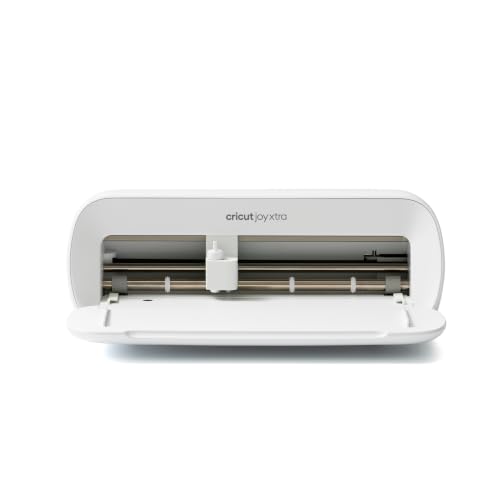 TOP CHOICEBest for beginners on a budgetCricut Joy Xtra – Smart Cutting MachineView on Amazon
- 3
 TOP CHOICEBest for shirts and apparelCricut Explore 5 Essential Bundle with EasyPressView on Amazon
- 4
 Best for print-then-cut stickersLikcut S41 Vinyl Cutter Machine with Print Then CutView on Amazon
- 5
 Best for simple paper projectsCricut Create MachineView on Amazon
- 6
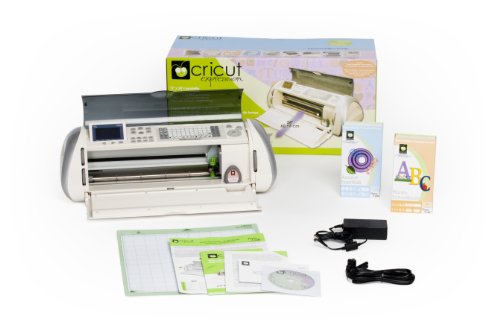 Best for older-model shoppersCricut Expression Electronic Cutting MachineView on Amazon
- 7
 Best for legacy Cricut usersCricut 29-0001 Personal Electronic Cutting MachineView on Amazon
Our Top Picks
Quick Comparison
| Product | Best for | Key feature |
|---|---|---|
| Cricut Explore 5 + Deluxe Bundle | Overall versatility | Works with 100+ materials |
| Cricut Joy Xtra | Compact beginner projects | Smart cutting, bundled images |
| Cricut Explore 5 Essential Bundle | Custom apparel | Includes EasyPress 9×9 |
| Likcut S41 Vinyl Cutter | Print-then-cut stickers | AI image generation |
| Cricut Create Machine | Paper and card crafts | Built-in cutting tools |
| Cricut Expression | Older-model users | Cartridge-era compatibility |
| Cricut 29-0001 Personal | Legacy Cricut projects | Classic personal cutter design |
Cricut Explore 5 + Deluxe Bundle
Cricut Explore® 5 + Deluxe Bundle + Digital Content, Taupe | Includes Supplies for 100 Projects + Additional $30 Bonus Digital Content – Works w/100+ Materials
Best for: Overall versatility across vinyl, cardstock, iron-on and more.
This is the most flexible option here for crafters who want one machine for many materials and projects. The bundle includes supplies for roughly 100 projects, according to the listing.
Pros
- Works with a wide range of materials
- Bundle includes supplies to start right away
Cons
- Higher commitment than entry-level models
Cricut Joy Xtra – Smart Cutting Machine
Cricut Joy Xtra – Smart Cutting Machine | Digital Content Bundle | Includes 30 images in Design Space App
Best for: Compact beginner projects and small craft spaces.
Suited to crafters with limited desk room who want to make cards, labels and small decor pieces. The bundled Design Space images give new users a quick starting library.
Pros
- Compact footprint
- Includes starter digital images
Cons
- Smaller cutting area limits large projects
Cricut Explore 5 Essential Bundle with EasyPress
Cricut Explore 5 Essential Bundle with Rainbow Sampler + EasyPress 9×9 | Cutting Machine for T-Shirts, Stickers & Custom Apparel – Includes Smart Vinyl & Iron-On, Heat Press & 400+ Project Ideas
Best for: Custom t-shirts and apparel projects.
Aimed at crafters who want to cut iron-on and press designs onto garments in one kit. The included EasyPress 9×9 heat press is the main draw for apparel makers.
Pros
- Heat press included for apparel
- Smart Vinyl and iron-on samples provided
Cons
- Bundle is most useful if you plan to press shirts
Likcut S41 Vinyl Cutter Machine with Print Then Cut
Likcut S41 Vinyl Cutter Machine with Print Then Cut – AI Image Generation Sticker Cutter and Maker Machine for Room Decor, HTV, Cardstock and Custom Stickers, Crafts for Adults
Best for: Print-then-cut stickers and custom decals.
Suits makers who want to print designs and cut them out, including stickers and room decor. Owners often mention the AI image generation feature as a time-saver for custom artwork. For another angle, check out 6 Best Paper Cutting Machine Cricut Options for Crafters (2026).
Pros
- Print-then-cut workflow for stickers
- Works with HTV and cardstock
Cons
- Software setup may take some learning
Cricut Create Machine
Cricut Create Machine
Best for: Simple paper and card crafts.
A good fit for crafters focused on cards, scrapbook elements and paper projects rather than heavy materials. It is a straightforward choice for hobbyists who mainly cut paper-based designs.
Pros
- Straightforward for paper crafts
- Familiar Cricut workflow
Cons
- Fewer material options than newer Explore models
Cricut Expression Electronic Cutting Machine
Cricut Expression Electronic Cutting Machine
Best for: Older-model shoppers and legacy cartridge projects.
Mainly suited to crafters who already own cartridges from the earlier era or want a lower-cost introduction to die-cut crafting. Check software compatibility before buying, since current Design Space support may differ from older systems.
Pros
- Works with many older cartridges
- Familiar design for legacy crafters
Cons
- May not run the latest software features
Buying Guide
Cutting Capacity and Mat Size
The size of the cutting area determines how large a single project can be. Smaller machines suit stickers, cards and small vinyl decals, while larger models handle wider sheets and bigger home decor pieces. If you plan to make wall art or large banners, check the maximum cut width before you buy.
Also consider whether the machine uses standard mats or a continuous feed. Mats keep thin materials stable, but they add to your ongoing supply costs.
Compatible Materials
Think about the materials you use most often. Vinyl, cardstock and iron-on are common starting points, but some crafters want to cut thicker materials like chipboard, leather or balsa wood. A machine that supports a wider range of materials gives you more room to experiment as your skills grow.
Check whether the machine uses a single blade or a multi-tool system with interchangeable blades. Different blades let you handle different materials without buying an entirely new cutter.
Software and Design Options
Most Cricut machines pair with Design Space, the companion app that handles design, text and cut settings. Review the built-in image libraries, font options and any bundled digital content, since these can save you from paying for extra designs right away.
If you prefer to create your own artwork, confirm that the software supports the file types you use and offers the editing tools you need. Some machines also support print-then-cut workflows, which can be useful for stickers and printed designs.
Included Accessories and Bundle Value
Bundles can be a good deal when they include tools, sample materials or a heat press you would otherwise buy separately. Compare what each bundle contains against what you already own. A bundle that includes supplies you will actually use offers better value than one padded with extras you will not touch.
Keep in mind that starter materials run out quickly. Look at the cost of replacement blades, mats and vinyl so you can plan your budget over the long term.
Ease of Use for Your Skill Level
Beginners often do best with compact machines that have straightforward setup and guided project tutorials. More experienced crafters may want advanced settings, faster cutting speeds and greater control over blade pressure. Choose a machine that matches where you are now and where you expect to be in a year.
FAQ
Which Cricut machine is best for beginners?
A compact, lower-cost model with simple setup is usually the best starting point for new crafters. These machines typically include guided tutorials and enough materials to practice common projects. You can upgrade later once you know which features matter most to you.
Can a Cricut cut materials other than vinyl and paper?
Many Cricut machines can cut fabric, iron-on, chipboard and thin wood when used with the correct blade and mat. Thicker materials usually require a more powerful model and a specific blade setting. Always check the compatible materials list for the exact machine you are considering.
Do I need a heat press to make custom shirts?
A heat press gives the most even and durable results for iron-on projects, but you can also use a household iron on many fabrics. Using a press helps the vinyl bond consistently and lasts through repeated washing. If you plan to make apparel often, a press is a worthwhile investment.
Do I need a computer to use a Cricut machine?
Most current models can be used with a tablet or smartphone through the Design Space app. A computer is helpful for detailed design work and managing larger file libraries. Confirm the device requirements listed for your chosen machine before you buy.
Are digital content bundles worth it?
Bundled images and fonts can save money if you plan to use them regularly. If your projects are mostly custom designs, bundled content may matter less. Look at what is included and decide whether it fits the kind of projects you want to make.
Conclusion
If you want the most complete all-around option and plan to craft often, a full-featured model with a deluxe bundle is the strongest choice. Beginners on a tighter budget will find a compact machine easier to learn and cheaper to start with.
For apparel and custom shirt projects, a bundle that includes a heat press and iron-on materials saves time and setup effort. Choose the machine that matches your materials, skill level and project goals, and you will get the most out of your purchase.
Related reading
- Cricut Personal Electronic Cutting Machine Review: What You Should Know
- Cricut Vinyl Cutter Machine: A Step-by-Step Guide for Beginners
- Which Is the Best Cricut Machine? 4 Best Picks Compared (2026)
- What Can You Make with Cricut Machine: 12 Project Ideas for Beginners
- Vinyl Cutting Machine Cricut: A Step-by-Step Guide for Beginners
- Top 4 Cricut Joy Cutting Machine Options for Crafters (2026)
- How Much Is Cricut Machine? Typical Prices and What Affects Them
About Colin Foster
Colin Foster is part of our editorial team and reviews and edits our arts & crafts supplies guides, checking product details against manufacturer specifications and owner feedback.
About the author
Colin Foster writes reviews and buying guides for Crafts Center.