7 Best Cricut Machine Hobby Lobby Options for Crafters (2026)
Compare the best cricut machine hobby lobby options for beginners and hobbyists. See which Cricut cutting machine fits your projects, materials, and crafting st
 By Colin Foster
Updated November 23, 2026
 By Colin Foster
Updated November 2026
Shoppers looking for a cricut machine hobby lobby option usually want to know which Cricut cutting machine fits their projects, their budget of space, and the materials they plan to cut. This list compares seven Cricut models using listing details, brand positioning, and common owner feedback patterns. The selection criteria were cutting capacity, supported materials, included starter supplies, portability, and how well each model suits beginners versus hobbyists.
Our top picks at a glance
- 1TOP CHOICEBest overallCricut Explore® 5 + Deluxe Bundle + Digital Content, TaupeView on Amazon
- 2
 TOP CHOICEBest for small spacesCricut Joy Xtra – Smart Cutting MachineView on Amazon
- 3
 TOP CHOICEBest for heat-transfer projectsCricut Maker 5 Cutting Machine and EasyPress Heat Press BundleView on Amazon
- 4
 Best starter kitCricut Joy 2 Essential Bundle + Rainbow SamplerView on Amazon
- 5
 Best for large project volumeCricut Explore® 5 Ultimate Bundle + Digital Content, TaupeView on Amazon
- 6
 Best for a lighter starter setupCricut Explore® 5 Essential Bundle + Digital Content, TaupeView on Amazon
- 7
 Best portable optionCricut Joy Machine & Digital Content Library Bundle | Includes 30 imagView on Amazon
Our Top Picks
Quick Comparison
| Product | Best for | Key feature |
|---|---|---|
| Cricut Explore 5 Deluxe Bundle | Versatile everyday crafting | Works with 100+ materials |
| Cricut Joy Xtra | Small spaces and quick cuts | Compact smart cutting machine |
| Cricut Maker 5 and EasyPress Bundle | Iron-on and heat-transfer projects | Includes EasyPress heat press |
| Cricut Joy 2 Essential Bundle | Beginners on a starter budget | Smart Vinyl and cardstock included |
| Cricut Explore 5 Ultimate Bundle | High-volume project makers | Supplies for 135 projects |
| Cricut Explore 5 Essential Bundle | First-time buyers wanting fewer extras | Supplies for 65 projects |
| Cricut Joy Machine Digital Bundle | Portable card and label making | Includes 30 Design Space images |
Cricut Explore® 5 + Deluxe Bundle + Digital Content, Taupe
Cricut Explore® 5 + Deluxe Bundle + Digital Content, Taupe | Includes Supplies for 100 Projects + Additional $30 Bonus Digital Content – Works w/100+ Materials
Best for: Versatile everyday crafting
This suits crafters who want one machine for cardstock, vinyl, and many other materials without outgrowing it quickly.
Pros
- Works with a wide range of materials
- Deluxe bundle includes a useful starter supply set
Cons
- Takes more counter space than compact models
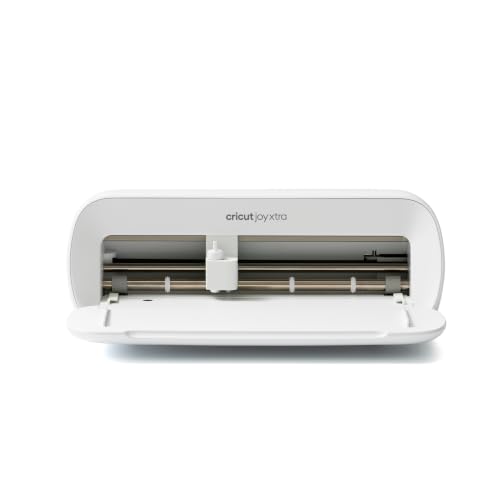
Cricut Joy Xtra – Smart Cutting Machine
Cricut Joy Xtra – Smart Cutting Machine | Digital Content Bundle | Includes 30 images in Design Space App
Best for: Small spaces and quick cuts
Best for apartment crafters and anyone who makes cards, labels, and small decor pieces rather than large sheets.
Pros
- Compact footprint fits on a small desk
- Includes starter images in Design Space
Cons
- Smaller cutting area limits large projects
Cricut Maker 5 Cutting Machine and EasyPress Heat Press Bundle
Cricut Maker 5 Cutting Machine and EasyPress Heat Press Bundle | Crafting Bundle, Rainbow Vinyl Included, Iron-On Sheets, DIY Crafts, Multiple Materials
Best for: Iron-on and heat-transfer projects
A good match for shirt, tote, and apparel makers who want cutting and pressing in one bundle.
Pros
- Pairs cutting and heat pressing in one setup
- Includes rainbow vinyl and iron-on sheets
Cons
- Heavier setup requires more storage room
Cricut Joy 2 Essential Bundle + Rainbow Sampler
Cricut Joy 2 Essential Bundle + Rainbow Sampler | Smart Cutting Machine with Smart Vinyl, Smart Iron-On, Cardstock, Insert Cards & Printable Vinyl – Create Up to 65 Projects
Best for: Beginners on a starter budget
Fits first-time crafters who want a sampler of materials to test ideas before buying more supplies.
Pros
- Sampler gives a broad materials starting point
- Smart materials reduce setup guesswork
Cons
- Limited to smaller cut sizes
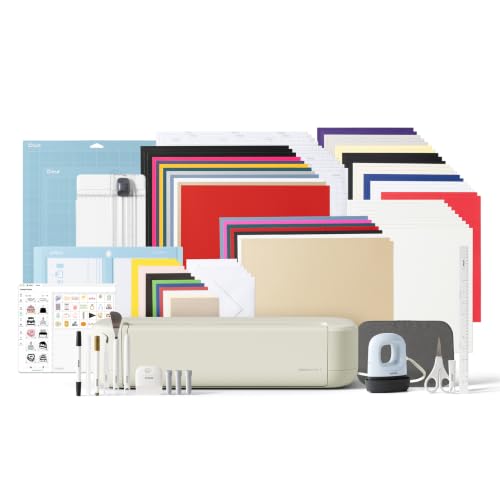
Cricut Explore® 5 Ultimate Bundle + Digital Content, Taupe
Cricut Explore® 5 Ultimate Bundle + Digital Content, Taupe | Includes Supplies for 135 Projects + Bonus Digital Content – Works with 100+ Materials – Sleek, Simplified Design
Best for: High-volume project makers
Suited to crafters who expect to make many projects and want a larger supply stock included from the start.
Pros
- Supplies listed for up to 135 projects
- Same versatile cutting range as the Explore 5 line
Cons
- Higher commitment than a starter bundle
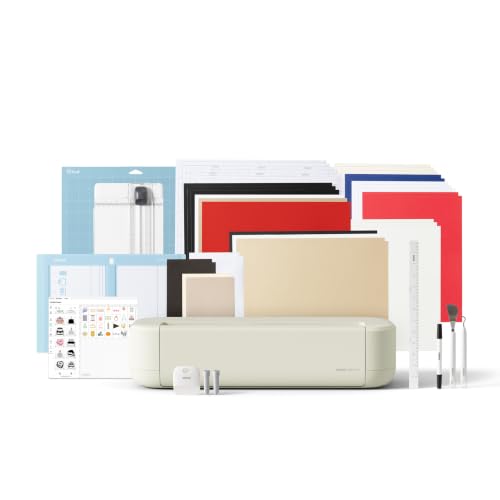
Cricut Explore® 5 Essential Bundle + Digital Content, Taupe
Cricut Explore® 5 Essential Bundle + Digital Content, Taupe | Includes Supplies for 65 Projects + Bonus Digital Content – Works with 100+ Materials – Sleek, Simplified Design
Best for: First-time buyers wanting fewer extras
Works for beginners who want the full Explore 5 cutting range with a leaner supply kit.
Pros
- Same material range as the Ultimate bundle
- Smaller bundle keeps the setup simple
Cons
- Fewer included supplies means more reordering sooner
Buying Guide
Cutting Capacity and Project Size
Check the largest material size each machine can cut before you buy. Smaller machines like the Joy models suit cards, labels, and small decals, while Explore and Maker models handle bigger pieces such as wall art, tote bags, and full-size stencils.
If you plan to cut large sheets often, look for a model with a wider cutting mat or a mat-free option so you are not limited by a small work area.
Supported Materials
Think about what you want to cut, from vinyl and iron-on to cardstock, fabric, and chipboard. Some machines support a broader range of materials than others, and the Maker line is built for heavier and more specialized materials.
Matching the machine to your favorite materials will save you from buying extra accessories later.
Included Starter Supplies
Bundles often include vinyl, iron-on sheets, cardstock, and digital content, which can add up to a good starter kit. Compare how many projects each bundle is said to support so you can judge the value of the included supplies.
If you already have materials on hand, a basic machine-only option may be the more economical choice.
Portability and Space
If your craft area is a shared table or a closet, a compact machine is easier to store and move. The Joy line is designed to be lightweight and simple to set up, which suits small apartments and travel crafting.
Larger models need a dedicated, stable surface, so measure your space before ordering.
Skill Level and Growth
Beginners may prefer a simpler machine with guided design tools and pre-loaded images, while experienced crafters often want more cutting power and the option to add tools over time. Choose a model that fits where you are now and still has room for the projects you hope to try later.
FAQ
Can I buy a Cricut machine at Hobby Lobby?
Hobby Lobby has carried Cricut products and related craft supplies in many locations, but availability varies by store and season. Check your local store or the retailer’s website before making a trip. Online listings are often the easiest way to compare models and bundles side by side.
Which Cricut machine is best for beginners?
Beginners often do well with the Joy line because it is compact, easy to set up, and comes with guided design tools. The Explore line is a good step up if you want more cutting range and material options. Pick the one that matches the projects you plan to start with.
Do I need a heat press to use a Cricut machine?
No, a heat press is optional. Many projects, such as vinyl decals and paper crafts, only need the cutting machine and a standard household iron for iron-on materials. A heat press like the EasyPress becomes useful when you want faster, more even results on fabric and heavier projects.
Is digital content included with every bundle?
Most bundles include some digital content, such as pre-loaded images or a design library, but the amount differs by model. Check each listing to see exactly what is included before you buy. Extra design content can also be purchased separately later.
Can Cricut machines cut materials other than vinyl?
Yes, Cricut machines can cut a wide range of materials, including cardstock, iron-on, and printable vinyl. Support for thicker or specialty materials depends on the model, so confirm the supported list for the machine you choose. The Maker line handles the widest variety.
Are Cricut bundles worth it compared to buying the machine alone?
Bundles can be worth it if you need starter supplies and do not already own them, since they bundle materials and tools in one purchase. If you already have a stash of vinyl and cardstock, a machine-only option may save you money. Compare what each bundle includes against what you actually need.
Conclusion
If you want the most all-around machine for a range of materials, the Explore 5 Deluxe Bundle is a strong choice, and the Maker 5 with EasyPress suits anyone focused on heat-transfer and fabric projects. Shoppers with limited space or who want something simple and portable should consider the Joy Xtra or the Joy 2 Essential Bundle.
For beginners who want room to grow, the Explore 5 Essential or Ultimate bundles offer a balance of capability and starter supplies, while the Joy Machine with the Digital Content Library suits crafters who mainly make cards and labels.
Related reading
- Which Is the Best Cricut Machine? 4 Best Picks Compared (2026)
- What Can You Make with Cricut Machine: 12 Project Ideas for Beginners
- Vinyl Cutting Machine Cricut: A Step-by-Step Guide for Beginners
- Top 4 Cricut Joy Cutting Machine Options for Crafters (2026)
- How Much Is Cricut Machine? Typical Prices and What Affects Them
- Cricut Vinyl Cutter Machine: A Step-by-Step Guide for Beginners
- Cricut Personal Electronic Cutting Machine Review: What You Should Know
About Colin Foster
Colin Foster is part of our editorial team and reviews and edits our arts & crafts supplies guides, checking product details against manufacturer specifications and owner feedback.
About the author
Colin Foster writes reviews and buying guides for Crafts Center.