Top 5 Digital Craft Cutting Machines for Beginners and Hobbyists (2026)
Compare the best digital craft cutting machines for beginners and hobbyists. See which models suit cards, labels, vinyl and paper crafts, plus a buying guide.
 By Colin Foster
Updated November 18, 2026
 By Colin Foster
Updated November 2026
A digital craft cutting machine reads a design from your computer or tablet and cuts paper, vinyl, cardstock or fabric with a blade, saving hours of hand cutting. The right model depends on your materials, how much space you have, and whether you want a machine that also draws or scans. This list compares five models on cut size, software support, portability, and the kinds of projects each one handles well.
Our top picks at a glance
- 1TOP CHOICEBest overallCricut Maker 4 – Smart Cutting Machine (Seashell) | Digital Content BundleView on Amazon
- 2
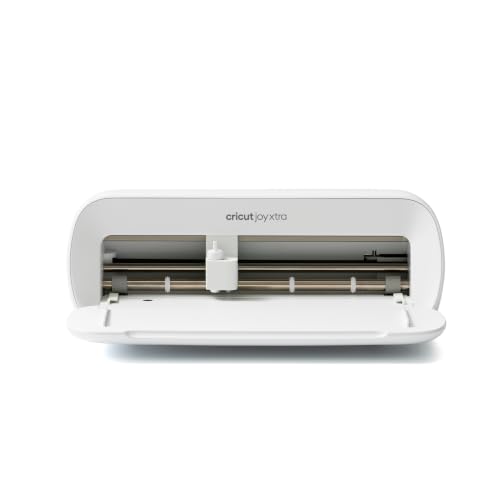 TOP CHOICEBest for portabilityCricut Joy Xtra – Smart Cutting Machine | Digital Content BundleView on Amazon
- 3
 TOP CHOICEBest for scanning your own artworkBrother SDX125EGY ScanNCut Electronic Cutting Machine GreyView on Amazon
- 4
 Best for card making on a budgetElectronic Die Cutting Machine for cardmaking, 9-inch OpeningView on Amazon
- 5
 Best for portable card and label bundlesCricut Joy Machine & Digital Content Library BundleView on Amazon
Our Top Picks
| Product | Best for | Key feature |
|---|---|---|
| Cricut Maker 4 | Versatile crafting across materials | Wide range of cutting blades |
| Cricut Joy Xtra | Small projects and portability | Compact, cuts smaller sizes |
| Brother SDX125EGY ScanNCut | Cutting your own drawings | Built-in scanner |
| Electronic Die Cutting Machine (9-inch) | Card making with dies | Manual die-cut opening |
| Cricut Joy Machine Bundle | Cards and labels on the go | Included content library |
Cricut Maker 4 – Smart Cutting Machine (Seashell) | Digital Content Bundle
Cricut Maker 4 – Smart Cutting Machine (Seashell) | Digital Content Bundle | Includes 30 images in Design Space App
Best for: Versatile crafting across materials
This suits hobbyists who want one machine for paper, fabric, chipboard and vinyl, and who plan to grow their projects over time. Owners often report that it handles a wide range of materials once they learn the blade settings.
Pros
- Works with many materials and blade types
- Bundled digital content gives you a starting library
Cons
- Higher starting cost than entry-level models
Cricut Joy Xtra – Smart Cutting Machine | Digital Content Bundle
Cricut Joy Xtra – Smart Cutting Machine | Digital Content Bundle | Includes 30 images in Design Space App
Best for: Small projects and portability
This is a good match for beginners making cards, labels and small decals who have limited desk space. Manufacturers position it as a compact machine that fits easily on a shelf or in a craft bag.
Pros
- Small footprint for tight workspaces
- Includes digital images to start designing right away
Cons
- Smaller cutting area limits large-format projects
Brother SDX125EGY ScanNCut Electronic Cutting Machine Grey
Brother SDX125EGY ScanNCut Electronic Cutting Machine Grey
Best for: Cutting your own drawings
This model fits crafters who sketch or have printed artwork they want to turn into cut files. Its built-in scanner lets you skip the digitizing step that many other machines require.
Pros
- Built-in scanner converts hand drawings into cut paths
- Handles a broad range of paper-based crafts
Cons
- Learning the scanning workflow takes some practice
Electronic Die Cutting Machine for cardmaking, 9-inch Opening
Electronic Die Cutting Machine for cardmaking,9” Opening | Electric Die Cutting Machine for Arts & Crafts,110v with US Plug
Best for: Card making with dies
This is aimed at card makers who already own metal or plastic dies and want a powered machine to run them. It is a die-cutting tool rather than a digital cutter, so it works with physical dies instead of uploaded designs.
Pros
- 9-inch opening accommodates standard die sizes
- Simple operation for repetitive card cutting
Cons
- Cannot cut custom digital designs without dies
Cricut Joy Machine & Digital Content Library Bundle
Cricut Joy Machine & Digital Content Library Bundle | Includes 30 images in Design Space App – Portable DIY Smart Machine for creating customized cards, crafts, & labels Blue
Best for: Cards and labels on the go
This bundle is suited to crafters who make cards, labels and gift tags away from home, such as at classes or family gatherings. The included content library reduces the time spent searching for designs.
Pros
- Portable design travels well for mobile crafting
- Content library included for immediate projects
Cons
- Best suited to small materials rather than large projects
Buying Guide
Cutting area and material size
Check the maximum cutting width and length before you buy. Cards and labels need far less room than banners or large vinyl decals. If you plan to cut 12-inch vinyl or cardstock, a standard-size mat is the minimum.
Materials you plan to cut
Paper and cardstock are the most common materials, but vinyl, iron-on and fabric need different blades and sometimes a different mat. List your materials first, then confirm the machine supports them.
Software and design library
Most machines rely on a companion app for designs. Look at whether the app is free, whether it works offline, and whether a content library is bundled. Some models let you import your own SVG files.
Portability and workspace
A compact machine fits a small desk or a craft bag. Larger machines need a permanent spot and clearance for the mat to move through the feed path.
Good picks for this: Cricut Joy Xtra, Cricut Joy Machine & Digital Content Library Bundle
FAQ
Do I need a computer to use a digital craft cutting machine?
Most models connect to a tablet or phone through an app, but some require a computer for certain tasks such as importing custom files. Check the manufacturer’s system requirements before buying.
Related reading
- Glowforge Aura Craft Laser Cutting Machine: A Step-by-Step Guide for Beginners
- Cricut Explore Air 2 Craft Cutting Machine: A Step-by-Step Guide for Beginners
- Cricut Explore 3 Craft Cutting Machine: A Step-by-Step Guide for Beginners
- Craft Cutting Machine Comparison: 6 Factors That Matter for Beginners (2026)
About Colin Foster
Colin Foster is part of our editorial team and reviews and edits our arts & crafts supplies guides, checking product details against manufacturer specifications and owner feedback.
About the author
Colin Foster writes reviews and buying guides for Crafts Center.