Cricut or Silhouette Machine: 4 Best Picks Compared for Crafters (2026)
Deciding between a cricut or silhouette machine? Compare four top cutting machines by fit, features and crafting needs to find the right one for you.
 By Colin Foster
Updated November 25, 2026
 By Colin Foster
Updated November 2026
Choosing a cricut or silhouette machine comes down to what you plan to make, how much space you have, and how much you want to handle by hand versus letting software do the work. Both brands sell smart cutting machines that cut vinyl, cardstock, iron-on and other materials from digital designs, but they differ in size, cutting force, blade options, and the way they connect to design software. This guide compares four machines from both lines, with the criteria we used to order them explained below. For another angle, check out Silhouette Cutting Machine vs Cricut: 5 Best Picks Compared (2026).
Our top picks at a glance
- 1TOP CHOICEBest overallCricut Maker 5 Cutting Machine and EasyPress Heat Press Bundle | CraftView on Amazon
- 2
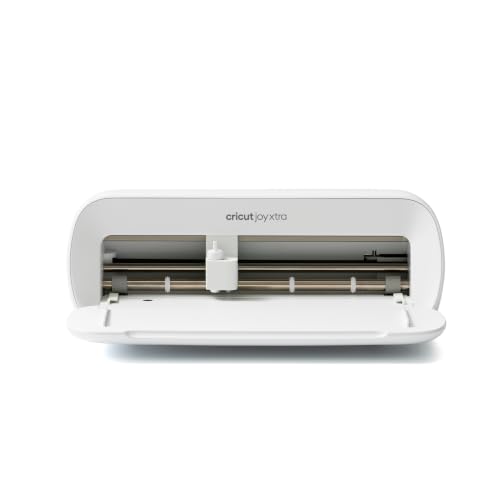 Best for compact spacesCricut Joy Xtra – Smart Cutting Machine | Digital Content Bundle | IncView on Amazon
- 3
 Best for print and cut workSilhouette America Cameo 5 Alpha (α) – Smart Cutting Machine for PrintView on Amazon
- 4
 Best budget pickSilhouette Portrait 4-9 inch Vinyl Cutting Machine with Studio SoftwarView on Amazon
The selection criteria were: cutting capability and material range, footprint and portability, software ecosystem and included design content, the availability of accessories like mats and blades, and the patterns owners commonly report about setup and daily use. These are research-based comparisons drawn from manufacturer specifications, brand reputation and common owner feedback. We have not tested these machines ourselves.
Our Top Picks
Quick Comparison
| Product | Best for | Key feature |
|---|---|---|
| Cricut Maker 5 Cutting Machine and EasyPress Heat Press Bundle | Multi-material projects and heat-transfer work | Bundled EasyPress heat press with cutting machine |
| Cricut Joy Xtra – Smart Cutting Machine | Small kitchens, desks and beginners | Compact footprint with included design content |
| Silhouette America Cameo 5 Alpha (α) – Smart Cutting Machine | Print and cut and detailed paper crafts | Quiet operation with AutoBlade and Studio software |
| Silhouette Portrait 4-9 inch Vinyl Cutting Machine | Small vinyl projects on a limited budget | Compact 4 to 9 inch cutting width with Studio software |
Cricut Maker 5 Cutting Machine and EasyPress Heat Press Bundle | Crafting Bundle, Rainbow Vinyl Included, Iron-On Sheets, DIY Crafts, Multiple Materials
Cricut Maker 5 Cutting Machine and EasyPress Heat Press Bundle | Crafting Bundle, Rainbow Vinyl Included, Iron-On Sheets, DIY Crafts, Multiple Materials
Cricut Maker 5 Cutting Machine and EasyPress Heat Press Bundle
Best for: Multi-material projects and heat-transfer work
This bundle suits crafters who want one setup for cutting vinyl, cardstock and fabric and then pressing finished designs onto shirts, bags and totes. It is a good fit for people planning regular iron-on projects who would rather not buy a separate heat press.
Key specs
- Smart cutting machine with a bundled EasyPress heat press
- Includes rainbow vinyl and iron-on sheets in the listing
- Designed for a wide range of crafting materials
Pros
- Cutting and heat pressing are covered in one purchase
- Works with the Cricut Design Space app for a familiar workflow
- Supports many material types for varied projects
Cons
- Takes up more desk space than the compact Joy line
- The bundle is a bigger upfront commitment than a machine alone
Bottom line: A strong choice for crafters who want cutting and heat transfer in one kit and have room for a full-size machine.
View on Amazon
Cricut Joy Xtra – Smart Cutting Machine | Digital Content Bundle | Includes 30 images in Design Space App
Cricut Joy Xtra – Smart Cutting Machine | Digital Content Bundle | Includes 30 images in Design Space App
Cricut Joy Xtra – Smart Cutting Machine
Best for: Small kitchens, desks and beginners
The Joy Xtra is aimed at people with limited workspace or who are just starting out with a cutting machine. Owners often describe it as easy to store between sessions, which matters for shared rooms and apartments.
Key specs
- Compact smart cutting machine from the Cricut Joy line
- Bundled with a digital content package of 30 images in Design Space
- Uses Cricut Design Space software
Pros
- Small footprint fits easily on a shelf or small desk
- Included design content gives you usable projects right away
- Simple setup for first-time users
Cons
- Smaller cutting area limits large-format projects
- Less suited to heavy materials than larger machines
Bottom line: Ideal for beginners and anyone with limited space who mainly works with vinyl, paper and light materials.
View on Amazon
Silhouette America Cameo 5 Alpha (α) – Smart Cutting Machine for Print & Cut – Quiet Operation with AutoBlade, Studio Software, Cutting Mat- Matte Black (Machine)
Silhouette America Cameo 5 Alpha (α) – Smart Cutting Machine for Print & Cut – Quiet Operation with AutoBlade, Studio Software, Cutting Mat- Matte Black (Machine)
Silhouette America Cameo 5 Alpha (α) – Smart Cutting Machine
Best for: Print and cut and detailed paper crafts
The Cameo 5 Alpha is a good match for crafters who print designs at home and then cut them out, such as stickers, card toppers and scrapbook elements. Its quiet operation is a frequently mentioned plus for people working in shared spaces.
Key specs
- Smart cutting machine built for print and cut workflows
- AutoBlade for automatic blade adjustment
- Includes Silhouette Studio software and a cutting mat
Pros
- Quiet operation compared with many cutters
- AutoBlade simplifies switching between materials
- Strong print and cut support for stickers and paper projects
Cons
- Silhouette Studio has a learning curve for new users
- Cutting mats need regular replacement with use
Bottom line: A solid pick for paper crafters and sticker makers who want precise print and cut results.
View on Amazon
Silhouette Portrait 4-9 inch Vinyl Cutting Machine with Studio Software, PixScan, Electric Tool and ES Mat Compatible, SNA and IPT Enabled, 50 db
Silhouette Portrait 4-9 inch Vinyl Cutting Machine with Studio Software, PixScan, Electric Tool and ES Mat Compatible, SNA and IPT Enabled, 50 db
Silhouette Portrait 4-9 inch Vinyl Cutting Machine
Best for: Small vinyl projects on a limited budget
The Portrait is a compact Silhouette option for people making small vinyl decals, labels and personalized items. Its narrow cutting width keeps the machine small, which suits crafters who work on small pieces.
Key specs
- Cutting width in the 4 to 9 inch range, per the listing name
- Works with Silhouette Studio software
- Compatible with ES mats and the PixScan feature
Pros
- Compact and easy to store
- Good match for small vinyl and decal projects
- Supports the Studio software ecosystem
Cons
- Narrow cutting width rules out larger designs
- Fewer built-in extras than the higher-end models
Bottom line: Best for hobbyists who mainly cut small vinyl pieces and want a compact Silhouette machine.
View on AmazonBuying Guide
Cutting Materials and Blade Options
Check which materials the machine cuts cleanly: vinyl, cardstock, iron-on, fabric and chipboard each need different blade pressure and sometimes different mats. Cricut and Silhouette both offer blade systems that adjust for material thickness, so confirm which blades are included and which you will need to buy later.
Good picks for this: Cricut Maker 5 Cutting Machine and EasyPress Heat Press Bundle; Silhouette America Cameo 5 Alpha (α) – Smart Cutting Machine
Cutting Area and Mat Size
Measure the largest design you plan to make. Mats commonly come in 8.5 by 11 inch and 12 by 12 inch sizes, and cutting width determines how wide a single design can be. A narrow machine is fine for stickers and labels, but it will force you to split larger designs across multiple passes.
Good picks for this: Silhouette Portrait 4-9 inch Vinyl Cutting Machine; Cricut Joy Xtra – Smart Cutting Machine
Footprint and Storage
Smart cutters need a flat, stable surface and room to feed material. Measure your workspace, including clearance for the mat to move in and out. If you share a room or need to pack the machine away between sessions, prioritize a compact body.
Good picks for this: Cricut Joy Xtra – Smart Cutting Machine; Silhouette Portrait 4-9 inch Vinyl Cutting Machine
Software and Design Content
Cricut machines run through Design Space, while Silhouette machines run through Silhouette Studio. Both have large libraries of designs, but the included content and the learning curve differ. Look at whether the bundled images match your style and whether you are comfortable learning new software.
Good picks for this: Cricut Joy Xtra – Smart Cutting Machine; Silhouette America Cameo 5 Alpha (α) – Smart Cutting Machine 7 Best Cartridges for Cricut Machine Picks for Crafters (2026) goes further into this.
Print and Cut Capability
If you plan to print designs on your home printer and cut them out, check that the machine supports print and cut with a camera or sensor system. This matters most for stickers, card toppers and printed paper crafts, where registration marks need to line up precisely.
Good picks for this: Silhouette America Cameo 5 Alpha (α) – Smart Cutting Machine; Cricut Maker 5 Cutting Machine and EasyPress Heat Press Bundle
Noise Level
Cutting machines can be loud, especially on dense materials. Owners in shared homes often note noise as a factor in daily use. If you cut during evenings or in a room near others, favor a machine with a reputation for quiet operation.
Good picks for this: Silhouette America Cameo 5 Alpha (α) – Smart Cutting Machine; Cricut Joy Xtra – Smart Cutting Machine
Durability and Care
Keep the cutting mat clean and replace it when the adhesive weakens, since a worn mat causes slipping and poor cuts. Clean the blade housing and wipe debris from the feed path. Follow the manufacturer’s care instructions and store the machine covered to limit dust.
Good picks for this: Cricut Maker 5 Cutting Machine and EasyPress Heat Press Bundle; Silhouette Portrait 4-9 inch Vinyl Cutting Machine
FAQ
Is a cricut or silhouette machine better for beginners?
Both brands offer beginner-friendly options. Cricut’s Design Space app is often described as straightforward for first projects, while Silhouette Studio gives more control and has a steeper learning curve. Choose based on whether you prefer guided simplicity or more manual settings.
Can a cricut or silhouette machine cut fabric?
Many models can cut fabric when used with a stabilizer and the correct blade and mat. Check the manufacturer’s material guide for your specific machine before cutting, since thicker or stretchy fabrics may need adjustment.
Do I need a separate heat press for iron-on projects?
Not always. Some crafters use a household iron, but a dedicated heat press gives more even pressure and temperature control. The Cricut Maker 5 bundle includes a heat press, which can simplify iron-on work.
What cutting mat size should I buy?
Match the mat to your largest design. 12 by 12 inch mats handle most paper and vinyl projects, while smaller mats suit compact machines and small pieces. Check the machine’s listed maximum cutting width before purchasing.
Can I use third-party design software with these machines?
Cricut machines are designed around Design Space, and Silhouette machines around Silhouette Studio. Compatibility with other programs varies by model and file type, so confirm supported formats for the specific machine you choose.
How do I choose between a Cricut and a Silhouette?
Consider your preferred software, the materials you cut most, your workspace size, and whether you need print and cut. Cricut tends to suit guided, all-in-one projects, while Silhouette tends to suit users who want more hands-on control and detailed paper work.
Conclusion
For most crafters, the choice between a cricut or silhouette machine depends on workflow rather than brand alone. The Cricut Maker 5 bundle fits people who want cutting and heat pressing together. The Cricut Joy Xtra suits small spaces and beginners. The Silhouette Cameo 5 Alpha is strong for print and cut and quiet operation, and the Silhouette Portrait works well for small vinyl projects where compact size matters most. Match the machine to your materials, workspace and software preference, and you will be better placed to get consistent results.
Sources
- Consumer safety guidance on using electrical household and hobby equipment safely (cpsc.gov)
- Workplace and home workshop safety practices for power tools and cutting equipment (osha.gov)
- Standards and measurement references for materials and dimensions (nist.gov)
Related reading
- Which Is the Best Cricut Machine? 4 Best Picks Compared (2026)
- What Can You Make with Cricut Machine: 12 Project Ideas for Beginners
- Vinyl Cutting Machine Cricut: A Step-by-Step Guide for Beginners
- Top 4 Cricut Joy Cutting Machine Options for Crafters (2026)
- How Much Is Cricut Machine? Typical Prices and What Affects Them
About Colin Foster
Colin Foster is part of our editorial team and reviews and edits our arts & crafts supplies guides, checking product details against manufacturer specifications and owner feedback.
About the author
Colin Foster writes reviews and buying guides for Crafts Center.