6 Best Cricut Personal Cutting Machine Options for Crafters (2026)
Compare six Cricut personal cutting machine options by fit, key features and owner feedback patterns, so you can pick the right model for your crafts.
 By Colin Foster
Updated November 25, 2026
 By Colin Foster
Updated November 2026
Choosing a cricut personal cutting machine comes down to what you plan to cut, how much space you have, and how many accessories you want to buy later. This list compares six Cricut models and bundles, ordered by how well each one fits the criteria we weighed most: material range, cutting capacity, ease of setup for beginners, the size of the included starter supplies, and how well the bundle covers a first year of projects. Nothing here comes from our own cutting tests; the comparisons draw on manufacturer specifications, brand reputation and the patterns owners tend to report.
Our top picks at a glance
- 1TOP CHOICEBest overallCricut Explore® 5 Ultimate Bundle + Digital Content, TaupeView on Amazon
- 2
 TOP CHOICEBest for small craft roomsCricut Joy Xtra – Smart Cutting Machine | Digital Content BundleView on Amazon
- 3
 TOP CHOICEBest budget pickCricut 29-0001 Personal Electronic Cutting MachineView on Amazon
- 4
 Best for mid-level projectsCricut Explore® 5 Essential Bundle + Digital Content, TaupeView on Amazon
- 5
 Best for fabric and specialty materialsBrother SDX125EGY ScanNCut Electronic Cutting Machine GreyView on Amazon
- 6
 Best for heavy-duty and frequent useCricut Explore® 5 + Deluxe Bundle + Digital Content, TaupeView on Amazon
Our Top Picks
Quick Comparison
| Product | Best for | Key feature |
|---|---|---|
| Cricut Explore® 5 Ultimate Bundle + Digital Content, Taupe | Crafters who want the most starter supplies | Supplies listed for 135 projects |
| Cricut Joy Xtra – Smart Cutting Machine | Digital Content Bundle | Small kitchens and craft nooks | Compact footprint with a bundled image set |
| Cricut 29-0001 Personal Electronic Cutting Machine | Budget-minded beginners | Classic personal cutter with a straightforward setup |
| Cricut Explore® 5 Essential Bundle + Digital Content, Taupe | Hobbyists moving past basic projects | Supplies listed for 65 projects |
| Brother SDX125EGY ScanNCut Electronic Cutting Machine Grey | Fabric, felt and specialty materials | Built-in scanner for cutting custom shapes |
| Cricut Explore® 5 + Deluxe Bundle + Digital Content, Taupe | Regular makers with a steady project load | Supplies listed for 100 projects |
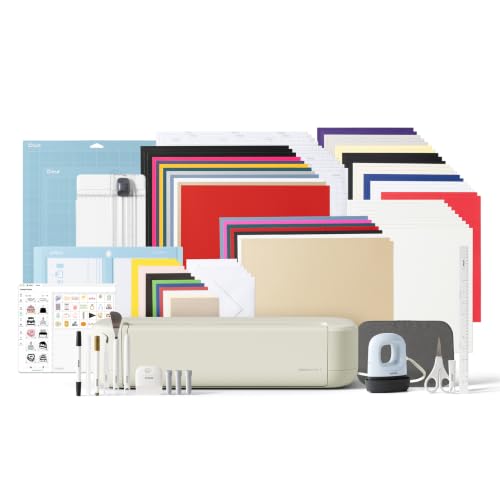
Cricut Explore® 5 Ultimate Bundle + Digital Content, Taupe
Cricut Explore® 5 Ultimate Bundle + Digital Content, Taupe | Includes Supplies for 135 Projects + Bonus Digital Content – Works with 100+ Materials – Sleek, Simplified Design
Best for: Best overall, for crafters who want the largest starter kit in one purchase.
This bundle suits someone who wants to start cutting across many project types right away, without buying materials separately during the first few months. Its wide supply list makes it a practical choice for families or gift buyers.
Key specs
- Works with 100+ materials, per the listing
- Supplies listed for 135 projects
- Includes bonus digital content
- Taupe finish
Pros
- Largest supply list in this group, which reduces early shopping
- Covers a wide range of materials for varied projects
- Bonus digital content adds design options from the start
Cons
- Takes up more desk space than compact models
- Higher commitment if you are unsure you will keep crafting
Bottom line: A strong pick for crafters who want a complete starting point and plan to use the machine regularly.
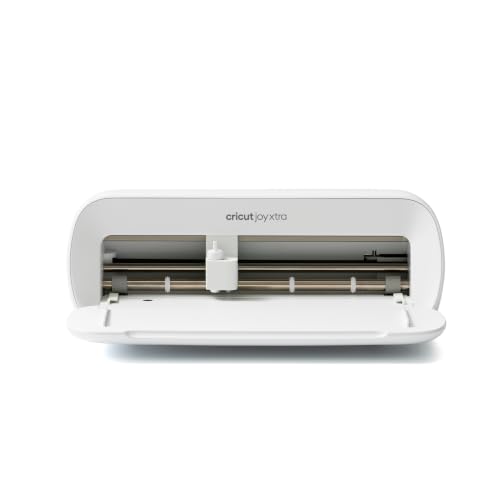
View on AmazonCricut Joy Xtra – Smart Cutting Machine | Digital Content Bundle
Cricut Joy Xtra – Smart Cutting Machine | Digital Content Bundle | Includes 30 images in Design Space App
Best for: Best for small craft rooms, where desk space is limited.
The Joy line is designed for compact setups. It suits people making cards, labels, stickers and small decor who do not need a full-size cutter.
Key specs
- Smart cutting machine with a compact footprint
- Digital content bundle including 30 images in Design Space
Pros
- Easy to store or move between rooms
- Good fit for cards, labels and small vinyl projects
- Bundled images help beginners get started quickly
Cons
- Smaller cutting area limits large-format projects
- Fewer materials supported than the Explore line
Bottom line: Best for shoppers who prioritize space savings and small-scale crafts over large projects.
View on AmazonCricut 29-0001 Personal Electronic Cutting Machine
Cricut 29-0001 Personal Electronic Cutting Machine
Best for: Best budget pick for beginners who want a basic personal cutter.
This is a long-established model in the personal cutting category. It suits crafters who want to learn the basics of cutting paper, cardstock and vinyl without a large upfront commitment.
Key specs
- Personal electronic cutting machine for paper and light materials
- Compatible with the Cricut software ecosystem
Pros
- Simple, familiar design for first-time users
- Widely supported by tutorials and accessories
- Good entry point for paper crafts
Cons
- Fewer features than newer models
- Limited for thick or specialty materials
Bottom line: A sensible starting point for beginners who want to test the hobby before investing in a larger model.
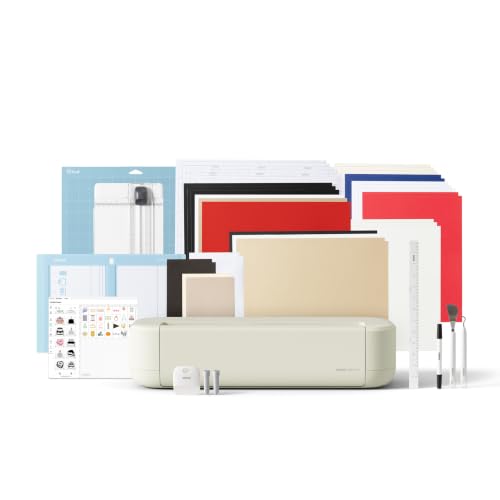
View on AmazonCricut Explore® 5 Essential Bundle + Digital Content, Taupe
Cricut Explore® 5 Essential Bundle + Digital Content, Taupe | Includes Supplies for 65 Projects + Bonus Digital Content – Works with 100+ Materials – Sleek, Simplified Design
Best for: Best for mid-level projects, once you have outgrown basic cutting.
This bundle suits hobbyists who want a versatile machine and a solid first set of supplies, without the largest kit in the lineup.
Key specs
- Works with 100+ materials, per the listing
- Supplies listed for 65 projects
- Includes bonus digital content
Pros
- Good balance of machine capability and starter supplies
- Wide material compatibility
- Sleek design suited to shared spaces
Cons
- Supply list is smaller than the Ultimate bundle
- May need extra materials sooner for heavy use
Bottom line: A balanced choice for hobbyists who want room to grow without paying for the biggest kit.
View on AmazonBrother SDX125EGY ScanNCut Electronic Cutting Machine Grey
Brother SDX125EGY ScanNCut Electronic Cutting Machine Grey
Best for: Best for fabric and specialty materials, including felt and fabric projects.
This is a different kind of machine from the Cricut line. It suits sewists and quilters who want to cut fabric and custom shapes, with a built-in scanner for working from printed or hand-drawn designs.
Key specs
- Electronic cutting machine with a built-in scanner
- Designed for fabric, felt and craft materials
Pros
- Strong fit for fabric and textile projects
- Scanner feature suits custom or traced designs
- Useful for quilting and appliqué work
Cons
- Not a Cricut machine, so Cricut materials and software do not transfer
- Learning curve if you are coming from vinyl-only cutting
Bottom line: Best for fabric-focused crafters who want a dedicated cutter rather than a vinyl-first machine.
View on AmazonCricut Explore® 5 + Deluxe Bundle + Digital Content, Taupe
Cricut Explore® 5 + Deluxe Bundle + Digital Content, Taupe | Includes Supplies for 100 Projects + Additional $30 Bonus Digital Content – Works w/100+ Materials
Best for: Best for heavy-duty and frequent use by regular makers.
This bundle sits between the Essential and Ultimate kits. It suits makers who cut several times a week and want a supply stock that lasts through multiple projects.
Key specs
- Works with 100+ materials, per the listing
- Supplies listed for 100 projects
- Includes bonus digital content
Pros
- Solid supply stock for regular use
- Wide material range
- Good value per project in the supply list
Cons
- Larger footprint than compact models
- Overkill for occasional crafters
Bottom line: A good middle option for frequent makers who want more supplies than the Essential bundle offers.
View on AmazonBuying Guide
Material range and cutting capacity
Check which materials the machine handles before you buy. Vinyl, cardstock and iron-on are common starting materials, while fabric, felt and thicker chipboard need more capable blades and sometimes a different machine type. Look at the listed maximum cut size as well, since it determines whether you can make banners or only small decals.
Good picks for this: Cricut Explore® 5 Ultimate Bundle + Digital Content, Taupe; Brother SDX125EGY ScanNCut Electronic Cutting Machine Grey
Size and desk space
Measure your workspace before ordering. Compact models are easier to store, but they limit the size of finished pieces. A full-size machine needs a clear area roughly the width of the mat plus room for your hands, so plan for that footprint on a table.
Good picks for this: Cricut Joy Xtra – Smart Cutting Machine | Digital Content Bundle; Cricut 29-0001 Personal Electronic Cutting Machine
Included starter supplies
Bundles differ mainly in the supplies they include. Compare the listed project counts, since a larger starter kit can save you several shopping trips in the first few months. Remember that consumables such as blades, mats and vinyl are ongoing costs regardless of bundle.
Good picks for this: Cricut Explore® 5 Essential Bundle + Digital Content, Taupe; Cricut Explore® 5 + Deluxe Bundle + Digital Content, Taupe
Ease of setup and software
Beginners benefit from machines with straightforward setup and well-documented software. Cricut machines connect through the Design Space app, and many owners report that the Bluetooth or USB connection is the most common source of early frustration, so read the setup instructions before the first cut.
Good picks for this: Cricut 29-0001 Personal Electronic Cutting Machine; Cricut Joy Xtra – Smart Cutting Machine | Digital Content Bundle
Use case and project type
Match the machine to what you plan to make. Paper crafts, cards and labels need less power than fabric or layered vinyl projects. Decide whether you will mostly cut paper, vinyl or textiles, and let that guide the choice.
Good picks for this: Brother SDX125EGY ScanNCut Electronic Cutting Machine Grey; Cricut Explore® 5 Essential Bundle + Digital Content, Taupe
Durability and build quality
Look at build reports from owners over time, especially for moving parts such as the carriage and cutting head. Machines used several times a week experience more wear, so a sturdier build matters more for frequent makers than for occasional crafters.
Good picks for this: Cricut Explore® 5 + Deluxe Bundle + Digital Content, Taupe; Cricut Explore® 5 Ultimate Bundle + Digital Content, Taupe
Care and maintenance
Plan for blade replacement, mat cleaning and dust control. Keep the cutting area free of lint and adhesive residue, and replace blades when cuts start tearing rather than clean-cutting. Following the manufacturer’s cleaning schedule helps maintain consistent results.
Good picks for this: Cricut Explore® 5 Essential Bundle + Digital Content, Taupe; Cricut Joy Xtra – Smart Cutting Machine | Digital Content Bundle
FAQ
Which cricut personal cutting machine is best for a complete beginner?
The Cricut 29-0001 Personal Electronic Cutting Machine is a reasonable starting point for paper and light materials. If you want more supplies included, the Essential bundle is a middle ground.
Can a Cricut machine cut fabric?
Cricut machines are primarily designed for paper, vinyl and similar materials. For fabric-focused projects, a dedicated fabric cutter such as the Brother ScanNCut is often a better fit, though results depend on the fabric and stabilizer you use.
Is a bundle better than buying the machine alone?
Bundles can save time in the first few months because they include supplies. If you already own mats, blades and materials, a machine-only purchase may make more sense.
How much space do I need for a cutting machine?
Plan for the machine footprint plus enough room to load mats and handle finished pieces. Compact models need far less space than full-size machines, so measure your table before ordering.
Do I need the Design Space app to use a Cricut?
Cricut machines are designed to work with the Design Space app for most projects. Check the manufacturer’s current requirements before buying, since software details can change.
What maintenance does a cutting machine need?
Clean the cutting area regularly, keep mats free of debris, and replace blades when cuts become inconsistent. Consult the manufacturer’s manual for the recommended schedule.
Conclusion
For most buyers, the best cricut personal cutting machine depends on space, project type and how many supplies you want in the box. The Explore 5 Ultimate bundle is the most complete starting point. The Joy Xtra suits small rooms, while the Cricut 29-0001 works well for budget-minded beginners. Hobbyists who want a middle path should look at the Essential or Deluxe bundles, and fabric-focused makers may prefer the Brother ScanNCut.
Sources
- Consumer safety guidance on using electrical appliances and tools safely at home (cpsc.gov)
- General guidance on electrical equipment use and power safety in the home (energy.gov)
Before you buy: helpful guides
- Cricut Explore 3 Craft Cutting Machine: A Step-by-Step Guide for Beginners
- Cricut Explore Air 2 Craft Cutting Machine: A Step-by-Step Guide for Beginners
- Vinyl Cutting Machine Cricut: A Step-by-Step Guide for Beginners
- Cricut Explore Air 2 Smart Cutting Machine: A Step-by-Step Guide for Beginners
- Cricut Vinyl Cutter Machine: A Step-by-Step Guide for Beginners
Related reading
- Cricut Personal Electronic Cutting Machine Review: What You Should Know
- Top 4 Cricut Joy Cutting Machine Options for Crafters (2026)
- Silhouette Cutting Machine vs Cricut: 5 Best Picks Compared (2026)
About Colin Foster
Colin Foster is part of our editorial team and reviews and edits our arts & crafts supplies guides, checking product details against manufacturer specifications and owner feedback.
About the author
Colin Foster writes reviews and buying guides for Crafts Center.