6 Best Cricut Sticker Cutting Machine Options for 2026
Compare the best cricut sticker cutting machine options for 2026, from all-in-one sticker printers to vinyl cutters. See specs, pros, cons and who each one suit
 By Colin Foster
Updated November 25, 2026
 By Colin Foster
Updated November 2026
Shopping for a cricut sticker cutting machine means choosing between a few very different tools. Some are all-in-one printers that print a design and cut it out in one pass. Others are cutters that work with printable sticker paper or vinyl you supply. This list narrows the field to six options that cover small-batch sticker makers, gift makers, and hobbyists who want room to grow. The selection criteria were research-based: manufacturer specifications, brand reputation for sticker work, and the patterns owners commonly report in reviews, including cut quality, print clarity, software ease, and how well each model handles printable sticker paper.
Our top picks at a glance
- 1TOP CHOICEBest overallCricut StickerPix Print + Cut™ Essential Bundle, Sea Green | All-in-OnView on Amazon
- 2
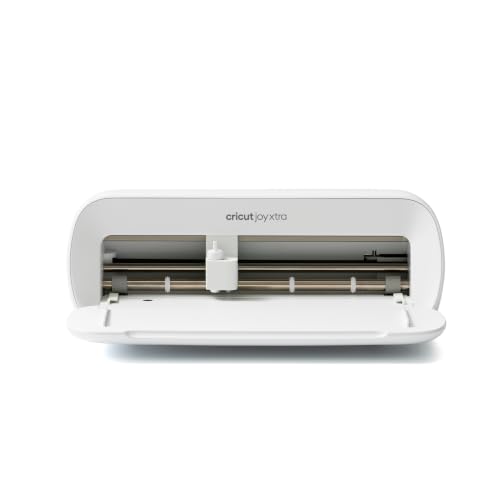 TOP CHOICEBest for crafters already in the Cricut ecosystemCricut Joy Xtra – Smart Cutting Machine | Digital Content BundleView on Amazon
- 3
 TOP CHOICEBest for larger sticker projectsCricut Maker 4 Cutting Machine Bundle Ultimate Sticker Making KitView on Amazon
- 4
 Best for full-color printed stickersLiene PixCut S1 Color Sticker Printer & Cutting MachineView on Amazon
- 5
 Best for vinyl and custom designsLikcut S41 Vinyl Cutter Machine with Print Then CutView on Amazon
- 6
 Best budget pick for sticker paperCricut Printable Sticker Paper (8 ct)View on Amazon
Our Top Picks
Quick Comparison
| Product | Best for | Key feature |
|---|---|---|
| Cricut StickerPix Print + Cut Essential Bundle | All-in-one sticker printing and cutting | Print, label, and cut in one device |
| Cricut Joy Xtra Smart Cutting Machine | Compact crafting with Cricut software | Small footprint and included digital images |
| Cricut Maker 4 Cutting Machine Bundle | Larger and more varied sticker projects | Wider cutting capacity and a broad material range |
| Liene PixCut S1 Color Sticker Printer | Full-color custom stickers and labels | Thermal dye-sublimation printing with auto-cutting |
| Likcut S41 Vinyl Cutter Machine | Vinyl decals and AI-generated designs | Print-then-cut workflow with AI image generation |
| Cricut Printable Sticker Paper (8 ct) | Pairing with a Cricut for printed stickers | Sheets sized for printing and cutting |
Cricut StickerPix Print + Cut Essential Bundle, Sea Green | All-in-One Photo Printer, Label Maker, & Sticker Maker Machine
Cricut StickerPix Print + Cut™ Essential Bundle, Sea Green | All-in-One Photo Printer, Label Maker, & Sticker Maker Machine – Includes Sticker & Photo Paper – 300 DPI – Amazon Exclusive
Best for: All-in-one sticker printing and cutting
This suits crafters who want one machine to print designs, make labels, and cut stickers without juggling separate tools. It is a good fit for gift makers and anyone who wants printed sticker results with minimal setup.
Key specs
- Print, label, and sticker making in one unit
- Includes sticker and photo paper, according to the listing
- Listed at 300 DPI print resolution
Pros
- Handles printing and cutting in a single device
- Includes starter sticker and photo paper
- Suits gift and label projects as well as stickers
Cons
- Narrower material range than a dedicated cutting machine
- Consumables add to the ongoing cost of use
Bottom line: A strong first pick for someone who mainly wants printed, cut stickers and does not need a general-purpose craft cutter.
View on AmazonCricut Joy Xtra – Smart Cutting Machine | Digital Content Bundle
Cricut Joy Xtra – Smart Cutting Machine | Digital Content Bundle | Includes 30 images in Design Space App
Best for: Compact crafting with Cricut software
This suits beginners and hobbyists who already use Cricut Design Space and want a small machine for vinyl and paper stickers. It also works well for those with limited desk space.
Key specs
- Smart cutting machine compatible with Cricut Design Space
- Digital content bundle with 30 images, per the listing
- Compact footprint suited to small work areas
Pros
- Compact and easy to store
- Included digital images give you starter designs
- Works within the familiar Cricut app ecosystem
Cons
- Smaller cutting area limits large sticker sheets
- Fewer advanced features than larger Cricut models
Bottom line: A practical choice for beginners who want to make small stickers and keep their setup compact.
View on AmazonCricut Maker 4 Cutting Machine Bundle Ultimate Sticker Making Kit
Cricut Maker 4 Cutting Machine Bundle Ultimate Sticker Making Kit
Best for: Larger and more varied sticker projects
This suits hobbyists who plan to cut a range of materials beyond stickers, such as cardstock, iron-on, and fabric, and who want more cutting capacity than a compact machine offers.
Key specs
- Designed as a full-size smart cutting machine
- Bundle includes sticker-making materials, per the listing name
- Works with Cricut Design Space
Pros
- Broad material compatibility beyond vinyl
- Larger cutting area for bigger sheets
- Bundle reduces the need to buy starter supplies separately
Cons
- Takes up more workspace than compact models
- Higher up the range than a beginner may need for stickers alone
Bottom line: Best for crafters who see stickers as one part of a wider crafting practice.
View on AmazonLiene PixCut S1 Color Sticker Printer & Cutting Machine
Liene PixCut S1 Color Sticker Printer & Cutting Machine – All-in-One Sticker Maker for DIY Crafts, Custom Labels & Gifts. Thermal Dye-Sublimation Photo Printer, 300 DPI, Precise AI Auto-Cutting
Best for: Full-color custom stickers and labels
This suits sticker sellers, label makers, and gift creators who need full-color printed designs with precise outlines. It is aimed at people who prioritize print color over general craft versatility.
Key specs
- Thermal dye-sublimation photo printing
- 300 DPI resolution, per the listing
- Automatic cutting after printing
Pros
- Full-color printing suits photo-style stickers
- Automatic cutting reduces hand trimming
- Good fit for custom labels and gifts
Cons
- Narrower use outside printed stickers and labels
- Works best with its own specified media, so check compatibility before buying
Bottom line: The right pick for custom full-color stickers if print quality matters more than broad craft use.
View on AmazonLikcut S41 Vinyl Cutter Machine with Print Then Cut
Likcut S41 Vinyl Cutter Machine with Print Then Cut – AI Image Generation Sticker Cutter and Maker Machine for Room Decor, HTV, Cardstock and Custom Stickers, Crafts for Adults
Best for: Vinyl decals and AI-generated designs
This suits crafters who make vinyl decals, HTV projects, and custom stickers, and who want built-in AI image generation to create designs quickly.
Key specs
- Print-then-cut workflow for stickers
- AI image generation, per the listing name
- Works with cardstock, HTV, and vinyl
Pros
- Versatile across vinyl, HTV, and cardstock
- AI image generation speeds up design work
- Suits room decor and custom sticker projects
Cons
- Owners often report a learning curve with print-then-cut calibration
- Less established brand support than major names
Bottom line: A good choice for hobbyists who want vinyl and print-then-cut flexibility plus AI design tools.
View on AmazonCricut Printable Sticker Paper (8 ct)
Cricut® Printable Sticker Paper (8 ct)
Best for: Pairing with a Cricut for printed stickers
This suits anyone who already owns a compatible printer and cutter and needs sheets designed for printed, cut stickers. It is a consumable rather than a machine, so it complements the models above.
Key specs
- Pack of 8 sheets, per the listing
- Designed for printable sticker projects
Pros
- Easy way to test printed sticker projects
- Pairs with Cricut cutting workflows
- Small pack suits occasional use
Cons
- Requires a printer and cutter, so it is not a standalone solution
- Small pack means frequent reorders for heavy use
Bottom line: A useful add-on for anyone pairing a Cricut with printed sticker work, rather than a machine purchase on its own.
View on AmazonBuying Guide
Print-and-Cut Capability
Decide whether you need the machine to print as well as cut. All-in-one units handle printing and cutting in one device, while cutters work with sheets you print elsewhere. If you already own an inkjet printer, a cutter alone may be enough.
Good picks for this: Cricut StickerPix Print + Cut Essential Bundle, Liene PixCut S1 Color Sticker Printer
Cutting Area and Sheet Size
Check the maximum cutting width and length against the sticker sizes you plan to make. Compact machines suit small stickers, while larger models give you room for full sheets and bigger designs.
Good picks for this: Cricut Joy Xtra Smart Cutting Machine, Cricut Maker 4 Cutting Machine Bundle
Software and Ecosystem
The design software you use day to day matters as much as the hardware. Cricut Design Space is a common choice with a large image library. Confirm that a machine works with the app you plan to use before you buy.
Good picks for this: Cricut Joy Xtra Smart Cutting Machine, Cricut Maker 4 Cutting Machine Bundle
Material Compatibility
Look at which media the machine handles: printable sticker paper, adhesive vinyl, cardstock, or iron-on. A machine that works with a wider range of materials gives you more options as your projects grow.
Good picks for this: Likcut S41 Vinyl Cutter Machine, Cricut Maker 4 Cutting Machine Bundle
Print Quality and Color
For full-color stickers, check the stated print resolution and the printing method. Manufacturers often list DPI figures, and owners frequently comment on how color holds up on glossy and matte finishes.
Good picks for this: Liene PixCut S1 Color Sticker Printer, Cricut StickerPix Print + Cut Essential Bundle
Footprint and Storage
Measure your workspace before buying. Compact machines are easier to store between projects, while larger cutters need a dedicated spot. Consider where the machine will sit while it is cutting.
Good picks for this: Cricut Joy Xtra Smart Cutting Machine, Likcut S41 Vinyl Cutter Machine
Ongoing Supplies
Printable sticker paper, ink, and vinyl are recurring costs. Check whether the machine uses proprietary media and how easy it is to find compatible supplies. Plan for the materials you will use most often.
Good picks for this: Cricut Printable Sticker Paper (8 ct), Cricut StickerPix Print + Cut Essential Bundle
FAQ
What is the difference between a sticker printer and a cutting machine?
A sticker printer prints a design onto printable media, and many models also cut it out. A cutting machine cuts shapes from materials such as vinyl, paper, and cardstock, usually from sheets printed elsewhere.
Do I need a separate printer for a cricut sticker cutting machine?
It depends on the model. All-in-one units print and cut in one device. Cutters work with printable sticker paper, which you print on a standard inkjet printer before cutting.
What materials can I use for stickers?
Common choices include printable sticker paper, adhesive vinyl, and cardstock. Each material suits different finishes, so check the machine’s compatibility list before buying supplies.
Is a compact machine enough for sticker making?
For small stickers and occasional projects, a compact machine is often enough. If you plan to cut full sheets or a wider range of materials, a larger cutting area is more practical.
How do I keep cut stickers from peeling or tearing?
Use the correct blade setting and media type, and check that the material is fully seated on the mat. Manufacturers usually publish recommended settings for each material, which are a good starting point.
Does software matter when choosing a sticker cutter?
Yes. The app you use controls designs, cut settings, and file handling. Choose a machine that works with software you already know or are willing to learn.
Conclusion
For an all-in-one solution, the Cricut StickerPix Print + Cut Essential Bundle is the most direct choice. Crafters already in the Cricut ecosystem will find the Cricut Joy Xtra a practical, compact option, while the Cricut Maker 4 suits those who plan to cut a wider range of materials. For full-color custom labels, the Liene PixCut S1 is built around printing quality. The Likcut S41 fits vinyl and AI-driven design work, and the Cricut Printable Sticker Paper is a useful add-on for anyone pairing their own printer with a cutter. Match the machine to your materials, space, and software, and the right choice will be clear.
Sources
- Consumer safety guidance on electrical appliances and small machine use (cpsc.gov)
- Background on energy use and standby power for household electronics (energy.gov)
Before you buy: helpful guides
Related reading
- Top 4 Cricut Joy Cutting Machine Options for Crafters (2026)
- Silhouette Cutting Machine vs Cricut: 5 Best Picks Compared (2026)
- Cricut Personal Electronic Cutting Machine Review: What You Should Know
- Cricut Maker 4 Smart Cutting Machine Review: Is It Worth It?
About Colin Foster
Colin Foster is part of our editorial team and reviews and edits our arts & crafts supplies guides, checking product details against manufacturer specifications and owner feedback.
About the author
Colin Foster writes reviews and buying guides for Crafts Center.