Silhouette Cutting Machine vs Cricut: 5 Best Picks Compared (2026)
Silhouette cutting machine vs Cricut: compare five top Silhouette models by use case, specs and pros and cons to find the right cutter for your crafts.
 By Colin Foster
Updated November 24, 2026
 By Colin Foster
Updated November 2026
Choosing between a silhouette cutting machine vs Cricut comes down to what you plan to make, how much software control you want, and whether you need print-and-cut, vinyl work or heavier materials. This list focuses on Silhouette models, so each pick below is a real Silhouette machine you can compare against Cricut options. The selection criteria were cutting versatility, material range, software and registration features, workspace and blade system, and the patterns owners commonly report about setup and daily use.
Our top picks at a glance
- 1TOP CHOICEBest overallSilhouette Cameo 5 Alpha PlusView on Amazon
- 2
 TOP CHOICEBest for print-and-cut craftsSilhouette Cameo PROView on Amazon
- 3
 TOP CHOICEBest for vinyl and signsSilhouette Portrait 4-9 inch Vinyl Cutting MachineView on Amazon
- 4
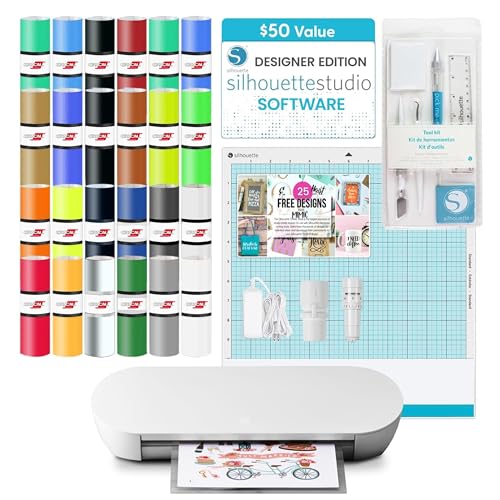 Best starter bundleSilhouette America Portrait 4 Vinyl Cutting Machine, Starter BundleView on Amazon
- 5
 Best for quiet home useSilhouette America Cameo 5 AlphaView on Amazon
Our Top Picks
| Product | Best for | Key feature |
|---|---|---|
| Silhouette Cameo 5 Alpha Plus | All-round crafters who want one machine for cutting and sketching | Fast Sketch mode and 4-point registration |
| Silhouette Cameo PRO | Print-and-cut projects and heavier materials | Dual-powered carriage with built-in roll feeder and cross cutter |
| Silhouette Portrait 4-9 inch Vinyl Cutting Machine | Vinyl decals, stickers and small sign work | Compact 4 to 9 inch cutting width with PixScan support |
| Silhouette America Portrait 4 Vinyl Cutting Machine, Starter Bundle | Beginners who want materials and software in one box | Included Oracle vinyl sheets, tool kit and designs |
| Silhouette America Cameo 5 Alpha | Quiet operation in shared or home spaces | AutoBlade and quiet cutting operation |
Silhouette Cameo 5 Alpha Plus
Silhouette Cameo 5 Alpha Plus – 15" Craft & Vinyl Cutter Machine with Automatic Blade, Fast Sketch Mode & 4-Point Registration – Includes Studio Software & 100 Designs, 1-Month Subscription – Black
Best for: All-round crafters who want one machine for cutting and sketching
This model suits hobbyists who move between cardstock, vinyl and iron-on projects and want faster setup for sketch-style cutting. It is a strong match for anyone comparing a silhouette cutting machine vs Cricut for a mix of paper and vinyl work.
Key specs
- 15-inch craft and vinyl cutting format
- Automatic blade
- Fast Sketch mode
- 4-point registration
- Includes Studio software and 100 designs
Pros
- Wide cutting format for larger designs
- Fast Sketch mode speeds up pen-style work
- Included software and design library reduce the first-week learning curve
Cons
- Larger footprint than compact vinyl cutters
- Software features may require an active subscription for some uses
Bottom line: A good pick if you want one flexible machine for most craft materials and plan to grow into sketch and vinyl projects.
View on AmazonSilhouette Cameo PRO
Silhouette Cameo PRO | Dual-Powered Carriage, Built-In Roll Feeder & Cross Cutter, Supports Heat Pen and Embossing Tools
Best for: Print-and-cut projects and heavier materials
This machine fits crafters who print stickers, labels or cards and then cut them out, or who work with thicker stock. Its built-in roll feeder and cross cutter make it useful for longer runs.
Key specs
- Dual-powered carriage
- Built-in roll feeder
- Built-in cross cutter
- Supports heat pen and embossing tools
Pros
- Roll feeder allows continuous cutting of long designs
- Cross cutter helps finish print-and-cut sheets without a separate trimmer
- Tool support expands options beyond basic blades
Cons
- Higher complexity than entry-level models
- Roll feeder setup takes practice to get straight cuts
Bottom line: Best for crafters who regularly print and cut and want the most built-in hardware in the Silhouette lineup.
View on AmazonSilhouette Portrait 4-9 inch Vinyl Cutting Machine
Silhouette Portrait 4-9 inch Vinyl Cutting Machine with Studio Software, PixScan, Electric Tool and ES Mat Compatible, SNA and IPT Enabled, 50 db
Best for: Vinyl decals, stickers and small sign work
This compact cutter suits people making decals, car lettering, labels or small signs. Its narrower cutting width keeps the footprint small on a desk or shelf.
Key specs
- 4 to 9 inch cutting width
- PixScan support
- Electric tool compatible
- ES mat compatible
- SNA and IPT enabled
Pros
- Compact design fits small workspaces
- PixScan supports print-and-cut alignment on printed sheets
- Works with a range of vinyl and mat types
Cons
- Narrow cutting width limits large single-piece designs
- Not designed for heavy chipboard or thick materials
Bottom line: A focused choice for vinyl-based projects in limited space, especially if your work stays under about nine inches wide.
View on AmazonSilhouette America Portrait 4 Vinyl Cutting Machine, Starter Bundle
Silhouette America Portrait 4 Vinyl Cutting Machine, Starter Bundle – 9"" Precision Cutter with Designer Edition Software, 24 Sheets Oracle Vinyl, Tool Kit & 25 Free Designs – Electric Tool Compatible
Best for: Beginners who want materials and software in one box
New crafters often struggle to source the right vinyl, mats and tools at the same time. This bundle packages the cutter with starter supplies, which simplifies the first project.
Key specs
- 9-inch precision cutting width
- Designer Edition software
- 24 sheets of Oracle vinyl
- Tool kit included
- 25 free designs
- Electric tool compatible
Pros
- Starter materials reduce the first-purchase guesswork
- Designer Edition software and free designs help you start cutting quickly
- Compact cutter suits a beginner workspace
Cons
- Starter vinyl quantity runs out quickly on larger projects
- Narrower cutting width than the Cameo line
Bottom line: The most convenient entry point for someone new to vinyl cutting who wants everything needed for the first few projects.
View on AmazonSilhouette America Cameo 5 Alpha
Silhouette America Cameo 5 Alpha (α) – Smart Cutting Machine for Print & Cut – Quiet Operation with AutoBlade, Studio Software, Cutting Mat- Matte Black (Machine)
Best for: Quiet operation in shared or home spaces
Owners who craft in a living room, bedroom or apartment often care about noise as much as cut quality. This model is positioned for quiet operation with an automatic blade, making it easier to work during evenings.
Key specs
- AutoBlade system
- Quiet operation
- Studio software included
- Matte black finish
- Cutting mat included
Pros
- Quiet operation suits shared living spaces
- AutoBlade simplifies blade setup
- Includes a mat and software for immediate use
Cons
- Standard cutting format is narrower than the Cameo 5 Alpha Plus
- Advanced features may require learning Studio software
Bottom line: A practical choice for quieter home craft sessions, especially for paper and light vinyl work.
View on AmazonBuying Guide
Cutting Width and Project Size
Measure the largest design you expect to make before buying. Compact models around four to nine inches suit stickers, labels and small decals, while larger formats around fifteen inches handle banners, wall art and bigger cardstock layouts.
Good picks for this: Silhouette Cameo 5 Alpha Plus, Silhouette Portrait 4-9 inch Vinyl Cutting Machine
Print-and-Cut Support
If you print designs on your home printer and then cut them out, look for registration features such as PixScan or four-point registration. These help the machine find alignment marks and cut accurately around printed edges.
Good picks for this: Silhouette Cameo PRO, Silhouette Portrait 4-9 inch Vinyl Cutting Machine
Material Range and Thickness
Check which materials the machine handles: vinyl, cardstock, iron-on, and in some cases chipboard or embossing sheets. Manufacturers usually list maximum material thickness, and staying within it protects blades and motors.
Good picks for this: Silhouette Cameo PRO, Silhouette Cameo 5 Alpha
Software and Design Library
Silhouette machines run on Studio software, and the included design library and feature set vary by model. Review what comes bundled, including free designs, and whether advanced features need a subscription.
Good picks for this: Silhouette Cameo 5 Alpha Plus, Silhouette America Portrait 4 Vinyl Cutting Machine, Starter Bundle
Noise Level and Workspace
Cutting noise matters in shared homes. Consider where the machine will sit, how much desk space you have and whether you will cut at night. Quieter operation and a smaller footprint both help in apartments and multipurpose rooms.
Good picks for this: Silhouette America Cameo 5 Alpha, Silhouette Portrait 4-9 inch Vinyl Cutting Machine
Beginner Support and Starter Kits
If you are new to vinyl or die-cut crafts, a starter bundle can save time by including mats, sample vinyl and tools. Confirm the quantity of starter materials so you know how far it will go.
Good picks for this: Silhouette America Portrait 4 Vinyl Cutting Machine, Starter Bundle
Care and Blade Maintenance
Blades dull with use, and cutting mats lose grip over time. Plan to replace blades and replace mats when adhesion weakens. Keep the cutting area clean of lint and vinyl scraps, and follow the manufacturer’s guidance for storage and cleaning.
Good picks for this: Silhouette Cameo PRO, Silhouette America Cameo 5 Alpha
FAQ
Is a Silhouette cutting machine better than Cricut for vinyl?
Both brands cut vinyl well. Silhouette models often appeal to crafters who want more hands-on control of blade settings and software, while Cricut is known for its app-driven workflow. The better choice depends on whether you prefer manual settings or a simpler app experience.
Can Silhouette machines do print-and-cut?
Several Silhouette models support print-and-cut through registration features such as PixScan or four-point registration. The Cameo PRO and the Portrait 4-9 inch model are both listed with registration support in their specifications.
Do I need a subscription to use Silhouette software?
Basic Studio software use is generally available without a subscription, but some advanced features and design access may require one. Check the current terms for the specific model before purchasing.
What is the best Silhouette machine for beginners?
For most beginners, a starter bundle such as the Silhouette America Portrait 4 Vinyl Cutting Machine, Starter Bundle is convenient because it includes vinyl, tools and designs. Owners who plan to grow into larger projects may prefer a wider model like the Cameo 5 Alpha Plus.
How wide a cutting area do I need?
Measure your largest planned project and add a margin for the mat. Narrow formats around four to nine inches work for stickers and small decals, while fifteen-inch formats suit larger wall art and banners.
Is a silhouette cutting machine loud?
Noise varies by model and material. Owners often describe cutting as audible but manageable, and the Cameo 5 Alpha is positioned for quiet operation, which may suit shared spaces.
Should I buy a machine or a bundle?
If you already own vinyl, mats and tools, a machine-only purchase may suit you. If you are starting from scratch, a bundle that includes sample materials simplifies the first few projects and reduces the number of separate orders.
Conclusion
When comparing a silhouette cutting machine vs Cricut, Silhouette’s strongest options are the Cameo 5 Alpha Plus for all-round crafting, the Cameo PRO for print-and-cut and heavier materials, the Portrait 4-9 inch model for compact vinyl work, the Portrait 4 starter bundle for beginners, and the Cameo 5 Alpha for quieter home use. Match the cutting width, registration features and included materials to your projects, and you will choose the right machine for your workbench.
Sources
- Product safety guidance and recall information for electrical craft equipment (cpsc.gov)
- Workplace and home-studio safety practices for cutting tools and blades (osha.gov)
- Standards and measurement references for accuracy in cutting and registration (nist.gov)
Before you buy: helpful guides
Related reading
- Cricut Machine vs Silhouette: 5 Best Cutters Compared (2026)
- Top 4 Cricut Joy Cutting Machine Options for Crafters (2026)
About Colin Foster
Colin Foster is part of our editorial team and reviews and edits our arts & crafts supplies guides, checking product details against manufacturer specifications and owner feedback.
About the author
Colin Foster writes reviews and buying guides for Crafts Center.