6 Best Cricut Machine That Cuts Woods for Hobbyists (2026)
Wondering which cricut machine that cuts wood is right for you? We compare six Cricut models on specs, materials and fit so you can choose with confidence.
 By Emily Parker
Updated November 24, 2026
 By Emily Parker
Updated November 2026
Looking for a cricut machine that cuts wood? Most Cricut models are built for vinyl, cardstock and fabric, so the right pick depends on whether you want thin wood veneer, basswood sheets or simply a machine that handles many materials well. This list compares six current Cricut cutters on the criteria that matter most for wood projects: blade options, cutting force, material range, bed size, and how well each model fits a hobbyist’s workshop. We drew on manufacturer specifications, brand reputation and common owner feedback patterns rather than hands-on trials.
Our top picks at a glance
- 1TOP CHOICEBest overallCricut Maker 5 Essential Bundle + Digital Content, Slate BlueView on Amazon
- 2
 TOP CHOICEBest for heavier materialsCricut Maker 4 – Smart Cutting Machine (Seashell)View on Amazon
- 3
 TOP CHOICEBest for a complete starter kitCricut Maker 5 Cutting Machine and EasyPress Heat Press BundleView on Amazon
- 4
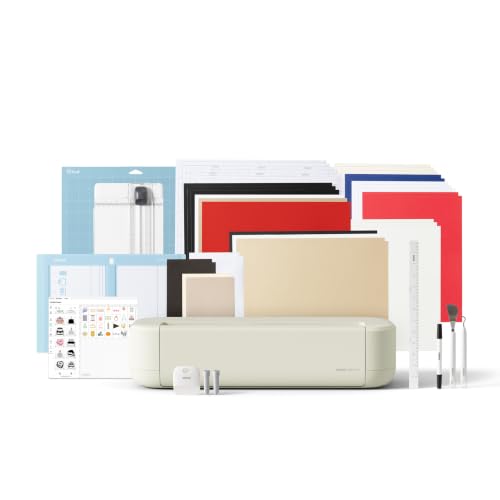 Best for crafters who want a sleek, simplified setupCricut Explore 5 Essential Bundle + Digital Content, TaupeView on Amazon
- 5
 Best for a deluxe material libraryCricut Explore 5 + Deluxe Bundle + Digital Content, TaupeView on Amazon
- 6
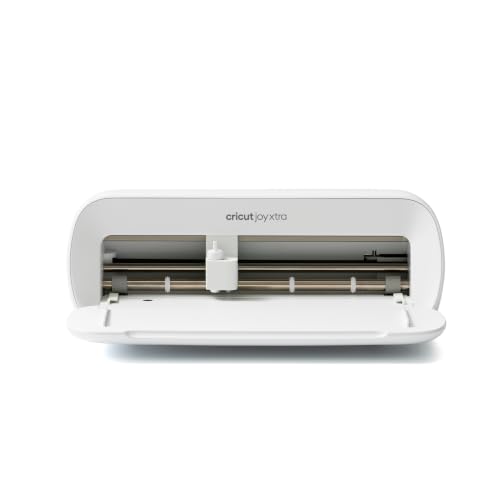 Best compact pick for small spacesCricut Joy Xtra – Smart Cutting MachineView on Amazon
Our Top Picks
Quick Comparison
| Product | Best for | Key feature |
|---|---|---|
| Cricut Maker 5 Essential Bundle + Digital Content | Hobbyists who want the widest wood and material range | Works with 300+ materials, rated for heavier stock |
| Cricut Explore 5 + Deluxe Bundle + Digital Content | Crafters with varied projects and a larger supply kit | Works with 100+ materials and a deluxe bundle |
| Cricut Maker 5 Cutting Machine and EasyPress Heat Press Bundle | Beginners who want cutting and heat pressing together | Includes EasyPress for iron-on and fabric projects |
| Cricut Maker 4 Smart Cutting Machine | Users focused on thicker, heavier materials | Smart cutting with a digital content bundle |
| Cricut Explore 5 Essential Bundle + Digital Content | Makers who prefer a clean, simplified design | Works with 100+ materials in a streamlined setup |
| Cricut Joy Xtra Smart Cutting Machine | Small workspaces and light wood veneer projects | Compact footprint with a digital content bundle |
Cricut Maker 5 Essential Bundle + Digital Content, Slate Blue
Cricut Maker® 5 Essential Bundle + Digital Content, Slate Blue | Includes Supplies for 65 Projects + Bonus Digital Content – Works with 300+ Materials – Sleek, Simplified Design
Best for: Hobbyists who want the widest wood and material range
This is the model most likely to suit someone who plans to cut a variety of wood-based materials alongside vinyl and fabric. It is aimed at makers who expect to move between many project types and want one machine that covers most of them.
Key specs
- Works with 300+ materials according to the listing
- Includes supplies for 65 projects plus bonus digital content
- Sleek, simplified design
Pros
- Broad material compatibility, including many thicker stocks
- Strong fit for mixed-material workshops
- Bundle includes starter supplies for many projects
Cons
- Wood cutting still depends on thickness and blade choice
- Higher up the range than most beginners need
Bottom line: Pick this if you want the most flexible Cricut for wood and mixed materials and expect to use it regularly.
View on AmazonCricut Explore 5 + Deluxe Bundle + Digital Content, Taupe
Cricut Explore® 5 + Deluxe Bundle + Digital Content, Taupe | Includes Supplies for 100 Projects + Additional $30 Bonus Digital Content – Works w/100+ Materials
Best for: Crafters with varied projects and a larger supply kit
This bundle suits makers who like having materials on hand and want to explore many project styles without buying supplies separately.
Key specs
- Works with 100+ materials according to the listing
- Includes supplies for 100 projects
- Additional bonus digital content
Pros
- Large starter supply selection
- Good value for multi-project makers
- Familiar Design Space workflow
Cons
- Material range is narrower than the Maker line for heavy wood
- Bundle extras may not matter to every buyer
Bottom line: A strong choice for varied crafting, but check that your wood thickness falls within the Explore line’s capability before buying.
View on AmazonCricut Maker 5 Cutting Machine and EasyPress Heat Press Bundle
Cricut Maker 5 Cutting Machine and EasyPress Heat Press Bundle | Crafting Bundle, Rainbow Vinyl Included, Iron-On Sheets, DIY Crafts, Multiple Materials
Best for: Beginners who want cutting and heat pressing together
Good for people who want to combine wood or veneer projects with iron-on designs on fabric and tote bags, all from one bundle.
Key specs
- Includes Cricut Maker 5 cutting machine and EasyPress heat press
- Rainbow vinyl and iron-on sheets included
- Designed for multiple materials
Pros
- Covers cutting and heat transfer in one purchase
- Good starter kit for mixed crafts
- Includes materials to begin right away
Cons
- Heat press adds bulk to a small workspace
- Less relevant if you only plan to cut wood
Bottom line: Best if you want a cutting machine plus heat pressing for projects beyond wood.
View on AmazonCricut Maker 4 – Smart Cutting Machine (Seashell)
Cricut Maker 4 – Smart Cutting Machine (Seashell) | Digital Content Bundle | Includes 30 images in Design Space App
Best for: Users focused on thicker, heavier materials
Suits crafters who want a Maker-class cutter for heavier stock and are comfortable adjusting settings for each material.
Key specs
- Smart cutting machine with digital content bundle
- Includes 30 images in the Design Space app
Pros
- Maker-line cutting platform for heavier materials
- Smart material settings in Design Space
- Digital content gets projects started quickly
Cons
- Thick wood still requires careful blade and pass setup
- Previous-generation feel compared with the newest Maker
Bottom line: A solid option for heavier cutting at a lower position in the lineup than the Maker 5.
View on AmazonCricut Explore 5 Essential Bundle + Digital Content, Taupe
Cricut Explore® 5 Essential Bundle + Digital Content, Taupe | Includes Supplies for 65 Projects + Bonus Digital Content – Works with 100+ Materials – Sleek, Simplified Design
Best for: Makers who prefer a clean, simplified design
A good match for crafters who want a tidy machine and mainly work with thinner materials, with wood as an occasional addition.
Key specs
- Works with 100+ materials according to the listing
- Includes supplies for 65 projects
- Sleek, simplified design
Pros
- Clean, easy-to-store design
- Good coverage of common craft materials
- Straightforward setup in Design Space
Cons
- Not built for the heaviest wood stocks
- Smaller supply kit than the deluxe bundle
Bottom line: Choose this for a simple, space-friendly machine that handles thin wood alongside everyday craft materials.
View on AmazonCricut Joy Xtra – Smart Cutting Machine
Cricut Joy Xtra – Smart Cutting Machine | Digital Content Bundle | Includes 30 images in Design Space App
Best for: Small workspaces and light wood veneer projects
This compact cutter suits people with limited room and projects built around thin wood veneer, card and vinyl rather than thick boards.
Key specs
- Compact smart cutting machine
- Includes 30 images in the Design Space app
Pros
- Small footprint for tight spaces
- Quick setup for simple projects
- Good for light wood and paper crafts
Cons
- Limited for thick or dense wood
- Smaller cutting capacity than full-size models
Bottom line: A good fit for light wood veneer and compact workspaces, but not for solid lumber.
View on AmazonBuying Guide
Material thickness and wood type
Cricut machines are rated for specific material thicknesses. Thin wood veneer, balsa and basswood sheets are the realistic targets for most Cricut models. Solid lumber or dense hardwood generally falls outside what these machines are designed to cut. Check the manufacturer’s stated maximum thickness for each model before you start a wood project.
Good picks for this: Cricut Maker 5 Essential Bundle + Digital Content, Cricut Maker 4 – Smart Cutting Machine
Blade and tool options
Cutting wood depends heavily on the blade. Manufacturers describe specialty blades and tool heads designed for heavier materials, and Maker-line machines support a wider range of these. Confirm which blades are compatible with the model you choose and whether they are sold separately.
Good picks for this: Cricut Maker 5 Cutting Machine and EasyPress Heat Press Bundle, Cricut Maker 5 Essential Bundle + Digital Content
Cutting force and machine class
Higher cutting force generally means better performance on denser materials. Maker-class machines are built for more demanding materials than Explore or Joy models. If your wood projects use anything beyond thin veneer, a Maker-line machine is usually the safer choice.
Good picks for this: Cricut Maker 4 – Smart Cutting Machine, Cricut Explore 5 + Deluxe Bundle + Digital Content
Workspace size and mat dimensions
Measure your workspace before buying. Compact models such as the Joy line fit small desks, while full-size machines need more clearance. Consider both the machine footprint and the mat size you plan to use, since wood sheets often need the larger mat to be cut efficiently.
Good picks for this: Cricut Joy Xtra – Smart Cutting Machine, Cricut Explore 5 Essential Bundle + Digital Content, Taupe
Material library and included supplies
Bundles can save setup time, but compare what is included. Some bundles add supplies for many projects, while others focus on digital content. Check whether the materials listed match the projects you plan to make.
Good picks for this: Cricut Explore 5 + Deluxe Bundle + Digital Content, Cricut Maker 5 Cutting Machine and EasyPress Heat Press Bundle
Durability and daily care
Wood dust and resin residue can build up on the cutting area. Keep the mat clean, store blades safely and clear debris after each session. Regular maintenance helps a cutter stay accurate across many projects.
Good picks for this: Cricut Maker 5 Essential Bundle + Digital Content, Cricut Explore 5 Essential Bundle + Digital Content, Taupe
Safety when cutting wood
Wood dust can be irritating to lungs and eyes. Work in a ventilated area, avoid running the machine unattended, and keep hands clear of the cutting path. For guidance on wood dust exposure, consult occupational safety resources and a qualified professional if you have respiratory concerns.
Good picks for this: Cricut Maker 4 – Smart Cutting Machine, Cricut Joy Xtra – Smart Cutting Machine
FAQ
Can a Cricut machine cut wood?
Yes, but only thin wood such as veneer, balsa and basswood sheets. Cricut machines are not designed for solid lumber or thick hardwood. Always check the manufacturer’s maximum thickness for your specific model.
Which Cricut model is best for cutting wood?
Maker-line machines are generally better suited to wood than Explore or Joy models because they support heavier materials and more specialty blades. The Cricut Maker 5 Essential Bundle is a strong all-round choice.
Do I need a special blade to cut wood?
Often yes. Cricut sells blades and tool heads for heavier materials. Confirm compatibility with your model before purchasing, and test cuts on scrap material first.
Can a Joy machine cut wood?
The Joy line works best with thin wood veneer and light materials. It is not a good fit for solid or thick wood.
Is wood cutting safe on a home Cricut?
Cutting thin wood is generally manageable with ventilation and basic precautions. Avoid running the machine unattended and keep dust out of the workspace. For health questions about dust exposure, consult a qualified professional.
What wood works best with a Cricut?
Thin basswood, balsa and wood veneer sheets are the most common choices for home crafters. They cut cleanly when the blade and settings match the thickness of the sheet.
Can I use Design Space for wood projects?
Yes. Design Space lets you set material types and cut settings, and it includes project templates. For more on the software workflow, see the guides on this site.
Conclusion
For the widest range of wood and mixed materials, the Cricut Maker 5 Essential Bundle is the most flexible choice. If you want heavier cutting at a lower position in the lineup, the Maker 4 is a practical alternative. The Explore models suit crafters who mainly work with thinner materials, and the Joy Xtra fits small spaces and light veneer projects. Match the machine to the thickness of the wood you plan to cut, and you will avoid most disappointment.
For step-by-step setup, see Cricut Explore Air 2 Die Cut Machine: A Step-by-Step Guide for Beginners. To compare models further, read Which Is the Best Cricut Machine? 4 Best Picks Compared (2026) and Cricut Maker 4 Smart Cutting Machine Review: Is It Worth It?. For project ideas once you have your machine, see What Can You Make with Cricut Machine: 12 Project Ideas for Beginners.
Sources
- Consumer product safety guidance on tools and workshop equipment (cpsc.gov)
- Occupational guidance on wood dust exposure and workplace ventilation (osha.gov)
- Health information on inhaling wood dust and particulate matter (nih.gov)
Before you buy: helpful guides
Related reading
About Emily Parker
Emily Parker is part of our editorial team and reviews and edits our arts & crafts supplies guides, checking product details against manufacturer specifications and owner feedback.
About the author
Emily Parker writes reviews and buying guides for Crafts Center.