Cricut Machine Explore Air 2 Bundle: 6 Best Picks Compared (2026)
Compare six cricut machine explore air 2 bundle options by fit, included supplies and project range, with pros, cons and buying tips to help you choose.
 By Colin Foster
Updated November 24, 2026
 By Colin Foster
Updated November 2026
Shoppers searching for a cricut machine explore air 2 bundle usually want one thing: a complete starter kit that gets them cutting vinyl, cardstock and iron-on within minutes of opening the box. This list focuses on Cricut Explore-family and Maker-family bundles sold on Amazon, compared by the features that matter most to beginner and hobbyist crafters: how many materials the machine handles, how many projects the included supplies cover, whether bonus digital content is bundled, the footprint on your desk, and how much room the bundle leaves for growth into heavier materials later.
Our top picks at a glance
- 1TOP CHOICEBest overallCricut Explore 5 + Deluxe Bundle + Digital Content, TaupeView on Amazon
- 2
 TOP CHOICEBest for small craft roomsCricut Joy 2 Essential Bundle + Rainbow SamplerView on Amazon
- 3
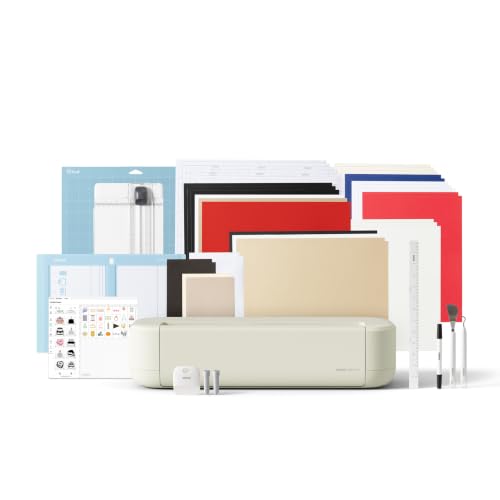 TOP CHOICEBest budget pickCricut Explore 5 Essential Bundle + Digital Content, TaupeView on Amazon
- 4
 Best for heavy-duty projectsCricut Maker 5 Essential Bundle + Digital Content, Slate BlueView on Amazon
- 5
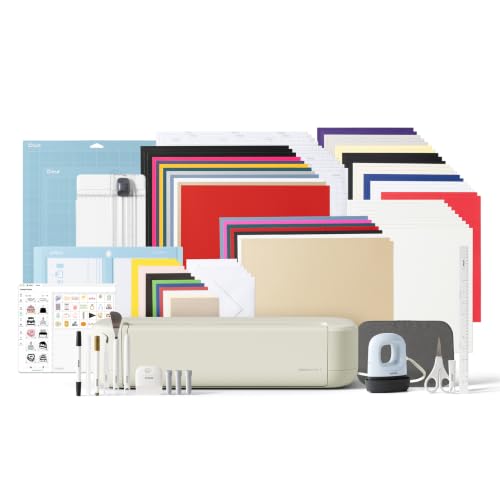 Best for high-volume supply stockCricut Explore 5 Ultimate Bundle + Digital Content, TaupeView on Amazon
- 6
 Best for heat-press projectsCricut Maker 5 Cutting Machine and EasyPress Heat Press BundleView on Amazon
Our Top Picks
The six products below were compared on their listing details and the patterns owners commonly describe in feedback. The table gives a quick overview, followed by a closer look at each bundle.
Quick Comparison
| Product | Best for | Key feature |
|---|---|---|
| Cricut Explore 5 + Deluxe Bundle + Digital Content, Taupe | Crafters who want the most supplies at the Explore level | Supplies for 100 projects plus bonus digital content |
| Cricut Explore 5 Essential Bundle + Digital Content, Taupe | First-time buyers with a modest project list | Supplies for 65 projects, works with 100+ materials |
| Cricut Explore 5 Ultimate Bundle + Digital Content, Taupe | Frequent makers who cut a lot of vinyl and cardstock | Supplies for 135 projects |
| Cricut Joy 2 Essential Bundle + Rainbow Sampler | Small spaces and quick, single-session projects | Compact smart cutting machine with a sampler of materials |
| Cricut Maker 5 Essential Bundle + Digital Content, Slate Blue | Makers who plan to cut fabric, chipboard and thicker materials | Works with 300+ materials |
| Cricut Maker 5 Cutting Machine and EasyPress Heat Press Bundle | Shirts, totes and pillow covers that need a heat press | Machine paired with an EasyPress heat press and iron-on sheets |
Cricut Explore 5 + Deluxe Bundle + Digital Content, Taupe
Cricut Explore® 5 + Deluxe Bundle + Digital Content, Taupe | Includes Supplies for 100 Projects + Additional $30 Bonus Digital Content – Works w/100+ Materials
We also found 6 Best Janome 8077 Computerized Sewing Machines with Exclusive Bonus Bundle (2026): Our Picks useful on this point.
Best for: Best overall for the Explore line
This is the most complete Explore-family kit in this list. It suits crafters who want a large supply of starter materials and some bonus digital content from the start, rather than buying vinyl and cardstock separately in the first month. It is a sensible choice for scrapbookers, card makers and people who expect to cut paper, vinyl and iron-on across many different projects.
Key specs
- Works with 100+ materials
- Includes supplies for 100 projects
- Bonus digital content included
- Taupe color finish
Pros
- Large included supply kit reduces early purchases
- Covers a wide range of materials for paper, vinyl and iron-on
- Deluxe tier gives more variety for different project types
Cons
- Larger footprint than compact smart machines
- Not built for thick materials like chipboard or leather
Bottom line: Pick this if you want the broadest Explore-level starter kit and plan to cut a mix of paper, vinyl and iron-on from day one.
View on AmazonCricut Explore 5 Essential Bundle + Digital Content, Taupe
Cricut Explore® 5 Essential Bundle + Digital Content, Taupe | Includes Supplies for 65 Projects + Bonus Digital Content – Works with 100+ Materials – Sleek, Simplified Design
Best for: Best budget pick
This bundle covers the core Explore workflow with a smaller supply set. It fits beginners who want to learn the software and cutting basics without committing to a larger stock of materials. It is also a practical choice for gift-givers who want a clean, ready-to-use starter kit.
Key specs
- Works with 100+ materials
- Includes supplies for 65 projects
- Bonus digital content included
- Sleek, simplified design
Pros
- Good entry point into the Explore family
- Includes enough supplies to learn several techniques
- Same material compatibility as larger Explore bundles
Cons
- Fewer included supplies mean more purchases sooner
- Limited for high-volume crafters
Bottom line: A strong fit for beginners who want the Explore machine without paying for a larger supply set they may not use right away.
View on AmazonCricut Explore 5 Ultimate Bundle + Digital Content, Taupe
Cricut Explore® 5 Ultimate Bundle + Digital Content, Taupe | Includes Supplies for 135 Projects + Bonus Digital Content – Works with 100+ Materials – Sleek, Simplified Design
Best for: Best for high-volume supply stock
The Ultimate bundle is aimed at makers who already know they will cut often and want a large inventory of starter materials on hand. Small business owners, classroom teachers and regular gift makers tend to get the most from this tier because it reduces how often they need to restock the basics.
Key specs
- Works with 100+ materials
- Includes supplies for 135 projects
- Bonus digital content included
- Sleek, simplified design
Pros
- Largest supply count among Explore bundles
- Good value if you cut frequently
- Same machine capability as the smaller Explore bundles
Cons
- Overkill for occasional crafters
- Uses more storage space for the supply kit
Bottom line: Choose this if you cut often and would rather have a deep supply stock from the first day than restock every few weeks.
View on AmazonCricut Joy 2 Essential Bundle + Rainbow Sampler
Cricut Joy 2 Essential Bundle + Rainbow Sampler | Smart Cutting Machine with Smart Vinyl, Smart Iron-On, Cardstock, Insert Cards & Printable Vinyl – Create Up to 65 Projects
Best for: Best for small craft rooms
The Joy 2 is a compact smart cutting machine built for quick, single-session projects. It suits people working in a kitchen corner, a spare bedroom or a shared apartment where a full-size machine would take up too much of the workspace. Owners often describe it as the easiest option for simple labels, cards and stickers.
Key specs
- Smart cutting machine format
- Includes Smart Vinyl, Smart Iron-On, cardstock, insert cards and printable vinyl
- Creates up to 65 projects with the included materials
- Compact footprint for limited space
Pros
- Small footprint fits tight craft spaces
- Rainbow Sampler gives a variety of colors to start
- Good for quick projects and gift tags
Cons
- Smaller cutting area limits large designs
- Not suited to thick or heavy materials
Bottom line: Ideal for crafters with limited room who mostly make small items like cards, labels and vinyl decals.
View on AmazonCricut Maker 5 Essential Bundle + Digital Content, Slate Blue
Cricut Maker® 5 Essential Bundle + Digital Content, Slate Blue | Includes Supplies for 65 Projects + Bonus Digital Content – Works with 300+ Materials – Sleek, Simplified Design
Best for: Best for heavy-duty projects
The Maker line is built for a wider range of materials than the Explore family. People who want to cut fabric, chipboard, balsa wood or other thicker stock will find this bundle a better match. It also suits crafters who expect their hobby to grow beyond paper and vinyl into more demanding projects.
Key specs
- Works with 300+ materials
- Includes supplies for 65 projects
- Bonus digital content included
- Slate Blue color finish
Pros
- Handles a much wider range of materials
- Good room to grow as skills develop
- Sleek, simplified design
Cons
- Higher cost of entry than Explore bundles
- More capability than needed for basic paper and vinyl crafts
Bottom line: Pick this if you already know you want to cut fabric, thick material or specialty stock and want one machine to handle all of it.
View on AmazonCricut Maker 5 Cutting Machine and EasyPress Heat Press Bundle
Cricut Maker 5 Cutting Machine and EasyPress Heat Press Bundle | Crafting Bundle, Rainbow Vinyl Included, Iron-On Sheets, DIY Crafts, Multiple Materials
Best for: Best for heat-press projects
This bundle pairs the Maker 5 with an EasyPress heat press, a combination that makes sense for people focused on apparel and textile decoration. Iron-on sheets, rainbow vinyl and a heat press together cover the full process from cutting to pressing, which can save time for shirt, tote and pillow projects.
Key specs
- Includes Cricut Maker 5 cutting machine
- Includes EasyPress heat press
- Rainbow vinyl and iron-on sheets included
- Supports multiple crafting materials
Pros
- Machine and heat press work together for apparel projects
- Included vinyl and iron-on support immediate use
- Good for custom shirts, bags and gifts
Cons
- Larger total setup takes more counter space
- Heat press is only useful if you plan to decorate textiles
Bottom line: The right choice for crafters who mostly make custom apparel and want the cutting and pressing steps in one kit.
View on AmazonBuying Guide
Machine line: Explore vs Joy vs Maker
The Explore family handles paper, vinyl and iron-on well and is the most common choice for general hobby use. The Joy line is compact and suited to small projects. The Maker line supports a broader range of materials, including fabric and thicker stock. Start by listing the materials you actually plan to cut, then match the line to that list.
Good picks for this: Cricut Explore 5 Essential Bundle + Digital Content, Taupe; Cricut Maker 5 Essential Bundle + Digital Content, Slate Blue
Included supplies and project count
Bundles are often described by how many projects their included supplies cover. A count of 65 projects is enough for a few months of casual crafting, while 135 projects suits someone who cuts several times a week. Check whether the supplies include the materials you plan to use most, such as vinyl colors, cardstock and iron-on sheets.
Good picks for this: Cricut Explore 5 Ultimate Bundle + Digital Content, Taupe; Cricut Explore 5 + Deluxe Bundle + Digital Content, Taupe
Material compatibility
Check the listed material count and the kinds of materials named. Explore-family bundles list 100+ materials, which covers most paper, vinyl and iron-on work. Maker-family bundles list 300+ materials and add fabric, chipboard and other thicker stock. If you plan to cut anything heavier than cardstock, the Maker line is the safer choice.
Good picks for this: Cricut Maker 5 Essential Bundle + Digital Content, Slate Blue; Cricut Explore 5 Essential Bundle + Digital Content, Taupe
Size and workspace fit
Measure your intended spot before buying. Full-size Explore and Maker machines need a clear work area that is wider than the mat you plan to use. A standard 12 x 12 inch mat requires roughly that same footprint plus room for your hands and tools. Compact machines like the Joy line fit on a small desk or a corner shelf, which makes them useful for shared spaces.
Good picks for this: Cricut Joy 2 Essential Bundle + Rainbow Sampler; Cricut Explore 5 + Deluxe Bundle + Digital Content, Taupe
Use case and project type
Think about what you will make most often. Cards, labels and stickers suit a compact machine. Shirts, totes and pillow covers call for iron-on materials and often a heat press. Frequent gift-makers and small sellers benefit from larger supply counts. Matching the bundle to your main project type avoids paying for capability you will not use.
Good picks for this: Cricut Maker 5 Cutting Machine and EasyPress Heat Press Bundle; Cricut Joy 2 Essential Bundle + Rainbow Sampler
Durability and build quality
Owners generally report that Cricut machines are sturdy for their intended use, but the cutting blade, mat and drive components wear with heavy use. Consider how often you will cut and plan to replace blades and mats as they dull. A bundle with more included supplies gives you extra mats and materials to work with while you wait for replacements.
Good picks for this: Cricut Explore 5 Ultimate Bundle + Digital Content, Taupe; Cricut Maker 5 Essential Bundle + Digital Content, Slate Blue
Care and maintenance
Keep the cutting area free of lint and vinyl scraps. Clean the blade housing and the mat regularly, and replace the blade when cuts start to drag or tear. Store the machine covered when not in use to keep dust out of the drive mechanism. Following the manufacturer’s cleaning and storage guidance extends the life of the machine.
Good picks for this: Cricut Joy 2 Essential Bundle + Rainbow Sampler; Cricut Explore 5 Essential Bundle + Digital Content, Taupe
FAQ
What is included in a cricut machine explore air 2 bundle?
Bundles vary by model, but most include the cutting machine, starter materials such as vinyl and cardstock, a cutting mat or two, and sometimes bonus digital content. Check the listing to see exactly how many projects the supplies cover.
Can I cut fabric with an Explore bundle?
Explore-family bundles are built for paper, vinyl and iron-on. For fabric and thicker materials, the Maker line is designed for a wider range of stock.
Do I need a heat press for iron-on projects?
You can apply iron-on with a household iron on many projects, but a heat press gives more even pressure and consistent results on shirts and totes. The EasyPress bundle is one option if you plan to do a lot of apparel work.
How much space does a cutting machine need?
Full-size machines need a clear work area wider than your mat. Measure the spot first and leave room for your hands and tools. Compact smart machines suit small desks and shared spaces.
Is the Joy line good enough for beginners?
Yes, for small projects such as cards, labels, stickers and vinyl decals. If you expect to move into fabric or thick materials later, the Explore or Maker line will give you more room to grow.
How often do blades and mats need replacing?
It depends on how often you cut and what materials you use. Replace the blade when cuts start to drag or tear, and replace mats when they lose their grip. Owners commonly describe needing replacements sooner with heavier materials.
Should I consult anyone before buying a cutting machine?
For most hobby use, the listing details and your project list are enough to decide. If you plan to use a machine for a business or a specialized workshop, speak with a local craft supply retailer or a professional in that field before committing.
Conclusion
For most beginners, a cricut machine explore air 2 bundle style kit from the Explore family covers the widest range of everyday projects. The Explore 5 + Deluxe Bundle suits buyers who want the largest starter supply, the Essential bundle suits a modest budget, and the Ultimate suits frequent crafters. The Joy 2 fits small spaces and quick projects, the Maker 5 Essential is the pick for fabric and thicker materials, and the Maker 5 EasyPress bundle is the choice for apparel work. Match the bundle to the materials and projects you already plan to make, and the rest of the decision tends to follow.
Sources
- Product safety guidance for electrical and household craft equipment, including general use and storage advice (cpsc.gov)
- Workplace guidance on safe use of cutting tools and blades, useful for shop and studio set-up (osha.gov)
- General information on electrical equipment efficiency and safe operation at home (energy.gov)
Before you buy: helpful guides
- Cricut Explore Air 2 Craft Cutting Machine: A Step-by-Step Guide for Beginners
- Cricut Explore Air 2 Smart Cutting Machine: A Step-by-Step Guide for Beginners
- Cricut Explore Air 2 Die Cut Machine: A Step-by-Step Guide for Beginners
- Cricut Explore 3 Craft Cutting Machine: A Step-by-Step Guide for Beginners
Related reading
- 5 Best Cricut Joy Xtra Cutting Machine Personalization Making Edition Bundles (2026): Our Picks
- Which Is the Best Cricut Machine? 4 Best Picks Compared (2026)
- What Can You Make with Cricut Machine: 12 Project Ideas for Beginners
- Vinyl Cutting Machine Cricut: A Step-by-Step Guide for Beginners
About Colin Foster
Colin Foster is part of our editorial team and reviews and edits our arts & crafts supplies guides, checking product details against manufacturer specifications and owner feedback.
About the author
Colin Foster writes reviews and buying guides for Crafts Center.